The “Security Alert: Login attempt was detected from an unrecognized location” phishing email uses a fake security warning to trick recipients into giving away their email account passwords. It claims that someone tried to access the account from an unfamiliar location and urges the recipient to change their password immediately.
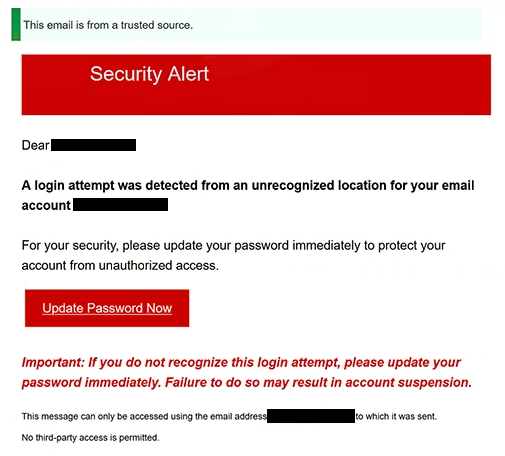
The subject used for this email is “Action Required: Email Delivery Status.” At the top, it also claims that the email comes from a trusted source. The security warning then says that a login attempt from an unrecognized location was detected for the recipient’s email account.
Recipients are told to update their password to prevent unauthorized access. The email also warns that ignoring the supposed login attempt may result in account suspension. This creates a sense of urgency and makes changing the password seem like the safest response.
To supposedly secure the account, the email tells recipients to use “Update Password Now.” Following this instruction opens a fake login page rather than the real website of the recipient’s email provider.
The phishing site is set up to recognize which email service the recipient uses and display a matching login page. In the example examined, it copied Google’s sign-in screen. The recipient’s email address was already shown, leaving only the password to be entered.
This can make the page look convincing, but it is not connected to Google or another legitimate email provider. Any password entered there is collected by the scammers.
An email account can be particularly valuable to attackers because it often contains personal correspondence and is connected to many other online services. If scammers gain access, they may read stored emails, search for sensitive information, or impersonate the account owner when contacting other people.
They may also try to reset passwords for other accounts registered with the compromised email address. Shopping accounts, social media profiles, cloud services, and other platforms often rely on email for account recovery. Stolen email credentials may also be sold to other cybercriminals.
The login attempt described in the email is not real. It is simply used to frighten recipients into believing that their account is already at risk and that they need to change their password through the supplied option.
The full “Security Alert: Login attempt was detected from an unrecognized location” phishing email is below:
Subject: Action Required: Email Delivery Status
This email is from a trusted source.
Security AlertDear -,
A login attempt was detected from an unrecognized location for your email account -.
For your security, please update your password immediately to protect your account from unauthorized access.
[Update Password Now]
Important: If you do not recognize this login attempt, please update your password immediately. Failure to do so may result in account suspension.
This message can only be accessed using the email address – to which it was sent.
No third-party access is permitted.
How to recognize the “Security Alert: Login attempt was detected from an unrecognized location” phishing email
An unexpected warning about an unfamiliar login can easily cause concern, which is exactly what this phishing email relies on. Instead of checking whether the reported activity actually happened, recipients are encouraged to react immediately and provide their password.
The subject “Action Required: Email Delivery Status” is also unusual for an email that supposedly concerns an unauthorized login. Email delivery and account sign-in activity are different issues, making the wording inconsistent with the security warning that follows.
Another suspicious detail is the threat of account suspension. The email says that failing to update the password may result in the account being suspended. This gives recipients another reason to act quickly even though there is no proof that anyone actually tried to sign in.
The fake login page can be harder to recognize because it may resemble the recipient’s real email provider. A Google-style sign-in screen, for example, can be copied without any involvement from Google. Familiar logos and account layouts should therefore not be enough to convince someone that a page is genuine.
If an email claims that an unfamiliar login occurred, the safest approach is to open the email provider independently. Recent login activity and security settings can then be checked directly from the real account. If the login was genuine and unauthorized, the password can be changed there without using anything supplied in the suspicious email.
Receiving or reading the “Security Alert: Login attempt was detected from an unrecognized location” phishing email does not compromise the account. The password is put at risk when it is entered on the fake sign-in page.
Site Disclaimer
2-remove-virus.com is not sponsored, owned, affiliated, or linked to malware developers or distributors that are referenced in this article. The article does not promote or endorse any type of malware. We aim at providing useful information that will help computer users to detect and eliminate the unwanted malicious programs from their computers. This can be done manually by following the instructions presented in the article or automatically by implementing the suggested anti-malware tools.
The article is only meant to be used for educational purposes. If you follow the instructions given in the article, you agree to be contracted by the disclaimer. We do not guarantee that the artcile will present you with a solution that removes the malign threats completely. Malware changes constantly, which is why, in some cases, it may be difficult to clean the computer fully by using only the manual removal instructions.