The “Security Alert: Unauthorized Login Detected” phishing email is designed to steal email account login credentials by convincing recipients that someone has attempted to access their account without permission. It presents itself as an urgent security notification, but the reported login attempt is fabricated and is used to direct recipients to a phishing website.
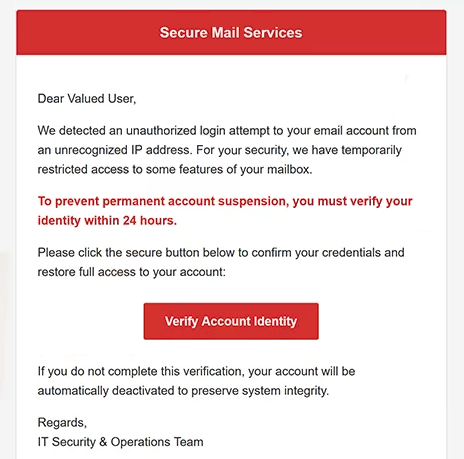
The email has been observed with the subject line “Security Alert: Unauthorized Login Detected.” It claims that a suspicious login attempt has been identified and provides details supposedly associated with the activity. These details are included to make the warning appear like a legitimate automated security notification.
Recipients are told that they need to review the activity and secure their account if they do not recognize the login attempt. The email provides a button labeled “Verify Account Identity,” presenting it as the way to protect the supposedly compromised account.
Clicking “Verify Account Identity” does not take the recipient to a legitimate email security service. Instead, the button leads to a phishing website that imitates a webmail login page. The purpose of this page is to persuade visitors to enter their email account credentials.
The fake login page asks for information needed to access the recipient’s mailbox. Credentials submitted through the page are collected by the scammers rather than used to verify the alleged unauthorized login or secure the account.
The “Security Alert: Unauthorized Login Detected” phishing email relies heavily on urgency. A warning about someone attempting to access an account can prompt recipients to respond immediately because they may believe their emails or other private information are already at risk. This reduces the likelihood that they will independently verify the notification before using the supplied button.
If scammers obtain valid email credentials, they may be able to access the victim’s mailbox. This could expose private correspondence and other information stored in the account. The compromised email address could also be used to impersonate its owner when contacting other people.
Unauthorized access to a mailbox can potentially affect other online accounts as well. Email addresses are frequently used for password resets and account recovery, meaning access to the inbox may help attackers target services connected to the same address.
The full “Security Alert Unauthorized Login Detected” phishing email is below:
Subject: [URGENT] Security Alert: Unauthorized Login Detected
Secure Mail Services
Dear Valued User,
We detected an unauthorized login attempt to your email account from an unrecognized IP address. For your security, we have temporarily restricted access to some features of your mailbox.
To prevent permanent account suspension, you must verify your identity within 24 hours.
Please click the secure button below to confirm your credentials and restore full access to your account:
[Verify Account Identity]If you do not complete this verification, your account will be automatically deactivated to preserve system integrity.
Regards,
IT Security & Operations Team
How to recognize the “Security Alert: Unauthorized Login Detected” phishing email
An unexpected warning about an unauthorized login should be verified independently. Instead of using the “Secure My Account” button, recipients can open their email provider’s official website or application and review available account activity and security information there.
The request to act through a button contained in the email is an important warning sign. Phishing campaigns frequently direct recipients away from legitimate services and toward websites designed to imitate familiar login interfaces. A page can reproduce logos, colors, and other visual elements without being operated by the organization it claims to represent.
Recipients should examine the destination behind the “Secure My Account” button before interacting with it. If the website does not use the legitimate domain of the relevant email provider, credentials should not be entered. Accessing the service independently avoids relying on a destination selected by the sender of the email.
The complete sender address should also be checked. A security-related display name or professional-looking notification does not establish that an email came from the organization responsible for the recipient’s account. Differences between the claimed sender and the actual sending domain can reveal the deception.
The urgency of the “Security Alert: Unauthorized Login Detected” phishing email should also encourage additional scrutiny rather than immediate action. The possibility of unauthorized account access is deliberately used to create concern and push recipients toward the supplied button.
Simply receiving or opening this phishing email does not provide scammers with the recipient’s login credentials. Users who have not submitted information through the associated website should avoid the button and delete the email.
If credentials have already been entered on the phishing page, the password for the affected email account should be changed through the legitimate provider. If the same password was reused elsewhere, it should also be replaced on those accounts. The mailbox should be reviewed for unauthorized activity, unexpected changes, or unfamiliar account settings.
Site Disclaimer
2-remove-virus.com is not sponsored, owned, affiliated, or linked to malware developers or distributors that are referenced in this article. The article does not promote or endorse any type of malware. We aim at providing useful information that will help computer users to detect and eliminate the unwanted malicious programs from their computers. This can be done manually by following the instructions presented in the article or automatically by implementing the suggested anti-malware tools.
The article is only meant to be used for educational purposes. If you follow the instructions given in the article, you agree to be contracted by the disclaimer. We do not guarantee that the artcile will present you with a solution that removes the malign threats completely. Malware changes constantly, which is why, in some cases, it may be difficult to clean the computer fully by using only the manual removal instructions.