The “Security notification on your chase account” phishing email is a scam that impersonates Chase Bank to steal online banking credentials. It claims that the recipient’s account has been locked following a security review and that identity verification is necessary to restore access. The warning is designed to persuade recipients to visit a counterfeit banking website and enter their usernames and passwords.
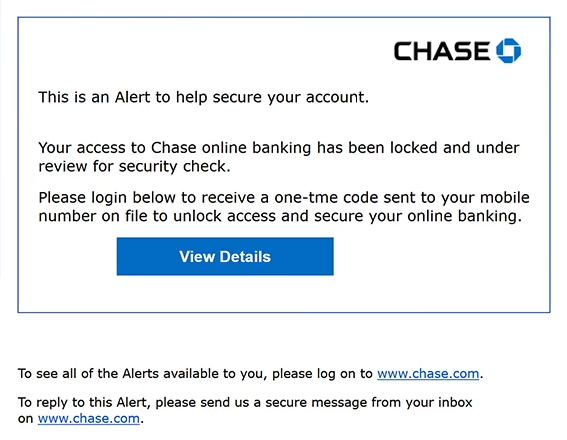
The phishing email uses the subject line “Security notification on your chase account” and presents itself as an official Chase security alert. It states that access to the recipient’s online banking account has been restricted and placed under review. However, the email does not explain what triggered the supposed security check or provide evidence that the account has actually been locked.
Recipients are instructed to click a button labeled “View Details” and sign in to receive a one-time verification code sent to their registered mobile number. This instruction makes the process resemble a legitimate banking security procedure. In reality, the button directs recipients to a phishing website.
The counterfeit website imitates Chase’s online banking login page, including the bank’s logo, username and password fields, and familiar footer elements. These details are intended to convince visitors that they are accessing the bank’s genuine authentication service. However, credentials submitted through the page are collected by the scammers.
If attackers obtain valid banking credentials, they may attempt to access the victim’s account and view sensitive financial information. Depending on the account’s security measures, they could also attempt unauthorized transactions, modify contact details, or interfere with the legitimate account owner’s access.
Compromised banking accounts may expose additional personal information that could be exploited in identity-related scams. Attackers might also attempt to access connected financial services or use stolen information in further attempts to impersonate the victim. These consequences depend on the information obtained and whether the attackers successfully bypass additional authentication requirements.
The full “Security notification on your chase account” phishing email is below:
Subject: Security notification on your chase account
Chase
This is an Alert to help secure your account.
Your access to Chase online banking has been locked and under review for security check.
Please login below to receive a one-tme code sent to your mobile number on file to unlock access and secure your online banking.
[View Details]
To see all of the Alerts available to you, please log on to www.chase.com.
To reply to this Alert, please send us a secure message from your inbox on www.chase.com.
How to recognize phishing emails
The “Security notification on your chase account” phishing email contains several warning signs, beginning with its unexpected claim that online banking access has been locked. Although legitimate banks may restrict accounts following suspicious activity, this email provides no meaningful explanation of the supposed security issue. Instead, it immediately directs recipients toward an authentication procedure.
Another suspicious detail is the request to sign in to receive a one-time verification code. The phishing email presents this as a necessary step for unlocking the account, but the linked website is not operated by Chase. References to verification codes and registered mobile numbers can make phishing emails appear credible because they resemble familiar banking security procedures.
The “View Details” button is particularly important. Despite its ordinary label, it directs recipients to a website using an unrelated domain. Phishing emails frequently conceal deceptive destinations behind buttons that appear to provide account information or security updates.
The counterfeit login page provides further evidence of deception. It reproduces Chase’s branding and familiar authentication fields, but these visual elements can be copied. The website’s actual domain is a more reliable indicator of its identity than the logo or appearance of the login form.
The email also contains a noticeable spelling mistake, referring to a “one-tme code” instead of a “one-time code.” Although legitimate communications can contain errors, such mistakes are worth examining when an email claims to originate from a major financial institution.
Another characteristic is the inclusion of references to Chase’s official website and secure messaging system. These details may make the email appear trustworthy, even though the primary action button leads elsewhere. The presence of a legitimate website address in the email body does not establish that every embedded link is authentic.
Site Disclaimer
2-remove-virus.com is not sponsored, owned, affiliated, or linked to malware developers or distributors that are referenced in this article. The article does not promote or endorse any type of malware. We aim at providing useful information that will help computer users to detect and eliminate the unwanted malicious programs from their computers. This can be done manually by following the instructions presented in the article or automatically by implementing the suggested anti-malware tools.
The article is only meant to be used for educational purposes. If you follow the instructions given in the article, you agree to be contracted by the disclaimer. We do not guarantee that the artcile will present you with a solution that removes the malign threats completely. Malware changes constantly, which is why, in some cases, it may be difficult to clean the computer fully by using only the manual removal instructions.