The “Security Review Requested” email is a phishing attempt designed to steal email account login credentials. It presents itself as an account security notification and claims that changes have recently been detected in the recipient’s profile settings. The email recommends reviewing the account, but the supplied button leads to a phishing page rather than a legitimate security service.
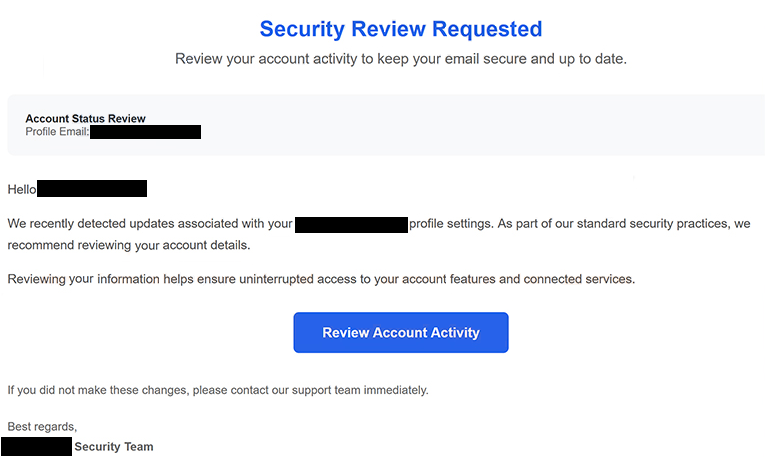
The email has been observed with the subject line “Security Review for Your Account.” It tells the recipient that updates associated with their profile settings were recently detected and describes the requested review as part of standard security practices. The email also claims that checking the account information will help maintain uninterrupted access to account features and connected services.
Notably, the email does not identify a specific email provider or company. This vague presentation allows the same phishing template to be sent to users of different email services without requiring significant changes to the email.
Recipients are instructed to select a button labeled “Review Account Activity.” The email also states that users who did not make the alleged changes should contact the support team immediately. These claims create the impression that suspicious activity may have occurred and that the recipient needs to investigate.
Selecting “Review Account Activity” opens a fake Roundcube Webmail login page hosted using Firebase Storage, Google’s legitimate cloud storage infrastructure. The use of Firebase does not make the phishing page legitimate. The service is simply being abused to host content created by the scammers.
The resulting page copies Roundcube branding and asks visitors to enter a username and password. Roundcube is legitimate open-source webmail software and has no connection to this phishing campaign. Its interface is imitated to make the login request appear familiar.
Credentials entered into the fake login form are captured by the scammers. Providing a username and password does not perform an account security review or provide information about the supposed profile changes.
If the submitted credentials are valid, scammers may gain unauthorized access to the victim’s mailbox. This could expose private emails and allow the compromised account to be used to impersonate its owner. Access to email may also help attackers reset passwords for other services associated with the same address. Accounts using the same password could also be compromised.
The full “Security Review Requested” phishing email is below:
Subject: Security Review for Your Account
Security Review Requested
Review your account activity to keep your email secure and up to date.Account Status Review
Profile Email: –Hello -,
We recently detected updates associated with your – profile settings. As part of our standard security practices, we recommend reviewing your account details.
Reviewing your information helps ensure uninterrupted access to your account features and connected services.
[Review Account Activity]If you did not make these changes, please contact our support team immediately.
Best regards,
-.com Security Team
© 2026 -. All rights reserved.
How to recognize the “Security Review Requested” phishing email
The lack of a clearly identified service provider is an important characteristic of this phishing email. It refers broadly to profile settings, account features, connected services, and a security team without naming the organization supposedly responsible for the account.
Recipients should not use the “Review Account Activity” button to investigate the alleged changes. Instead, they should access their email provider independently through its official website or application and check available account security information there.
The destination reached through the button also exposes the deception. The email directs recipients to a Firebase-hosted page imitating Roundcube rather than an account-management page belonging to their actual email provider. Legitimate hosting infrastructure can be abused to publish phishing pages, so the presence of a recognizable hosting provider does not establish that the content is trustworthy.
Users should also inspect the sender’s complete email address and the destination behind links or buttons before interacting with an unexpected security notification. A familiar-looking login page should not be trusted solely because it displays recognizable webmail branding.
Receiving or reading the “Security Review Requested” email does not disclose the recipient’s password. Users who have not entered credentials on the fake Roundcube page should avoid the supplied button and delete the email.
If a username and password have already been submitted, the affected email password should be changed through the legitimate provider. Any other account using the same password should also receive a new, unique password, and the mailbox should be reviewed for unauthorized activity.
Site Disclaimer
2-remove-virus.com is not sponsored, owned, affiliated, or linked to malware developers or distributors that are referenced in this article. The article does not promote or endorse any type of malware. We aim at providing useful information that will help computer users to detect and eliminate the unwanted malicious programs from their computers. This can be done manually by following the instructions presented in the article or automatically by implementing the suggested anti-malware tools.
The article is only meant to be used for educational purposes. If you follow the instructions given in the article, you agree to be contracted by the disclaimer. We do not guarantee that the artcile will present you with a solution that removes the malign threats completely. Malware changes constantly, which is why, in some cases, it may be difficult to clean the computer fully by using only the manual removal instructions.