The “Some incoming messages have been placed on-hold” email scam is a phishing campaign that attempts to steal email account credentials by claiming that several incoming messages cannot be delivered to the recipient’s inbox. The email warns that messages have been placed on hold due to mailbox quota restrictions, storage limitations, or account-related issues and instructs the recipient to take immediate action to prevent message loss.
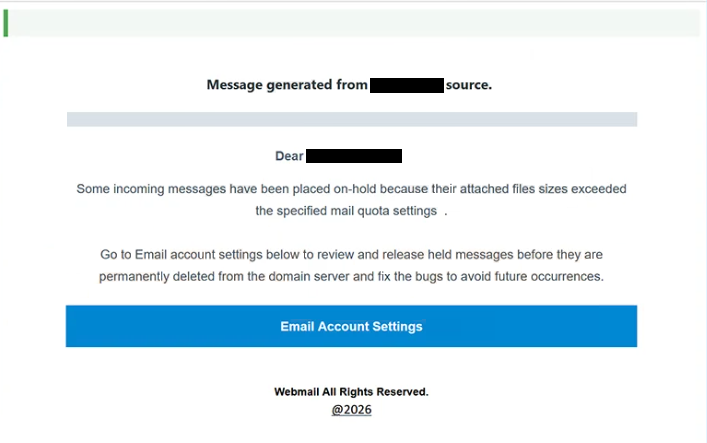
The phishing email is designed to appear as a legitimate notification from an email service provider or mail administrator. It informs recipients that incoming messages are being withheld and may eventually be deleted unless the reported issue is resolved. By suggesting that important emails are currently inaccessible, the scammers attempt to create urgency and encourage users to act without carefully examining the message.
To supposedly release the held messages, the “Some incoming messages have been placed on-hold” email directs recipients to click a button or hyperlink contained within the notification. Rather than opening a legitimate mailbox management portal, the link leads to a phishing website that imitates a webmail login page. The fraudulent site requests the user’s email address and password under the pretense of confirming account ownership and restoring message delivery.
Once credentials are entered, they are transmitted directly to the attackers behind the phishing campaign. Cybercriminals can then access the compromised mailbox and potentially use it to steal information, monitor communications, impersonate the account owner, or conduct additional phishing attacks using the victim’s account.
The “Some incoming messages have been placed on-hold” scam exploits a common concern among email users: missing important communications. Many people rely on email for business correspondence, financial notifications, account recovery requests, and personal communication. Attackers take advantage of this dependence by presenting a scenario that appears both plausible and urgent.
Another factor that contributes to the effectiveness of the scam is the use of technical language associated with email management. The notification may reference mailbox quotas, storage capacity, message retention policies, synchronization issues, or incoming mail restrictions. These references are intended to make the email resemble a legitimate administrative notice rather than a phishing attempt.
Unlike phishing campaigns that focus on password expiration or account suspension, the “Some incoming messages have been placed on-hold” scam centers on the possibility of losing access to incoming messages. This approach can be particularly effective because recipients may worry about missing important emails from clients, employers, service providers, or family members.
The email often uses professional formatting and service-related terminology to reinforce credibility. Some versions may include message counts, storage warnings, or references to mailbox maintenance procedures. These elements are intended to make the notification appear authentic and encourage recipients to follow the provided instructions.
Anyone who entered credentials into a phishing page connected to the “Some incoming messages have been placed on-hold” scam should immediately change their password and review the account for suspicious activity. If the same password was used on other services, those accounts should also be secured to prevent additional compromises.
The full “Some incoming messages have been placed on-hold” phishing email is below:
Subject: [-]: Please confirm to continue.
Message generated from – source.
Dear –
Some incoming messages have been placed on-hold because their attached files sizes exceeded the specified mail quota settings .
Go to Email account settings below to review and release held messages before they are permanently deleted from the domain server and fix the bugs to avoid future occurrences.
[Email Account Settings]
Webmail All Rights Reserved.
@2026
How to recognize phishing emails
Phishing campaigns such as the “Some incoming messages have been placed on-hold” scam frequently impersonate email service notifications in order to convince recipients to disclose sensitive information. Recognizing common warning signs can help prevent account compromise.
One major indicator is an unsolicited warning claiming that emails are being withheld, blocked, or placed on hold. Legitimate providers may occasionally notify users about storage limitations, but unexpected emails demanding immediate verification through embedded links should always be treated cautiously.
The sender’s address should be reviewed carefully. Fraudulent emails often imitate support teams, email administrators, or service providers while using unrelated domains or suspicious email addresses. Even when the sender name appears legitimate, the actual address may reveal that the message did not originate from the claimed organization.
Links contained within phishing emails are another important warning sign. In the “Some incoming messages have been placed on-hold” scam, the provided link redirects users to a counterfeit login page rather than an official email service portal. Hovering over links before clicking can help identify suspicious destinations.
Another common tactic is the use of urgency. The email may claim that messages will be deleted, remain inaccessible, or continue to accumulate unless immediate action is taken. Attackers rely on these warnings to pressure recipients into responding quickly rather than verifying the authenticity of the notification.
Users should also be cautious of any email requesting credentials through an external verification page. Legitimate email providers generally allow account management through official portals rather than requiring users to submit passwords through links contained in unsolicited messages.
Generic wording can provide another clue. Many phishing campaigns are distributed in bulk and therefore avoid including highly specific account information. Broad references to held messages, storage limitations, or mailbox maintenance are often signs of a mass-distributed phishing campaign.
The safest response to suspicious mailbox notifications is to avoid interacting with the email directly. Instead of clicking embedded links, users should manually access their email provider’s official website and review account notifications there. If no corresponding alert exists within the account, the message is likely fraudulent.
Site Disclaimer
2-remove-virus.com is not sponsored, owned, affiliated, or linked to malware developers or distributors that are referenced in this article. The article does not promote or endorse any type of malware. We aim at providing useful information that will help computer users to detect and eliminate the unwanted malicious programs from their computers. This can be done manually by following the instructions presented in the article or automatically by implementing the suggested anti-malware tools.
The article is only meant to be used for educational purposes. If you follow the instructions given in the article, you agree to be contracted by the disclaimer. We do not guarantee that the artcile will present you with a solution that removes the malign threats completely. Malware changes constantly, which is why, in some cases, it may be difficult to clean the computer fully by using only the manual removal instructions.