The “Suspicious Activity From Your IP Address” tech support scam presents a false security warning that claims a user’s device has been blocked because harmful activity was detected from their IP address. The warning appears as a web page that imitates the style of a security alert. It often fills the screen, uses urgent language and attempts to stop the user from closing the browser. Its purpose is to convince the user to call a phone number that is shown as a support line. The number connects the user to scammers who impersonate support technicians and attempt to obtain money or remote access to the device.
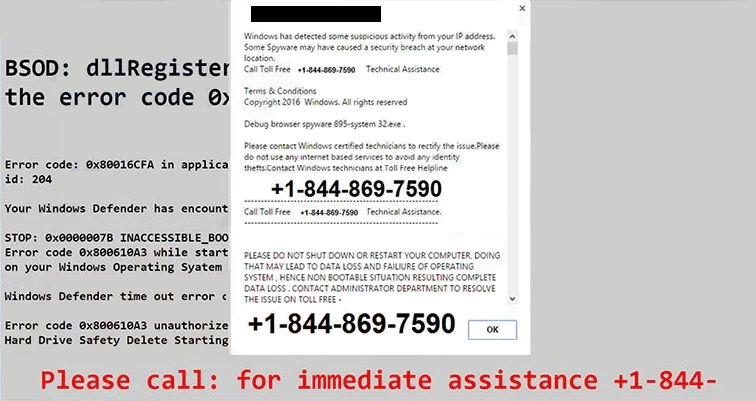
The page does not perform any real scan. It cannot read system files or detect activity from an IP address. It simply displays text that states that the device is locked or at risk. Some variations claim that malware has been found or that the user’s private information is exposed. Others mention legal consequences or network breaches. None of this information is genuine. The content is meant to create fear and prompt an immediate reaction.
When a user calls the number, the scammers follow a scripted procedure. They introduce themselves as technicians and reference general security concepts to appear knowledgeable. They instruct the user to download software that allows remote access. Once the scammers gain access, they navigate through system menus and open routine logs. These logs often contain harmless entries. The scammers point to them as proof of infection. They may also highlight standard processes running in the background and present them as threats.
After establishing a sense of urgency, the scammers offer to fix the supposed issues. They push the user to pay for support plans or repair services. These services do not provide any real benefit. Scammers often request payment through methods that limit the possibility of reversal. In some cases, they try to maintain remote access after the call to collect information or install other unwanted software.
Some versions of the “Suspicious Activity From Your IP Address” scam use repeated pop-ups to prevent the user from closing the web page. There may be audio playback that tells the user to call the number and warns against restarting the device. These features are meant to create pressure, but they do not indicate a system-level issue. Restarting the browser or the device removes the page entirely.
The scam is designed to appear personal even though it is not. The claims about suspicious activity and IP-based detection are generic and displayed to every user who lands on the page. The phone number connects to scammers rather than any real support service. There is no legitimate company involved, and no genuine security event triggers the warning. The page only exists to lead users toward a conversation in which scammers can attempt to take control of their device or extract payment.
The “Suspicious Activity From Your IP Address” scam is specific to the content and behaviour of this single web page. It does not act as malware. It does not access files or monitor the network. Its effectiveness relies entirely on the ability to create a convincing story that encourages the user to call the number and follow instructions.
Why users get redirected to tech support scams
Users often see the “Suspicious Activity From Your IP Address” scam because of redirects that originate from unsafe websites, intrusive advertising or unwanted software. One of the most common causes is adware. Adware is software that displays unwanted advertisements and directs users to sponsored or deceptive sites. It often arrives through bundled installers, free downloads or sites that host unverified files. Once adware is installed, it may change browser settings, inject advertisements into web pages or trigger automatic redirects to scam sites.
Another source of redirects is advertising networks that load through visited websites. Some sites use low-quality advertising services that deliver pop-ups or full-page ads. These ads may redirect users without clear interaction. Even legitimate sites may unintentionally load unsafe advertising if they rely on poor-quality networks. A single click on a misleading element can open the “Suspicious Activity From Your IP Address” scam page.
Browser notifications can also open pathways to scam content. Some websites prompt users to allow notifications. If the user accepts, they may later receive pop-up alerts that resemble system warnings. Clicking these alerts can lead directly to tech support scam pages. These notifications can appear when the user is not visiting the site that originally requested permission.
These redirects do not indicate a real security incident. They do not detect activity from an IP address. They do not reflect any problem with the device. They only show that the browser was redirected. The appearance of the “Suspicious Activity From Your IP Address” page is not proof of infection, but it is a sign that the user may have interacted with unsafe content or installed software that displays intrusive advertisements.
Unwanted redirects are a known behaviour of adware and deceptive websites. It creates an entry point for scams by presenting the user with a scenario that appears urgent. Users may believe the claims because the page looks authoritative. In reality, a web page cannot evaluate the device. It cannot identify malware, private data exposure or illegal activity. Any claim of system scanning through a web page should be viewed as an immediate warning sign.
Understanding why redirects occur helps users avoid interacting with these scams. Visiting secure websites, avoiding bundled installers, reviewing notification settings and removing unwanted software reduce the chance of landing on similar pages. The “Suspicious Activity From Your IP Address” scam uses a simple technique: present false claims and rely on fear to prompt action. Recognising this pattern can prevent further risk.
Site Disclaimer
2-remove-virus.com is not sponsored, owned, affiliated, or linked to malware developers or distributors that are referenced in this article. The article does not promote or endorse any type of malware. We aim at providing useful information that will help computer users to detect and eliminate the unwanted malicious programs from their computers. This can be done manually by following the instructions presented in the article or automatically by implementing the suggested anti-malware tools.
The article is only meant to be used for educational purposes. If you follow the instructions given in the article, you agree to be contracted by the disclaimer. We do not guarantee that the artcile will present you with a solution that removes the malign threats completely. Malware changes constantly, which is why, in some cases, it may be difficult to clean the computer fully by using only the manual removal instructions.