The “Suspicious Sign-In Attempt Blocked” email is a phishing attempt designed to steal email account login credentials. It is disguised as a security notification informing recipients that an unauthorized sign-in attempt has supposedly been detected. The warning is fabricated and does not indicate that an actual attempt to access the recipient’s account has occurred.
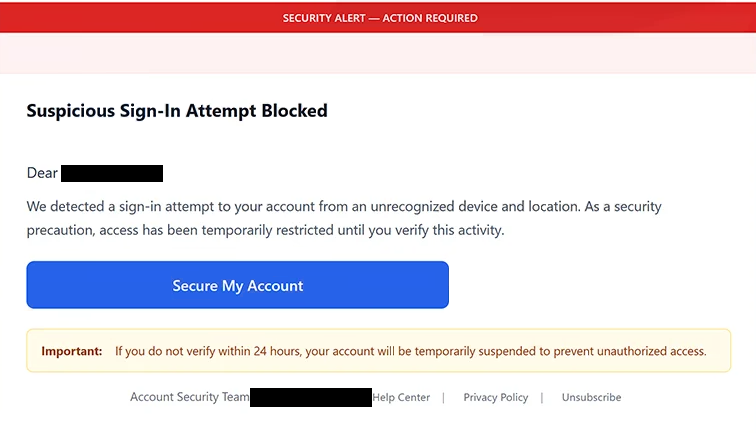
The email has been observed with the subject line “Security Notice: New Sign-In Detected.” It claims that somebody attempted to access the recipient’s account using an unrecognized device and location. According to the message, access to the account has been temporarily restricted as a security precaution until the recipient confirms the activity.
The message adds urgency by giving the recipient 24 hours to complete the supposed verification. It warns that the account could be temporarily suspended if no action is taken within this period. This deadline is part of the phishing lure and is intended to pressure recipients into following the instructions without carefully checking whether the notification is genuine.
To supposedly secure the account, the email provides a button labeled “Secure My Account.” Selecting this button leads to a fraudulent website rather than a legitimate account security page. The phishing page is hosted using Google Cloud Storage and imitates a Roundcube Webmail login interface.
On the fraudulent page, the recipient’s email address is already displayed in the username field. The visitor is then asked to enter the corresponding password. Having the email address pre-filled can make the page appear more convincing, but it does not mean that the website is associated with the recipient’s email provider.
Any password entered into this page is submitted to the scammers. The page does not verify a suspicious login attempt, remove an account restriction, or secure the mailbox. Its purpose is to obtain the victim’s email credentials.
If the stolen credentials are valid, scammers may use them to gain unauthorized access to the victim’s mailbox. This can expose emails and other information accessible through the account. A compromised mailbox may also be used to target other accounts associated with the same email address, particularly where email is used for password recovery.
Scammers could also misuse a compromised email account to impersonate its owner when contacting other people. Messages sent from a familiar address may appear more credible to the recipient’s contacts.
The full “Suspicious Sign-In Attempt Blocked” phishing email is below:
Subject: Security Notice: New Sign-In Detected
Security Alert — Action Required
Suspicious Sign-In Attempt BlockedDear -,
We detected a sign-in attempt to your account from an unrecognized device and location. As a security precaution, access has been temporarily restricted until you verify this activity.
[Secure My Account]Important: If you do not verify within 24 hours, your account will be temporarily suspended to prevent unauthorized access.
Account Security Team – Help Center | Privacy Policy | Unsubscribe
How to recognize and avoid the “Suspicious Sign-In Attempt Blocked” phishing email
Unexpected account security alerts should be verified independently rather than through buttons included in the message. If an email claims that a suspicious login has occurred, users can access their email service through its official website or application and review their account or security information there.
The 24-hour deadline used by this scam is another reason to be cautious. The message attempts to create urgency by claiming that the recipient’s account could be suspended unless verification is completed quickly. This pressure is intended to encourage immediate interaction with the phishing page.
The “Secure My Account” button should not be used to investigate the warning. Where possible, recipients can inspect the destination associated with a button before opening it. A login page reached through an unsolicited security email should not be trusted simply because it resembles a familiar Webmail interface.
In this campaign, the phishing page imitates Roundcube Webmail and displays the recipient’s email address in advance. Users should not interpret this pre-filled information as proof that the page is legitimate. The site is designed to obtain the password entered into the login form.
The sender should also be checked carefully. A security-themed display name does not establish who actually sent an email. Examining the complete sender address can reveal inconsistencies between the claimed organization and the actual source of the message.
Users who receive the “Suspicious Sign-In Attempt Blocked” email without entering credentials on the fraudulent page have not disclosed their password through this scam. They should avoid the supplied button and delete the message.
If a password has already been submitted through the fake Roundcube Webmail page, it should be changed immediately through the legitimate email service. The same should be done for other accounts if that password was reused. The affected mailbox should also be reviewed for unauthorized access or changes.
Site Disclaimer
2-remove-virus.com is not sponsored, owned, affiliated, or linked to malware developers or distributors that are referenced in this article. The article does not promote or endorse any type of malware. We aim at providing useful information that will help computer users to detect and eliminate the unwanted malicious programs from their computers. This can be done manually by following the instructions presented in the article or automatically by implementing the suggested anti-malware tools.
The article is only meant to be used for educational purposes. If you follow the instructions given in the article, you agree to be contracted by the disclaimer. We do not guarantee that the artcile will present you with a solution that removes the malign threats completely. Malware changes constantly, which is why, in some cases, it may be difficult to clean the computer fully by using only the manual removal instructions.