The “Truist – Online Banking Access Locked” email scam is a phishing email that claims the recipient’s Truist online banking profile has been locked. The message states that access was restricted because of suspicious activity or a security check. It tells the recipient that identity confirmation is required to restore access. This email is not sent by Truist, and it does not reflect a real banking restriction. It is designed to steal banking credentials and personal information.
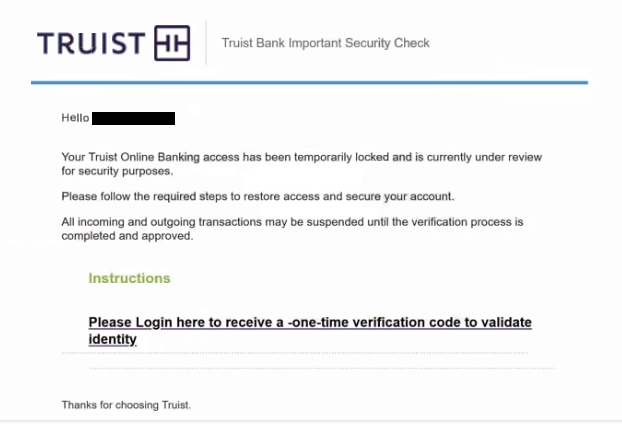
The subject line or main text uses the phrase “Truist – Online Banking Access Locked.” The email explains that the lock was placed to protect the account. It may mention unusual login attempts or security monitoring. These statements are fabricated. The sender does not have visibility into the recipient’s real bank account.
The email does not contain real account details. It does not show partial account numbers, real transaction references, or secure message IDs from Truist. It does not provide information that can be matched inside a real banking profile. This absence exists because the scammer has no access to Truist systems.
A link is included and is presented as the way to unlock the account. The recipient is told to verify identity to regain online banking access. This link does not lead to the official Truist website. It opens a phishing page that imitates a banking sign-in or verification screen.
The phishing page asks for sensitive information. This can include online banking usernames, passwords, full names, addresses, phone numbers, and sometimes debit card or account numbers. Entering this information does not unlock any account. The data is collected by scammers.
After details are entered, the page may display a message claiming that access has been restored. This message is only a visual response and not connected to Truist. No change is made to the real account.
If scammers obtain valid banking credentials, they can attempt to access the real account. This can expose balances, transaction history, and personal data. Stolen banking logins can be used for unauthorized transfers or payments. Even when direct access is not successful, the collected personal data can be used in identity theft or further fraud.
Information taken through the “Truist – Online Banking Access Locked” scam can also support impersonation attempts. Names, addresses, and phone numbers can be used to contact banks while pretending to be the victim. Banking credentials are highly valuable because they provide a path to financial accounts.
The lock described in the “Truist – Online Banking Access Locked” email is not real. Banks do not restore access by asking customers to submit credentials through links in unsolicited emails. Real access issues are handled through the official banking website, mobile app, or direct contact with the bank.
The full “Truist – Online Banking Access Locked” phishing email is below:
Subject: Action Required Today Regarding Your Truist Account
Truist Bank Important Security Check
Hello -,
Your Truist Online Banking access has been temporarily locked and is currently under review for security purposes.
Please follow the required steps to restore access and secure your account.
All incoming and outgoing transactions may be suspended until the verification process is completed and approved.
Instructions
Please Login here to receive a -one-time verification code to validate identity
Thanks for choosing Truist.
How the “Truist – Online Banking Access Locked” email is sent, and how to recognize it
The “Truist – Online Banking Access Locked” email scam is spread through phishing campaigns that send the same message to many recipients. The scammers do not verify whether the recipients are Truist customers. The message is written broadly so it can reach a large group.
The sender’s name may mention Truist or security teams, but the sending address does not belong to Truist. It often comes from unrelated domains. Checking the full sender address reveals this mismatch.
The content of the email remains general. It does not reference real transactions or dates tied to the account. Legitimate banking communications include details that can be reviewed after signing in through the official website or app. This scam does not.
The link in the email leads to a domain that is not owned by Truist. Even if the page looks like a real banking site, the web address is different. Any banking login page reached through a “Truist – Online Banking Access Locked” email should be treated as fraudulent.
Another warning sign is urgency. The email suggests that access will remain locked until verification is completed. Real banks do not require customers to confirm credentials through emailed links to resolve access issues.
The message also does not guide users to contact the bank through official support channels. It focuses only on the embedded link. Legitimate banks allow customers to resolve issues by signing in directly or calling verified support numbers.
The “Truist – Online Banking Access Locked” email scam relies on fear of losing account access. Checking sender domains, avoiding banking logins through email links, and using only the official Truist website or mobile app are effective ways to avoid this phishing scam.
Site Disclaimer
2-remove-virus.com is not sponsored, owned, affiliated, or linked to malware developers or distributors that are referenced in this article. The article does not promote or endorse any type of malware. We aim at providing useful information that will help computer users to detect and eliminate the unwanted malicious programs from their computers. This can be done manually by following the instructions presented in the article or automatically by implementing the suggested anti-malware tools.
The article is only meant to be used for educational purposes. If you follow the instructions given in the article, you agree to be contracted by the disclaimer. We do not guarantee that the artcile will present you with a solution that removes the malign threats completely. Malware changes constantly, which is why, in some cases, it may be difficult to clean the computer fully by using only the manual removal instructions.