The “Urgent: Action Required to Update Your Contact Records” email claims that the recipient’s email address is scheduled for permanent deactivation as part of a security measure. It states that unusual activity or a security incident has triggered a review process that requires the recipient to update contact records through a provided link. This claim is false. The email is a phishing attempt designed to harvest login credentials through a fake website that imitates an authentic sign-in page. The email has no connection to any legitimate account security process.
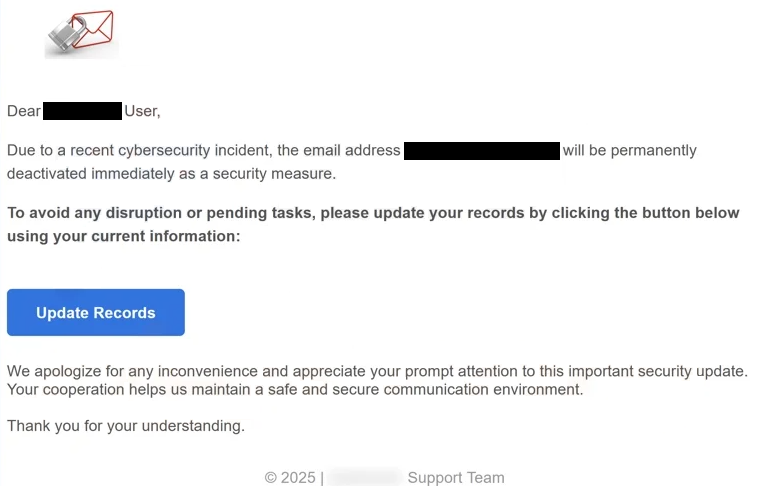
The email presents the subject line as a warning. It suggests that the recipient’s email address will be deactivated unless immediate action is taken. A button labelled Update Records directs the user to a website controlled by the sender of the phishing email. The page copies the general appearance of a recognised email service to persuade the user to enter their credentials. Once entered, these credentials are sent to the attacker.
When attackers gain access to an email account, they can read stored emails, view contact information and inspect recovery notices from other services. They may use the email account to reset passwords on linked services such as banking, e-commerce or cloud storage. They may also send phishing emails to the victim’s contacts. Because email accounts are used for recovery and authentication across many online services, compromise of a single account can result in wider unauthorised access.
The “Urgent: Action Required to Update Your Contact Records” email uses urgency as a core tactic. It states that deactivation is imminent and that the user must act immediately. The email includes no details about the alleged security incident and provides no documented procedure for account review. It does not reference any genuine service policy. Genuine services do not deactivate accounts by sending unsolicited notices with external links.
The link included in the phishing email does not lead to a legitimate service domain. Attackers often use domains that look similar at a glance, but upon closer inspection, they have unusual spellings or unrelated hosting. This pattern appears in many phishing attempts, but the focus here is on the specific way this email pressures users to confirm records on a fraudulent website.
The “Urgent: Action Required to Update Your Contact Records” email is distributed in bulk. Attackers distribute it widely with the expectation that a small number of recipients will click the link. The email does not target users based on specific account details. It does not contain personalised information, and its structure provides no evidence of a genuine account verification process.
Any recipient who enters information on the fraudulent website risks full account compromise. These individuals should change their email password, update passwords for dependent accounts and activate two-factor authentication where possible. Users who only received the email but did not interact with the link are not affected and can delete the email.
The full “Urgent: Action Required to Update Your Contact Records” email is below:
Subject: Urgent: Action Required to Update Your Contact Records
Secure Communication
Dear – User,
Due to a recent cybersecurity incident, the email address – will be permanently deactivated immediately as a security measure.
To avoid any disruption or pending tasks, please update your records by clicking the button below using your current information:
Update Records
We apologize for any inconvenience and appreciate your prompt attention to this important security update. Your cooperation helps us maintain a safe and secure communication environment.
Thank you for your understanding.
© 2025 | – Support Team
How to recognise phishing emails
There are clear signs that help identify the “Urgent: Action Required to Update Your Contact Records” email as a phishing attempt. Recognising these signs reduces the risk of credential theft.
The sender address is a primary indicator. The domain used does not match the domain of any genuine service provider. Attackers often rely on addresses that appear similar, but a closer look reveals misspellings or unrelated hosting. Real organisations do not send account security emails from unrecognised domains.
Another sign is the greeting. The phishing email usually addresses the recipient indirectly or uses the email address instead of a personal name. Genuine account notifications typically refer to the account holder directly. A general greeting indicates that the email is part of a mass distribution effort rather than a legitimate security review.
The presence of urgency is another signal. The “Urgent: Action Required to Update Your Contact Records” email claims that deactivation is imminent and that action must be taken immediately. Legitimate service providers do not force users to act through unsolicited links and do not threaten abrupt deactivation without a structured process.
The destination of the link also provides a clear warning. Hovering over the link reveals that the web address does not match the domain of the provider the email claims to represent. If the domain is unfamiliar or inconsistent, the link should not be opened.
Requests for login information through an email link indicate phishing. A genuine service provider does not ask users to confirm passwords or update records by entering credentials through an unsolicited email. Any such request should be treated with suspicion.
Language quality is also relevant. Phishing emails often contain unclear sentences, inconsistent tone or grammar errors. These issues can indicate that the email did not come from a professional source. Although not every phishing email contains obvious mistakes, any inconsistency adds to the overall set of warning signs.
If an email contains any of these signs, it is safer to avoid interacting with it. Recipients should not click links or enter information on unfamiliar websites. Account status should always be checked directly through the official website rather than through links provided in unsolicited emails.
Site Disclaimer
2-remove-virus.com is not sponsored, owned, affiliated, or linked to malware developers or distributors that are referenced in this article. The article does not promote or endorse any type of malware. We aim at providing useful information that will help computer users to detect and eliminate the unwanted malicious programs from their computers. This can be done manually by following the instructions presented in the article or automatically by implementing the suggested anti-malware tools.
The article is only meant to be used for educational purposes. If you follow the instructions given in the article, you agree to be contracted by the disclaimer. We do not guarantee that the artcile will present you with a solution that removes the malign threats completely. Malware changes constantly, which is why, in some cases, it may be difficult to clean the computer fully by using only the manual removal instructions.