The “Verify Mail Delivery Settings” email is a phishing attempt designed to look like a routine alert from a mail service provider. It claims that the recipient must review or update their mail delivery settings to avoid disruptions. The message usually states that some emails could not be delivered and urges the user to fix the issue by clicking a link. Although it resembles a standard service notification, the email is phishing and is not associated with any legitimate provider.
When recipients click the provided link, they are taken to a page that imitates a familiar login screen. The goal is to convince the user to enter their email address and password. Once submitted, the credentials are sent directly to the scammers. The fake page may display a short loading animation or redirect to a harmless website to create the impression that the issue has been resolved. In reality, the attackers now have access to the victim’s email account.
With control of an email account, scammers can reset passwords on other connected services, collect personal information, and monitor incoming emails. They may also use the compromised account to send additional phishing emails to the victim’s contacts. Because many users rely on their email address as the main recovery method for online accounts, losing access can result in broader compromise across banking, shopping, cloud storage, and social media platforms.
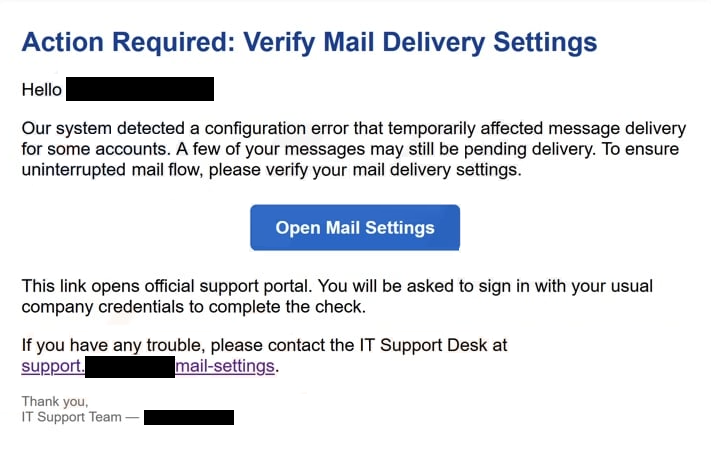
The full “Verify Mail Delivery Settings” email is below:
Subject: Action Required: Mail server configuration error detected — queued/delivery failures
Action Required: Verify Mail Delivery Settings
Hello -,
Our system detected a configuration error that temporarily affected message delivery for some accounts. A few of your messages may still be pending delivery. To ensure uninterrupted mail flow, please verify your mail delivery settings.
Open Mail Settings
This link opens official support portal. You will be asked to sign in with your usual company credentials to complete the check.
If you have any trouble, please contact the IT Support Desk at support.-/mail-settings.
Thank you,
IT Support Team — –
How to identify phishing emails
There are several signs that reveal the email is not legitimate. Many versions use generic greetings rather than addressing the recipient by name. The sender address often resembles a service account but comes from an unrelated domain. Scammers rely heavily on urgency, warning users that email delivery will be suspended unless action is taken immediately. Legitimate service providers do not request password verification through unsolicited links, and they do not threaten to restrict access without a clear explanation.
Examining the link before clicking can help identify phishing attempts. Hovering over the button or text often reveals a URL that does not match the official domain of the email provider. The body of the message may also contain spelling errors, awkward phrasing, or inconsistent formatting. These issues are common in phishing campaigns and differ from the polished communication expected from established companies. Users who encounter unexpected requests to update or confirm email settings should treat them with caution.
Verifying account status through an official website is a safer approach. If there is a real problem with mail delivery, the provider will display a notification once the user signs in. Accessing the account directly avoids the risk of interacting with fraudulent links. Users should also avoid supplying any personal information or account details through pages opened from unsolicited messages.
Remove “Verify Mail Delivery Settings” email
If you receive this email, you can remove “Verify Mail Delivery Settings” email from your inbox without worrying about the contents. If you have fallen for the phishing attempt and typed in your password on a phishing site, you need to change the password immediately.
Site Disclaimer
2-remove-virus.com is not sponsored, owned, affiliated, or linked to malware developers or distributors that are referenced in this article. The article does not promote or endorse any type of malware. We aim at providing useful information that will help computer users to detect and eliminate the unwanted malicious programs from their computers. This can be done manually by following the instructions presented in the article or automatically by implementing the suggested anti-malware tools.
The article is only meant to be used for educational purposes. If you follow the instructions given in the article, you agree to be contracted by the disclaimer. We do not guarantee that the artcile will present you with a solution that removes the malign threats completely. Malware changes constantly, which is why, in some cases, it may be difficult to clean the computer fully by using only the manual removal instructions.