The “Verify Your Apple ID Account” email scam is a phishing campaign that impersonates Apple to trick recipients into revealing their account credentials. The phishing email presents itself as an official security notification and claims that users must verify their Apple ID to keep their accounts and personal information protected. Its actual purpose is to direct recipients to a fake Apple sign-in page controlled by scammers.
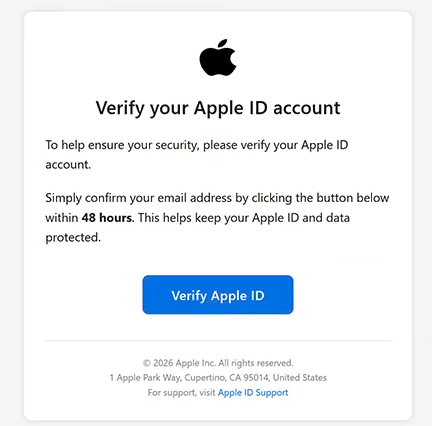
The phishing email uses the subject line “Action Required” and instructs recipients to confirm their email addresses within 48 hours. This deadline creates an artificial sense of urgency, encouraging users to complete the supposed verification process without questioning its legitimacy. The email does not identify a specific security incident or explain why the account suddenly requires additional verification.
Recipients are directed to click a button labeled “Verify Apple ID.” Rather than opening Apple’s legitimate account management service, the button leads to a phishing website hosted on a Heroku subdomain. The website imitates Apple’s authentication interface and displays recognizable branding to make the verification request appear authentic.
The phishing page initially asks visitors to provide an email address or phone number, resembling the first step of Apple’s usual sign-in process. It may subsequently request a password, allowing the scammers to capture the credentials needed to attempt unauthorized account access. The familiar login design is intended to make visitors believe they are interacting with Apple’s official services.
Compromised Apple account credentials can expose users to several risks. Depending on the account’s security settings and the access obtained, attackers may attempt to view information stored in iCloud, access personal files and photographs, or make unauthorized purchases through Apple services. They may also attempt to exploit payment methods associated with the account.
The phishing email includes Apple’s name, copyright information, and the company’s actual Cupertino address. These details are intended to strengthen its appearance as an official notification, but they do not establish authenticity. The sender’s email address is unrelated to Apple, and the verification website is not operated by the company.
The full “Verify Your Apple ID Account” phishing email is below:
Subject: Action Required
Verify your Apple ID account
To help ensure your security, please verify your Apple ID account.
Simply confirm your email address by clicking the button below within 48 hours. This helps keep your Apple ID and data protected.
[Verify Apple ID]
© 2026 Apple Inc. All rights reserved.
1 Apple Park Way, Cupertino, CA 95014, United States
For support, visit [Apple ID Support]
Apple · Inc
Unsubscribe
How to recognize phishing emails
The “Verify Your Apple ID Account” phishing email contains several warning signs, beginning with its unexpected request for account verification. It claims that confirming an email address is necessary to maintain account security but provides no specific explanation for the requirement. Legitimate account notifications generally offer enough context for users to understand why an action is needed.
The 48-hour deadline is another suspicious element. Phishing emails frequently impose short time limits to discourage recipients from examining the sender or checking the destination of embedded links. In this campaign, the deadline is presented as part of a security procedure, even though the email does not explain what would happen if verification were delayed.
The sender’s address is particularly important when evaluating the email. Although the content impersonates Apple, the email originates from an address that is not associated with the company. A recognizable sender name, company logo, or professional-looking layout does not guarantee that the email came from the organization being impersonated.
The “Verify Apple ID” button provides another clear indicator. Its destination is a Heroku-hosted website rather than an official Apple domain. Phishing websites frequently use unrelated hosting services while reproducing familiar login pages, making the address bar more useful for identifying deception than the website’s appearance.
The email’s footer also deserves attention. It includes Apple’s physical address, a copyright notice, a support reference, and an unsubscribe option. Such details can make phishing emails look like routine corporate correspondence, but they can be copied from legitimate communications and do not verify the sender’s identity.
Another warning sign is the request to enter account credentials after following an unsolicited verification link. The phishing page resembles an Apple sign-in form, beginning with a request for an email address or phone number. However, an authentic-looking authentication interface can still be hosted on a website controlled by scammers.
Site Disclaimer
2-remove-virus.com is not sponsored, owned, affiliated, or linked to malware developers or distributors that are referenced in this article. The article does not promote or endorse any type of malware. We aim at providing useful information that will help computer users to detect and eliminate the unwanted malicious programs from their computers. This can be done manually by following the instructions presented in the article or automatically by implementing the suggested anti-malware tools.
The article is only meant to be used for educational purposes. If you follow the instructions given in the article, you agree to be contracted by the disclaimer. We do not guarantee that the artcile will present you with a solution that removes the malign threats completely. Malware changes constantly, which is why, in some cases, it may be difficult to clean the computer fully by using only the manual removal instructions.