The “We ask you to confirm the email address used for your account” phishing email is a scam designed to steal email account credentials through a fake verification process. It impersonates a webmail service provider and claims that a recent platform update requires recipients to confirm their registered email addresses. The supposed update is used as a pretext to direct users to a phishing login website.
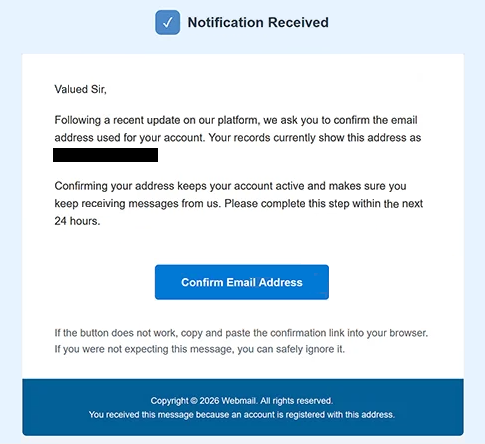
The phishing email uses the subject line “You have received Notification” and informs recipients that they must confirm their email addresses within 24 hours. It suggests that completing the procedure is necessary to keep their accounts active and continue receiving emails. However, the notification does not identify a specific platform update or explain why existing accounts suddenly require additional verification.
To complete the supposed confirmation, recipients are instructed to click a button labeled “Confirm Email Address.” The button leads to a phishing website hosted on a pages.dev subdomain rather than a legitimate webmail service. The observed website displays Google’s logo and “GMAIL Webmail” branding, creating the appearance of a familiar email authentication page.
The phishing website may adapt its login interface to match the visitor’s email provider. This allows the scammers to target users of different email services through the same campaign. By presenting recognizable branding and authentication fields, the website attempts to convince visitors that entering their credentials is part of a legitimate account verification procedure.
The actual purpose of the website is to collect email addresses and passwords. If recipients submit valid credentials, scammers may attempt to access their mailboxes without authorization. This could expose private correspondence, attachments, contact information, and other sensitive data stored in the compromised accounts.
Access to an email account may also enable additional attacks. Scammers could impersonate the account owner, send phishing emails to their contacts, or attempt to reset passwords for other services associated with the compromised address. The consequences depend on the account’s security settings and whether the stolen credentials can be used successfully.
The “We ask you to confirm the email address used for your account” phishing email is not a legitimate account verification notification. Its purpose is to obtain login credentials by exploiting concerns about account access and email service interruptions.
The full “We ask you to confirm the email address used for your account” phishing email is below:
Subject: You have received Notification
Notification Received
Valued Sir,
Following a recent update on our platform, we ask you to confirm the email address used for your account. Your records currently show this address as -.
Confirming your address keeps your account active and makes sure you keep receiving messages from us. Please complete this step within the next 24 hours.
[Confirm Email Address]
If the button does not work, copy and paste the confirmation link into your browser. If you were not expecting this message, you can safely ignore it.
Copyright © 2026 Webmail. All rights reserved.
You received this message because an account is registered with this address.
How to recognize phishing emails
The “We ask you to confirm the email address used for your account” phishing email contains several warning signs, including its unusual greeting, “Valued Sir.” The notification supposedly concerns an existing email account but does not identify the recipient by name or specify which email service is responsible for the request. This lack of personalization is suspicious, particularly when the email claims to require account-specific action.
Another warning sign is the 24-hour deadline. The phishing email suggests that recipients must confirm their addresses quickly to maintain account access, creating pressure to act before examining the request. However, it provides no clear explanation of the platform changes supposedly responsible for the verification requirement.
The subject line “You have received Notification” is also unusually generic. It does not identify the sender, the affected service, or the purpose of the email. Combined with the vague explanation of a platform update, this makes the notification difficult to associate with a legitimate account management process.
The “Confirm Email Address” button is particularly important because it directs recipients to a website unrelated to their email provider. Although the button appears to offer a routine verification procedure, the destination requests login credentials. This inconsistency between confirming an email address and entering an account password is characteristic of credential-stealing phishing emails.
The counterfeit login page may appear convincing because it reproduces recognizable email service branding. In the observed example, the website displays Google’s logo and Gmail-related text. However, familiar logos and authentication fields can be copied, and their presence does not establish that the website is operated by the company being impersonated.
The email also includes a copyright notice referring to “Webmail” and an explanation that the notification was sent because the recipient has a registered account. These generic administrative details do not identify a legitimate organization or verify the sender’s identity.
Site Disclaimer
2-remove-virus.com is not sponsored, owned, affiliated, or linked to malware developers or distributors that are referenced in this article. The article does not promote or endorse any type of malware. We aim at providing useful information that will help computer users to detect and eliminate the unwanted malicious programs from their computers. This can be done manually by following the instructions presented in the article or automatically by implementing the suggested anti-malware tools.
The article is only meant to be used for educational purposes. If you follow the instructions given in the article, you agree to be contracted by the disclaimer. We do not guarantee that the artcile will present you with a solution that removes the malign threats completely. Malware changes constantly, which is why, in some cases, it may be difficult to clean the computer fully by using only the manual removal instructions.