The “Webmail HostingServer has automatically updated” phishing email pretends to be a security notice concerning the recipient’s web hosting server. It claims that new antivirus protection has been installed automatically and asks the recipient to verify their identity to keep their email account active. In reality, there is no antivirus update that requires confirmation. The email is used to steal webmail login credentials.
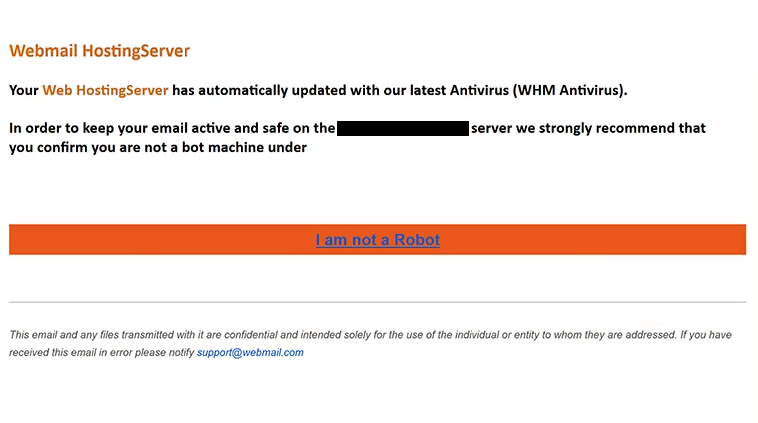
The subject contains the recipient’s information followed by “Confirm Your Access.” Inside, the email identifies itself as coming from “Webmail HostingServer” and says that the recipient’s web hosting server has been updated with the latest version of an antivirus product called “WHM Antivirus.”
Recipients are then told that they need to prove they are human so their email remains “active and safe” on the server. To supposedly complete this check, the email asks them to select “I am not a Robot.”
This does not perform a security check or confirm anything with the recipient’s hosting provider. It opens a fake “Webmail Login” page instead. The recipient’s email address is already filled in, leaving them to provide only their password. Anything entered into the form is sent to the scammers.
The phishing page also shows a “Secure SSL Connection” notice. This is meant to reassure visitors that the login form is safe, but text displayed on a website does not prove that the page belongs to a legitimate webmail service.
The site hosting the fake login form appears to be a legitimate WordPress website that has been compromised. The phishing page is stored inside its internal directories, suggesting that the site’s owner is not involved and that attackers are abusing the website to host their content.
The references to WHM are another part of the deception. WHM, or Web Host Manager, is a real hosting management product, but it has nothing to do with this phishing email. The scammers use familiar hosting terminology to make the supposed antivirus update sound more believable.
If the password entered on the fake login page is valid, attackers could gain access to the victim’s webmail or hosting account. This may allow them to read private emails, send emails using the compromised account, access connected services, or use the mailbox to target other people with additional phishing emails.
The full “Webmail HostingServer has automatically updated” phishing email is below:
Subject: -, Confirm Your Access
Webmail HostingServer
Your Web HostingServer has automatically updated with our latest Antivirus (WHM Antivirus).In order to keep your email active and safe on the – server we strongly recommend that you confirm you are not a bot machine under –
[I am not a Robot]This email and any files transmitted with it are confidential and intended solely for the use of the individual or entity to whom they are addressed. If you have received this email in error please notify the system administrator.
How to recognize the “Webmail HostingServer has automatically updated” phishing email
The request to complete an “I am not a Robot” check is one of the easiest details to question. The email claims that antivirus protection has already been installed on a hosting server, yet it says the recipient must prove they are human to keep their email active. These two things have no reasonable connection.
A real server antivirus update would not require users to confirm their identity through an unexpected email. If a hosting provider performs security maintenance, users can check their account directly through the hosting control panel or contact the provider if they are unsure whether any action is required.
The name “WHM Antivirus” should not make the email seem trustworthy either. WHM is legitimate hosting technology, but scammers often use real technical terms to make false security warnings sound convincing. In this case, the reference to WHM does not prove that the antivirus update exists.
The fake login page is another clear problem. Recipients are sent away from their normal webmail service and asked for a password on a page hosted through an unrelated website. Having the correct email address already filled in does not make the form genuine. That information can easily be included in a phishing link before the email is sent.
Users should also ignore claims such as “Secure SSL Connection” when deciding whether a login page can be trusted. A phishing site can display security-related wording just as easily as any other text. Even HTTPS by itself does not prove that the organization shown on a page actually owns it.
Anyone who receives the “Webmail HostingServer has automatically updated” phishing email should avoid following its instructions. If there is concern about the email or hosting account, the safest approach is to open the legitimate service independently and check the account there.
Simply reading the email does not expose the password. The main risk comes from entering credentials into the fake webmail form.
Site Disclaimer
2-remove-virus.com is not sponsored, owned, affiliated, or linked to malware developers or distributors that are referenced in this article. The article does not promote or endorse any type of malware. We aim at providing useful information that will help computer users to detect and eliminate the unwanted malicious programs from their computers. This can be done manually by following the instructions presented in the article or automatically by implementing the suggested anti-malware tools.
The article is only meant to be used for educational purposes. If you follow the instructions given in the article, you agree to be contracted by the disclaimer. We do not guarantee that the artcile will present you with a solution that removes the malign threats completely. Malware changes constantly, which is why, in some cases, it may be difficult to clean the computer fully by using only the manual removal instructions.