The “Webmail Is Down For Maintenance” phishing email tries to steal email account passwords by making recipients believe their webmail service is temporarily unavailable. It presents the situation as routine maintenance and asks users to sign in again to continue receiving emails. There is no genuine maintenance problem behind the warning.
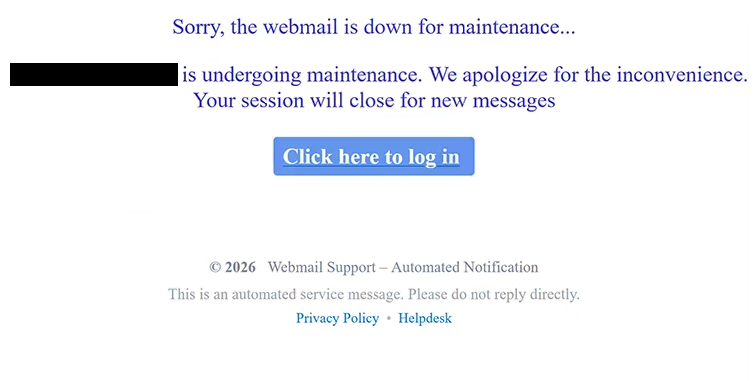
The subject is “WEBMAIL SERVICE MAINTENANCE.” The email says that the recipient’s webmail account is currently undergoing maintenance and apologizes for the inconvenience. It also warns that the current session will close for new emails, making it seem as though incoming emails could be affected unless the recipient signs in again.
Recipients are encouraged to “Click here to log in.” Instead of opening their normal webmail service, this takes them to a phishing page hosted using Backblaze B2 cloud storage.
The fake page can change its appearance depending on the recipient’s email address. It attempts to identify which email provider is being used and then shows a login form designed to resemble that service. In the example that was analyzed, the page copied Google’s authentication screen and already displayed the recipient’s email address.
The phishing page also used a Roundcube Webmail login screen in the background and showed a Gmail-themed “Account Authentication” form in front of it. Combining familiar email services can make the page look like part of a normal webmail authentication process, even though it has no connection to either service.
Entering a password does not restore webmail access or complete any maintenance procedure. The credentials are sent to the scammers, who can then attempt to access the real email account.
Neither Google, Roundcube, Backblaze, nor any legitimate webmail provider is responsible for this phishing email. Backblaze’s storage infrastructure is simply being misused to host the fake login page.
A stolen email password can give scammers access to private correspondence and information stored in the mailbox. They may also impersonate the account owner and use the compromised address to target contacts with further phishing emails. Since many online accounts rely on email for password recovery, access to the mailbox can also help attackers target other services linked to the same address.
The full “Webmail Is Down For Maintenance” phishing email is below:
Subject: WEBMAIL SERVICE MAINTENANCE
Sorry, the webmail is down for maintenance…
– is undergoing maintenance. We apologize for the inconvenience.
Your session will close for new messages
[Click here to log in]© 2026 Webmail Support – Automated Notification
This is an automated service message. Please do not reply directly.
Privacy Policy • Helpdesk
How to recognize the “Webmail Is Down For Maintenance” phishing email
The maintenance story does not make sense when compared with what the email asks recipients to do. Server maintenance is handled by the service provider and should not require individual users to enter their passwords through an unexpected email.
The warning that the recipient’s “session will close for new messages” is another attempt to make the situation seem urgent. Someone who depends on email for work or personal communication may worry about missing incoming emails and sign in without checking whether the maintenance notice is real.
The fake login page may initially seem convincing because it can show branding related to the recipient’s email provider. It may even display the correct email address automatically. Neither of these details proves that the page is legitimate. Email addresses can be included in phishing links and used to customize what appears after someone opens them.
There is also an unusual combination of Gmail and Roundcube elements on the phishing page. A legitimate login process would normally direct users through the authentication system provided by their actual email service rather than combining interfaces from different platforms.
If webmail really is unavailable, users should open the service the same way they normally do. They can also contact their email administrator or hosting provider directly to check whether maintenance is taking place. There is no need to use a login option supplied through an unexpected email.
Receiving or reading the “Webmail Is Down For Maintenance” phishing email does not expose the account password. The risk comes from entering credentials into the fake login form.
Incoming search terms:
Site Disclaimer
2-remove-virus.com is not sponsored, owned, affiliated, or linked to malware developers or distributors that are referenced in this article. The article does not promote or endorse any type of malware. We aim at providing useful information that will help computer users to detect and eliminate the unwanted malicious programs from their computers. This can be done manually by following the instructions presented in the article or automatically by implementing the suggested anti-malware tools.
The article is only meant to be used for educational purposes. If you follow the instructions given in the article, you agree to be contracted by the disclaimer. We do not guarantee that the artcile will present you with a solution that removes the malign threats completely. Malware changes constantly, which is why, in some cases, it may be difficult to clean the computer fully by using only the manual removal instructions.