The “Webmail Service Update” phishing email tries to turn what sounds like a routine software improvement into an opportunity to steal an email password. Rather than warning about an expired account or threatening immediate suspension, this campaign tells recipients that a new version of their webmail service has become available.
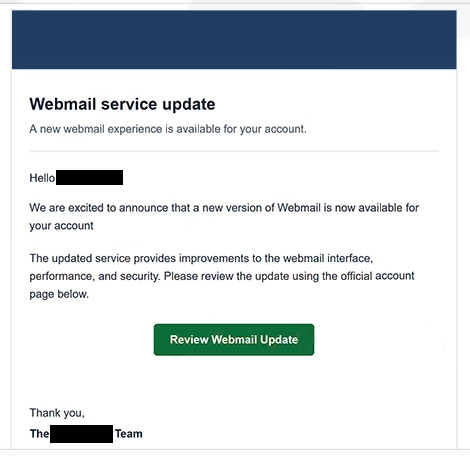
The email uses the subject “Webmail service update for -“. It addresses the recipient and announces that an updated webmail experience is ready for their account. According to the email, the new version offers improvements to the interface, performance, and security.
Recipients are invited to review these changes through a button that says “Review Webmail Update”. The email describes this as an official account page, making the action sound like a normal part of upgrading a webmail service.
There is no genuine webmail upgrade behind the button. Following it opens a phishing page hosted through Google Cloud Storage. Although this is a legitimate cloud platform, the page placed there is controlled by scammers and is not an official webmail account portal.
The site copies the appearance of a cPanel Webmail login page. In the analyzed version, the recipient’s email address appears to be automatically inserted into the login field. The visitor is then asked to provide the corresponding password.
Entering a password does not activate a new webmail version. The information is captured by the scammers, potentially giving them the credentials needed to access the victim’s email account.
Email credentials are especially valuable because an inbox can contain private conversations and information about other accounts. Access may also allow criminals to request password resets for services linked to the compromised email address or impersonate the account owner when contacting other people.
Neither cPanel nor Google is responsible for this phishing campaign. The cPanel-style interface is copied to make the login page appear authentic, while the cloud-storage service is simply being misused to host the fraudulent content.
If a password has already been entered on the fake page, it should be changed through the real email service as soon as possible. The same password should also be replaced on any other accounts where it has been reused.
The full “Webmail Service Update” phishing email is below:
Subject: Webmail service update for -.
–
Webmail service update
A new webmail experience is available for your account.
Hello -,
We are excited to announce that a new version of Webmail is now available for your account -.
The updated service provides improvements to the webmail interface, performance, and security. Please review the update using the official account page below.
[Review Webmail Update]Thank you,
The – Team
This is a service notification regarding your webmail account. For assistance, visit our Support Center.
© 2026 -. All rights reserved.
How to recognize the “Webmail Service Update” phishing email
This scam is notable because its approach is relatively positive. Instead of immediately frightening recipients with account closure or lost emails, it announces supposed improvements to their existing webmail service. Claims about better performance, security, and a refreshed interface give recipients a seemingly harmless reason to continue.
The email’s generic description of the provider is a reason to investigate it more closely. It discusses a new version of “Webmail” without establishing a clear connection to the company that actually manages the recipient’s email account.
The “Review Webmail Update” button is where the deception becomes more apparent. A recipient expecting information about a service update is instead taken to a login page hosted away from their normal webmail service. The fact that the email address may already appear in the form can make the page feel personalized, but it does not establish that the site is legitimate.
The cPanel-style appearance should not be used as proof of authenticity either. Login interfaces, logos, language selectors, and other familiar visual elements can be reproduced on phishing pages. The address displayed in the browser is more useful for determining whether a login form actually belongs to the expected service.
There is also no need to use an unsolicited email to check whether a webmail service has been updated. Users can open their usual webmail page or hosting control panel independently. Any genuine changes to the service can be reviewed from there without providing a password to a site reached through an unexpected email.
Incoming search terms:
Site Disclaimer
2-remove-virus.com is not sponsored, owned, affiliated, or linked to malware developers or distributors that are referenced in this article. The article does not promote or endorse any type of malware. We aim at providing useful information that will help computer users to detect and eliminate the unwanted malicious programs from their computers. This can be done manually by following the instructions presented in the article or automatically by implementing the suggested anti-malware tools.
The article is only meant to be used for educational purposes. If you follow the instructions given in the article, you agree to be contracted by the disclaimer. We do not guarantee that the artcile will present you with a solution that removes the malign threats completely. Malware changes constantly, which is why, in some cases, it may be difficult to clean the computer fully by using only the manual removal instructions.