The “Webmail – This is your last warning” phishing email is designed to steal email account passwords. It impersonates a webmail security notification and claims that recipients must confirm their identity to prevent restrictions from being placed on their accounts.
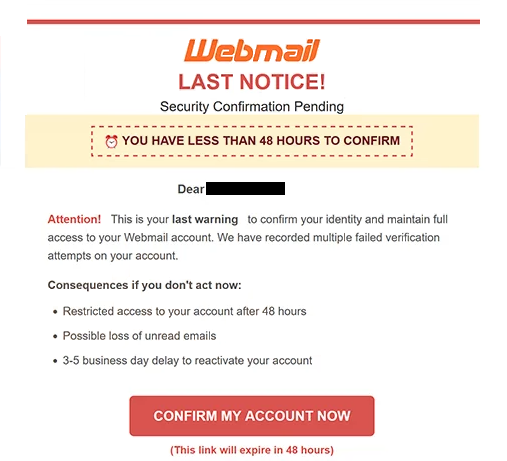
The email presents the situation as urgent. It claims that several verification attempts have already failed and describes the email as the recipient’s final warning. Recipients are given 48 hours to complete the supposed security confirmation.
According to the email, ignoring the request will result in restricted account access. It also warns that unread emails could be lost and claims that restoring access may take between three and five business days. These warnings are intended to pressure recipients into acting quickly.
To supposedly prevent these consequences, the email instructs recipients to select “CONFIRM MY ACCOUNT NOW”. It claims that the link expires within 48 hours and that a confirmation email will be sent after successful verification.
Following the button opens a phishing website rather than a legitimate webmail security page. During analysis, the site displayed a fake sign-in interface resembling a well-known email service. The recipient’s email address was already shown on the page, leaving only the password to be entered.
The page also claimed that the user’s session had timed out. This gives visitors a seemingly reasonable explanation for why they need to enter their password again. However, submitting the password does not verify the account. The credentials are instead exposed to the scammers behind the phishing site.
Access to an email account can give scammers access to information stored in the mailbox. It can also create risks for other accounts associated with that email address, particularly where email is used for password recovery.
The “Webmail – This is your last warning” phishing email therefore uses fabricated account-security problems and a short deadline to direct recipients to a fake login page designed to capture their webmail password.
The full “Webmail – This is your last warning” phishing email is below:
Subject: Priority Security Update for Your Account –
Webmail
Last Notice!Security Confirmation Pending
YOU HAVE LESS THAN 48 HOURS TO CONFIRM
Dear –
Attention! This is your last warning to confirm your identity and maintain full access to your Webmail account. We have recorded multiple failed verification attempts on your account.
Consequences if you don’t act now:
Restricted access to your account after 48 hours
Possible loss of unread emails
3-5 business day delay to reactivate your account[CONFIRM MY ACCOUNT NOW]
(This link will expire in 48 hours)
Confirmation process: Once verification is complete, you will receive a confirmation email within 48 hours. During this period, you can continue using your account normally.
If you haven’t requested this verification or need assistance, please contact our technical support team IMMEDIATELY.
How to recognize phishing emails
The artificial urgency is one of the most noticeable signs of this phishing email. Recipients are told that they have only 48 hours to act and face restricted access if they fail to comply. The email increases the pressure by warning about lost unread emails and a lengthy account recovery process.
The supposed failed verification attempts are another reason for caution. Instead of providing independently verifiable information about a genuine security event, the email immediately uses these claims to push recipients toward the “CONFIRM MY ACCOUNT NOW” button.
Where that button leads is particularly important. Phishing sites can copy logos, colors, and login interfaces from legitimate services. A familiar-looking sign-in page therefore does not prove that the website belongs to the email provider. Recipients should examine the actual domain before entering credentials.
The fake page used in this scam is especially deceptive because it already displays the recipient’s email address and asks only for the password. Its session timeout warning further encourages visitors to treat the password request as a normal sign-in procedure.
Unexpected account warnings can be checked without using links supplied in an email. Recipients can open their provider’s application or manually access its legitimate website and check the account from there. This prevents the email from controlling which website receives the user’s credentials.
The sender address should also be examined rather than relying only on the displayed sender name. Likewise, a professional design or recognizable branding does not establish that an email or linked website is genuine.
Anyone who has already submitted a password through the phishing page should change the affected account password. If the same password is used for other accounts, those passwords should also be changed.
Incoming search terms:
Site Disclaimer
2-remove-virus.com is not sponsored, owned, affiliated, or linked to malware developers or distributors that are referenced in this article. The article does not promote or endorse any type of malware. We aim at providing useful information that will help computer users to detect and eliminate the unwanted malicious programs from their computers. This can be done manually by following the instructions presented in the article or automatically by implementing the suggested anti-malware tools.
The article is only meant to be used for educational purposes. If you follow the instructions given in the article, you agree to be contracted by the disclaimer. We do not guarantee that the artcile will present you with a solution that removes the malign threats completely. Malware changes constantly, which is why, in some cases, it may be difficult to clean the computer fully by using only the manual removal instructions.