The “Webmail – your webmail application will be discontinued” email is part of a phishing campaign that attempts to scare recipients into believing their email service is about to be terminated. Unlike typical spam that promotes products or services, this message is structured as a warning. It claims that the current webmail platform will soon be disabled and that users must take action to keep their accounts active. While it may look like an official notice from an IT department or service provider, it is entirely deceptive.
What makes this scam effective is how it mimics routine administrative communication. The email often includes statements about system upgrades, policy changes, or service transitions. It may suggest that older webmail versions are being phased out and that users need to confirm their accounts to avoid disruption. The “Webmail – your webmail application will be discontinued” email usually contains a button or link labeled with phrases like “continue using email,” “upgrade now,” or “prevent deactivation.” This creates the impression that the action is both necessary and harmless.
However, the link provided does not lead to a real service page. Instead, it opens a fraudulent website that imitates a login portal. These pages are designed to look convincing, often featuring generic email branding rather than a specific provider, which allows attackers to target a wide audience. Once a user enters their credentials, the information is transmitted directly to the scammers. At that point, the attackers can gain access to the email account and potentially use it for further exploitation.
Another notable detail about the “Webmail – your webmail application will be discontinued” scam is its broad targeting approach. Since the email does not always mention a specific provider, it can be sent to users of many different services without modification. This lack of personalization is intentional. Attackers rely on volume rather than accuracy, assuming that a portion of recipients will respond without questioning whether the message applies to them.
If access to an email account is compromised, the consequences can extend beyond the account itself. Email inboxes often contain sensitive information, including personal communication, account recovery links, and connections to other platforms. Attackers may use the compromised account to reset passwords on other services, impersonate the user, or distribute additional phishing emails. Because of this, interacting with the “Webmail – your webmail application will be discontinued” email can lead to wider security issues, not just a single account breach.
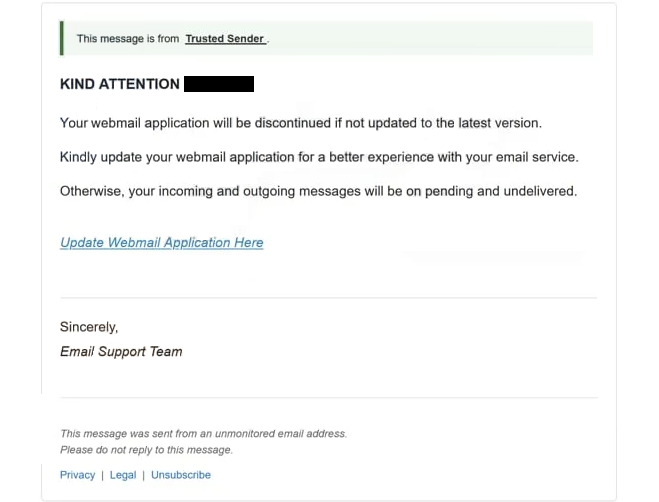
The full “Webmail – your webmail application will be discontinued” phishing email is below:
Subject: [-]: Please confirm to continue.
KIND ATTENTION –
Your webmail application will be discontinued if not updated to the latest version.
Kindly update your webmail application for a better experience with your email service.
Otherwise, your incoming and outgoing messages will be on pending and undelivered.
Update Webmail Application Here
Sincerely,
Email Support Team
This message was sent from an unmonitored email address.
Please do not reply to this message.
Privacy | Legal | Unsubscribe
How to recognize phishing emails
Spotting phishing emails like the “Webmail – your webmail application will be discontinued” scam requires attention to patterns rather than relying on a single indicator. These emails are designed to look convincing, but they often reveal themselves through a combination of subtle inconsistencies.
One common tactic is the use of pressure. Instead of presenting information neutrally, phishing emails push the idea that immediate action is required. In this case, the threat of losing access to email services is used to create urgency. Legitimate providers rarely demand instant responses through unsolicited emails, especially when it involves account changes.
Another detail worth examining is the structure of the link included in the email. While the visible text may suggest a legitimate destination, the underlying URL often points somewhere unrelated. Carefully checking where a link leads before interacting with it can prevent accidental redirection to a fake website. If the domain does not clearly match the official service, it should not be trusted.
The sender’s identity can also provide clues. Phishing attempts often use addresses that resemble official ones but include slight variations. These differences might be small, such as extra characters or altered domain names, but they are a strong indication that the email is not genuine. Authentic communications from service providers are typically consistent in how they present sender information.
The way the email is written can reveal additional warning signs. Some phishing emails include awkward sentence construction, inconsistent formatting, or wording that feels slightly unnatural. Others may appear more polished but still rely on vague language that does not clearly identify the service being referenced. In the case of the “Webmail – your webmail application will be discontinued” email, the lack of specific provider details is itself a red flag.
It is also important to consider what the email is asking for. Requests to log in through a provided link or to confirm account details should be treated with caution. Legitimate services do not require users to submit sensitive information through embedded links in unexpected emails. Instead, any account-related actions should be performed by navigating directly to the official website.
A practical habit is to ignore links in unsolicited emails and verify claims independently. If there is a real issue with an email account, it will be visible after logging in through the official service page. Taking this extra step can prevent falling for scams like the “Webmail – your webmail application will be discontinued” email.
Building awareness of these patterns is key to staying protected. Phishing emails rely on quick reactions and misplaced trust. Slowing down, reviewing the details, and questioning unexpected notifications can significantly reduce the risk of account compromise and help keep personal information secure.
Site Disclaimer
2-remove-virus.com is not sponsored, owned, affiliated, or linked to malware developers or distributors that are referenced in this article. The article does not promote or endorse any type of malware. We aim at providing useful information that will help computer users to detect and eliminate the unwanted malicious programs from their computers. This can be done manually by following the instructions presented in the article or automatically by implementing the suggested anti-malware tools.
The article is only meant to be used for educational purposes. If you follow the instructions given in the article, you agree to be contracted by the disclaimer. We do not guarantee that the artcile will present you with a solution that removes the malign threats completely. Malware changes constantly, which is why, in some cases, it may be difficult to clean the computer fully by using only the manual removal instructions.