The “Weekend Security Maintenance” email is a phishing attempt that uses a fabricated IT maintenance notice to steal webmail login credentials. It tells recipients that incoming messages were temporarily held on an email server while security work was performed over the weekend. The emails supposedly remain safe but cannot be delivered until the recipient takes action.
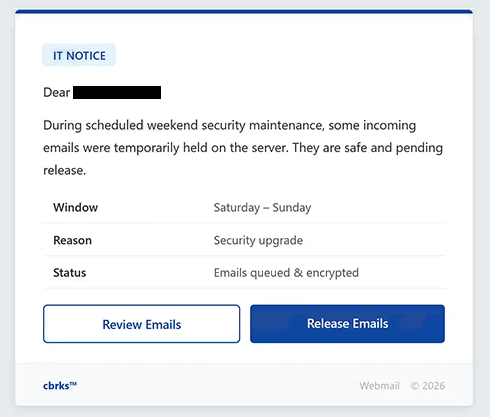
The phishing email has been observed with the subject “- Maintenance Temporarily Held.” It begins with “IT NOTICE” and addresses the recipient before explaining that scheduled weekend security maintenance caused some incoming emails to be retained on the server.
To make the explanation appear more credible, the email includes several details about the supposed maintenance. The window is listed as “Saturday – Sunday,” the reason is described as a “Security upgrade,” and the status of the affected messages is shown as “Emails queued & encrypted.” None of these details describe a genuine maintenance event. They are included to convince recipients that undelivered messages are waiting for them.
Two options are presented: “Review Emails” and “Release Emails.” Both buttons lead to the same type of phishing destination rather than a legitimate webmail management service. The linked page imitates the Roundcube Webmail login interface.
The phishing page displays a username field containing the recipient’s email address and asks for a password. Having the email address already filled in can make the login screen appear connected to the recipient’s actual mailbox, but the page is controlled by scammers. Any password entered into the form is captured rather than used to release queued messages.
The email is signed “cbrks” and also displays “Webmail © 2026.” There is no legitimate IT department, email provider, or company named “cbrks” associated with the campaign. Roundcube is likewise unrelated to the phishing operation.
If the entered credentials are valid, attackers may be able to sign in to the victim’s email account. This can expose private correspondence and other information stored in the mailbox. Access may also allow scammers to impersonate the account owner, send phishing emails to contacts, or attempt password resets for other services registered with the compromised address.
The supposed weekend maintenance, security upgrade, encrypted queue, and pending messages are all parts of the phishing scenario. There is no evidence in the email that genuine incoming messages have actually been held.
The full “Weekend Security Maintenance” phishing email is below:
Subject: [-]:Weekend Maintenance:Emails Temporarily Held
IT NOTICE
Dear -,
During scheduled weekend security maintenance, some incoming emails were temporarily held on the server. They are safe and pending release.
Window Saturday – Sunday
Reason Security upgrade
Status Emails queued & encrypted[Review Emails]
[Release Emails]cbrks™
Webmail © 2026
How to recognize the “Weekend Security Maintenance” phishing email
The claim that messages were placed in a queue during weekend security work is one of the main indicators of this campaign. The email attempts to make the situation sound routine by presenting it as ordinary IT maintenance, while simultaneously giving recipients a reason to interact with the “Review Emails” or “Release Emails” buttons.
Users should not use these buttons to determine whether messages are genuinely being held. If there is concern about delayed email, the mailbox should be opened directly through the normal webmail address. Server or account information can also be confirmed with the legitimate email administrator or hosting provider.
The “Emails queued & encrypted” status should not be treated as evidence that messages are actually waiting. It is simply text included in the phishing email. Likewise, the Saturday-to-Sunday maintenance window and “Security upgrade” explanation do not verify that any server work occurred.
The login page provides another important warning sign. Following either button results in a Roundcube-style page requesting a password. A familiar webmail interface can be copied, so its appearance alone does not establish that the page belongs to the recipient’s provider. The website address should be checked before any credentials are entered.
The unusual “cbrks” signature is also relevant to identifying this particular email. The campaign does not originate from a legitimate organization by that name, despite presenting the message as an official IT notification.
Simply receiving or reading the “Weekend Security Maintenance” phishing email does not compromise an account. Users who have not entered their password on the linked page should avoid the supplied buttons and delete the email.
Anyone who has already submitted credentials should change the affected email password through the legitimate service. The same password should also be replaced wherever else it has been reused, and the mailbox should be checked for unfamiliar logins or other unauthorized activity.
This campaign specifically claims that emails were held during a Saturday-to-Sunday security upgrade, labels them “queued & encrypted,” and provides “Review Emails” and “Release Emails” buttons. Both are used to direct recipients to a fake Roundcube Webmail login page created to capture their credentials.
Site Disclaimer
2-remove-virus.com is not sponsored, owned, affiliated, or linked to malware developers or distributors that are referenced in this article. The article does not promote or endorse any type of malware. We aim at providing useful information that will help computer users to detect and eliminate the unwanted malicious programs from their computers. This can be done manually by following the instructions presented in the article or automatically by implementing the suggested anti-malware tools.
The article is only meant to be used for educational purposes. If you follow the instructions given in the article, you agree to be contracted by the disclaimer. We do not guarantee that the artcile will present you with a solution that removes the malign threats completely. Malware changes constantly, which is why, in some cases, it may be difficult to clean the computer fully by using only the manual removal instructions.