The “Wells Fargo – Account Security Update” phishing email is a fraudulent message that impersonates Wells Fargo to trick recipients into disclosing sensitive banking information. The email claims that new security measures have been introduced for the recipient’s online banking account and instructs them to complete a verification process. In reality, the message is part of a phishing campaign designed to steal credentials and other confidential information.
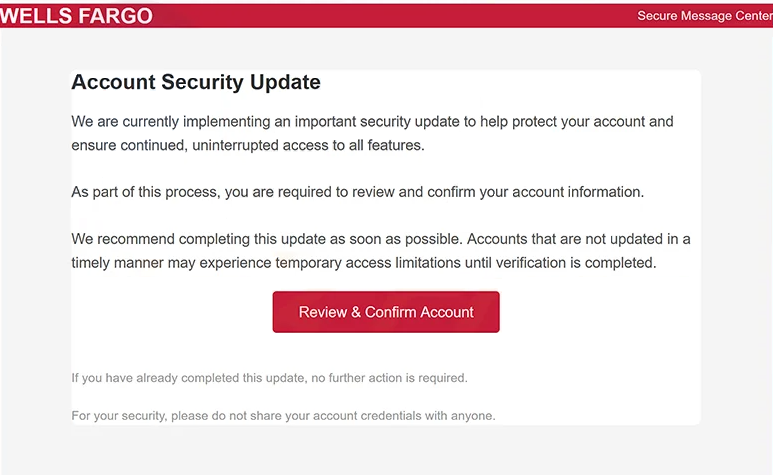
Unlike phishing emails that focus on suspicious transactions or payment confirmations, this campaign presents itself as a routine security update. Recipients are informed that additional protection has been applied to their online banking profile and that identity verification is required before full account access can continue. The notification attempts to make this request appear to be a standard security procedure implemented by the bank.
The email includes a button or hyperlink inviting recipients to review their security settings, confirm their identity, or unlock online banking. Instead of directing users to an official Wells Fargo webpage, the link opens a counterfeit website that imitates the bank’s sign-in portal. The fraudulent page is designed to persuade visitors that they are interacting with a legitimate banking website.
After arriving on the phishing page, victims are prompted to enter their online banking username and password. Depending on the version of the scam, the website may also request additional information, such as one-time verification codes, payment card details, or personal information. Rather than verifying the account, all submitted data is transmitted to the attackers operating the phishing campaign.
Compromised online banking credentials can have serious consequences. Cybercriminals may attempt to sign in to the victim’s account, review financial information, initiate unauthorized transactions, modify account settings, or misuse the stolen information in other fraudulent activities. If additional authentication details are obtained, the attackers’ ability to access the account may increase further.
The “Wells Fargo – Account Security Update” phishing email relies on trust in familiar financial institutions. By using the bank’s branding, security terminology, and professional formatting, the scammers attempt to convince recipients that the notification is genuine. However, the appearance of official logos or bank-related language does not confirm that an email originated from Wells Fargo.
Recipients who submitted information through the phishing website should immediately contact their financial institution, change their online banking password, and review recent account activity for unauthorized transactions. If payment card information or other sensitive financial data was disclosed, the bank should be informed without delay so that appropriate security measures can be taken.
The full “Wells Fargo – Account Security Update” phishing email is below:
Subject: Y o u r B a n k t r a n s a с t i o n a с t i v a t ε d o u r с o m p l i a n с ε s y s t ε m – – – > 691616
WELLS FARGO Secure Message Center
Account Security Update
We are currently implementing an important security update to help protect your account and ensure continued, uninterrupted access to all features.
As part of this process, you are required to review and confirm your account information.
We recommend completing this update as soon as possible. Accounts that are not updated in a timely manner may experience temporary access limitations until verification is completed.
[Review & Confirm Account]
If you have already completed this update, no further action is required.
For your security, please do not share your account credentials with anyone.
How to identify phishing emails impersonating Wells Fargo
Unexpected emails requesting users to verify banking information or complete security updates through embedded links should be treated with caution. Legitimate banks generally encourage customers to access their accounts by visiting the official website or mobile application directly rather than through links contained in unsolicited emails.
Recipients should also verify the sender’s email address instead of relying only on the displayed sender name. Phishing campaigns commonly imitate trusted organizations while using unrelated domains to send fraudulent messages.
Before entering credentials, users should examine the destination website carefully. Even if a page closely resembles the official Wells Fargo sign-in portal, it should not be trusted if it is hosted on an unfamiliar domain. Wells Fargo states that it will never ask customers to provide passwords, PINs, or one-time access codes through email or text messages.
Another common indicator is unnecessary urgency. Messages claiming that immediate verification is required to maintain account access or prevent service disruption are frequently used to pressure recipients into acting without independently confirming the request.
The safest way to verify an unexpected banking notification is to ignore the links contained in the email and manually navigate to the bank’s official website or use its official mobile application. If no corresponding alert appears after signing in, the email should be treated as a phishing attempt.
Incoming search terms:
Site Disclaimer
2-remove-virus.com is not sponsored, owned, affiliated, or linked to malware developers or distributors that are referenced in this article. The article does not promote or endorse any type of malware. We aim at providing useful information that will help computer users to detect and eliminate the unwanted malicious programs from their computers. This can be done manually by following the instructions presented in the article or automatically by implementing the suggested anti-malware tools.
The article is only meant to be used for educational purposes. If you follow the instructions given in the article, you agree to be contracted by the disclaimer. We do not guarantee that the artcile will present you with a solution that removes the malign threats completely. Malware changes constantly, which is why, in some cases, it may be difficult to clean the computer fully by using only the manual removal instructions.