The “Wells Fargo – Alert on your Account” phishing email is a banking scam designed to steal Wells Fargo account credentials. It impersonates the bank and warns recipients that their account could be suspended because of supposed problems with their personal information.
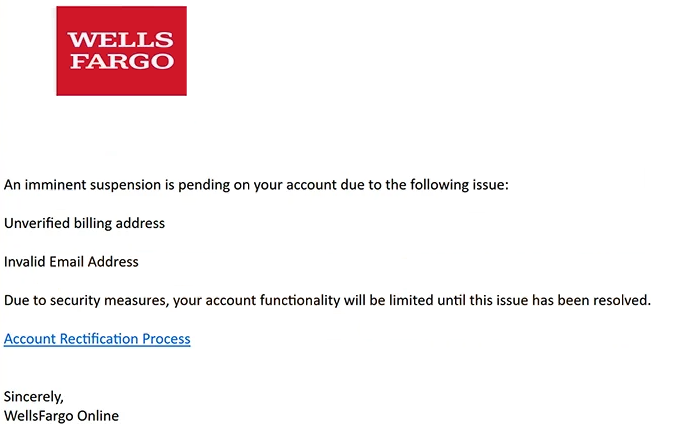
The email claims that two issues have been identified: an unverified billing address and an invalid email address. According to the warning, these problems have placed the recipient’s account at risk of suspension. It also claims that account functionality will remain limited until the information is corrected.
Recipients are encouraged to resolve the alleged problems through an “Account Rectification Process” link. The wording makes this appear to be an official procedure for restoring normal access to the account, but the link does not lead to a legitimate Wells Fargo service.
Instead, it opens a phishing website hosted on a domain unrelated to Wells Fargo. The fraudulent site imitates the bank’s sign-on page and uses familiar Wells Fargo branding to make the login request appear authentic.
The fake page asks visitors to enter their username and password. Any credentials submitted through it are provided to the scammers rather than Wells Fargo. Entering this information does not verify a billing address, correct an email address, or prevent the supposed suspension.
Stolen online banking credentials are particularly sensitive because they may enable unauthorized access to a victim’s financial account. Anyone who has entered credentials on the fake website should change the affected password and contact Wells Fargo through official channels to report the incident and check the account for unauthorized activity.
Wells Fargo is not associated with this phishing campaign. Its name and branding are being impersonated to make the “Wells Fargo – Alert on your Account” phishing email and the linked fake sign-on page appear legitimate.
The full “Wells Fargo – Alert on your Account” phishing email is below:
Subject: Alert on your Account
Wells Fargo
An imminent suspension is pending on your account due to the following issue:
Unverified billing address
Invalid Email Address
Due to security measures, your account functionality will be limited until this issue has been resolved.
[Account Rectification Process]
Sincerely,
WellsFargo Online
How to recognize phishing emails
The threatened suspension is one of the most important signs to examine in the “Wells Fargo – Alert on your Account” phishing email. The warning attempts to create urgency by telling recipients that their account functionality is limited and that suspension is pending.
The alleged reasons for the restriction also deserve scrutiny. The email claims that both the billing address and email address need attention and then directs recipients to an embedded link to resolve these issues. Unexpected banking warnings of this kind should be verified independently rather than through links provided in the email.
The “Account Rectification Process” link is particularly revealing. Its official-sounding wording does not indicate where it actually leads. In this campaign, the destination is an unrelated domain rather than a legitimate Wells Fargo website.
The counterfeit sign-on page can make the scam appear more convincing. It copies Wells Fargo branding and presents visitors with fields for a username and password. However, company logos and familiar login designs can be reproduced on phishing websites. The domain displayed in the browser’s address bar provides a more useful indication of who controls the page.
Sender information should also be examined carefully. A familiar display name does not establish that an email originated from the bank. The complete sender address and its domain should be checked when an unexpected account warning arrives.
Recipients concerned about their Wells Fargo account can avoid the email’s link entirely. They can open the bank’s official application or access its website independently and check their account there. This prevents an unsolicited email from determining where banking credentials are entered.
Site Disclaimer
2-remove-virus.com is not sponsored, owned, affiliated, or linked to malware developers or distributors that are referenced in this article. The article does not promote or endorse any type of malware. We aim at providing useful information that will help computer users to detect and eliminate the unwanted malicious programs from their computers. This can be done manually by following the instructions presented in the article or automatically by implementing the suggested anti-malware tools.
The article is only meant to be used for educational purposes. If you follow the instructions given in the article, you agree to be contracted by the disclaimer. We do not guarantee that the artcile will present you with a solution that removes the malign threats completely. Malware changes constantly, which is why, in some cases, it may be difficult to clean the computer fully by using only the manual removal instructions.