The “WeTransfer – Your files have been downloaded” scam is a phishing email that pretends to be a notification from WeTransfer. The email tells the recipient that shared files have been downloaded or are available to view. It presents this as a normal WeTransfer activity notice. The email is not sent by WeTransfer and is fraudulent.
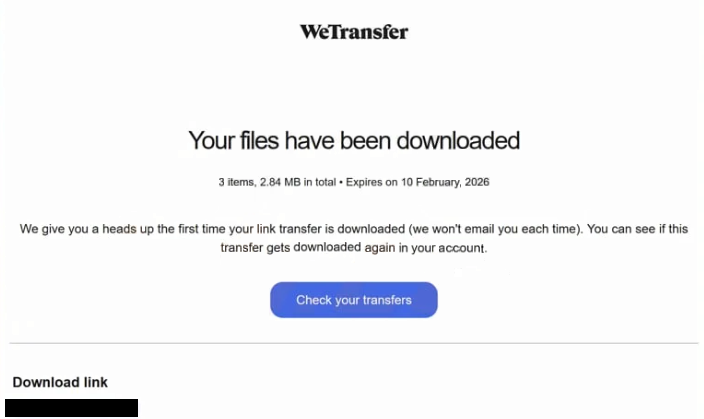
The email includes details such as a file name, transfer date, or a claim that documents were shared with the recipient. It invites the recipient to click a button or link to view or download the files. This link does not lead to the real WeTransfer site. It opens a fake web page that is made to look like a document access or email login page.
That page asks the recipient to sign in with an email address and password to access the files. The design can include simple branding, a document icon, or a layout that resembles a file-sharing page. These elements are used to make the request look legitimate. In reality, the page exists only to collect credentials.
When the recipient enters login details, the information is sent to the scammers. The page does not provide any files and is not connected to WeTransfer. After credentials are submitted, the site can show an error or redirect to another page, so the process appears normal. By that time, the scammers already have the login data.
The targeted information in the “WeTransfer – Your files have been downloaded” scam is email account credentials. Access to an email account allows entry to private messages, attachments, and contact lists. Email is also used for password resets on many services. With control of the inbox, scammers can reset passwords for other accounts linked to that address and approve those changes through email.
A compromised email account can also be used to send more phishing emails. Scammers can impersonate the owner and send file-themed emails to contacts. Since those emails come from a real address, recipients can trust them and open the links. This allows the scam to spread further.
The claim about downloaded or shared files is only a lure. The scammers do not have access to real transfers and cannot see WeTransfer activity. The story is used to create curiosity or concern so the recipient clicks the link. Real WeTransfer notifications do not ask users to enter email passwords on unrelated pages.
How to identify phishing emails
The “WeTransfer – Your files have been downloaded” scam arrives as a standard email that looks like a file-sharing notice. The subject line mentions downloaded files, received documents, or completed transfers. The sender name can appear as WeTransfer or a file service team. A check of the full sender address shows a domain that is not owned by WeTransfer. This mismatch is a key sign of this scam.
The email body focuses on file activity. It can mention a file title, a transfer size, or a download status. The message pushes the reader to click a button to view the files. It does not include a personal message from the sender who shared the files. It also does not show the full transfer details normally present in real WeTransfer emails.
The link in the email leads to a phishing site. The domain in the browser bar is unrelated to wetransfer.com and can contain random words or characters. The page can display a file preview image or a sign-in prompt. Its main feature is a login form asking for an email address and a password.
A real WeTransfer transfer allows file downloads through WeTransfer pages without asking for the recipient’s email password. The presence of a password request on a non-WeTransfer domain is a direct sign of fraud tied to this scam.
Another sign is the narrow focus on file downloads. The same theme appears in the subject line, email text, and action button. The email does not discuss account security, billing, or subscription details. It stays centered on the file claim.
The combination of a file download notice, a mismatched sender domain, and a login page on an unrelated site defines the “WeTransfer – Your files have been downloaded” scam.
Site Disclaimer
2-remove-virus.com is not sponsored, owned, affiliated, or linked to malware developers or distributors that are referenced in this article. The article does not promote or endorse any type of malware. We aim at providing useful information that will help computer users to detect and eliminate the unwanted malicious programs from their computers. This can be done manually by following the instructions presented in the article or automatically by implementing the suggested anti-malware tools.
The article is only meant to be used for educational purposes. If you follow the instructions given in the article, you agree to be contracted by the disclaimer. We do not guarantee that the artcile will present you with a solution that removes the malign threats completely. Malware changes constantly, which is why, in some cases, it may be difficult to clean the computer fully by using only the manual removal instructions.