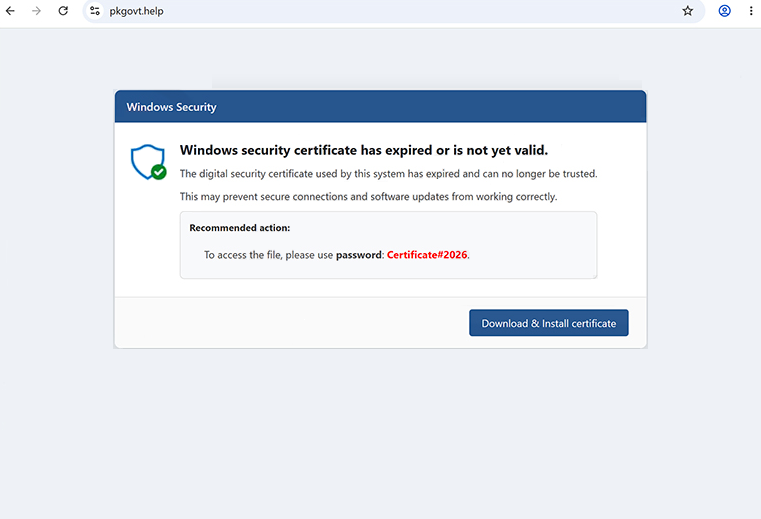
The “Windows Security Certificate Expired/Invalid” pop-up scam is a deceptive web page designed to frighten visitors into believing that their computer has encountered a critical security problem. The fraudulent message falsely claims that the Windows security certificate has expired or become invalid, placing the system and personal information at immediate risk. These warnings are entirely fabricated and are not generated by Microsoft or any legitimate security service.
Users typically encounter the “Windows Security Certificate Expired/Invalid” pop-up after being redirected from unreliable websites, rogue advertising networks, intrusive advertisements, or pages promoting potentially unwanted applications. In some cases, the fake warning appears automatically after clicking a misleading advertisement or visiting a compromised website.
The scam page is designed to resemble an official Windows security notification. It often uses familiar colours, warning icons, and technical language to convince visitors that the alert is genuine. The page may state that the computer’s security certificate has failed validation, expired unexpectedly, or can no longer establish secure communication with Microsoft services. None of these claims are legitimate.
To increase pressure, the page frequently displays alarming messages suggesting that passwords, banking information, saved documents, or other sensitive data are in immediate danger. Some versions also claim that internet access will soon be restricted or that malware has already been detected because of the alleged certificate problem. These warnings are intended solely to create panic and persuade users to follow the scammers’ instructions.
Many variants of the “Windows Security Certificate Expired/Invalid” pop-up encourage visitors to call a so-called Microsoft support number. During these fake support calls, scammers typically claim they can repair the problem remotely. They may ask victims to install remote administration software, allowing the attackers to access the computer directly. Once connected, they often pretend to perform diagnostics while displaying harmless system logs or routine Windows events as evidence of serious infections.
In addition to requesting remote access, the scammers may attempt to convince victims to purchase unnecessary technical support services, fake antivirus subscriptions, or software that provides no real protection. Some campaigns also request payment through bank transfers, gift cards, or cryptocurrency, making the transactions difficult or impossible to recover.
Certain versions of this scam may redirect users to websites promoting questionable software or display forms requesting personal information such as names, email addresses, telephone numbers, or payment details. Any information entered on these pages may be collected and misused for fraud, identity theft, or future phishing campaigns.
Although the page itself cannot determine whether a Windows security certificate has expired, its appearance may convince inexperienced users that their computer has been compromised. Simply viewing the webpage does not infect a device, but interacting with the scam, downloading promoted software, granting remote access, or disclosing sensitive information can lead to financial losses, privacy breaches, or additional malware infections.
Anyone who has installed software or granted remote access after interacting with the “Windows Security Certificate Expired/Invalid” pop-up should immediately disconnect the affected device from the internet, uninstall any remote administration programs that were installed during the support session, run a thorough malware scan using reputable security software, and change passwords for important online accounts. Users who disclosed financial information should also contact their bank or payment provider as soon as possible.
The full text from the “Windows Security Certificate Expired/Invalid” pop-up scam is below:
Windows Security
Warning
Windows security certificate has expired or is not yet valid.
The digital security certificate used by this system has expired and can no longer be trusted.
This may prevent secure connections and software updates from working correctly.
Recommended action:
To access the file, please use password: Certificate#2026.
Download & Install certificate
Why are you seeing fake Windows alerts
Scam pages displaying messages such as “Windows Security Certificate Expired/Invalid” are commonly delivered through malicious advertising networks operating on unreliable websites. Clicking deceptive advertisements, fake download buttons, streaming pages, torrent sites, or other questionable content can trigger automatic redirects to these fraudulent warnings.
Potentially unwanted applications installed on a computer may also generate redirects to scam pages. Adware and similar software can inject advertisements into web browsers, alter browsing behaviour, or repeatedly open deceptive websites without the user’s consent.
Cybercriminals also promote fake security alerts through phishing emails, misleading social media posts, fraudulent online advertisements, and compromised websites. These campaigns attempt to attract visitors by claiming that a device has been infected, blocked, or requires urgent maintenance.
To reduce the likelihood of encountering scams like the “Windows Security Certificate Expired/Invalid” pop-up, users should avoid interacting with suspicious advertisements, download software only from official sources, review installation settings carefully to decline unwanted applications, keep browsers and operating systems updated, and use reputable security software capable of blocking malicious websites. Most importantly, users should remember that legitimate Microsoft security warnings are not delivered through random web pages that demand phone calls, immediate payments, or remote access to a computer.
Incoming search terms:
Site Disclaimer
2-remove-virus.com is not sponsored, owned, affiliated, or linked to malware developers or distributors that are referenced in this article. The article does not promote or endorse any type of malware. We aim at providing useful information that will help computer users to detect and eliminate the unwanted malicious programs from their computers. This can be done manually by following the instructions presented in the article or automatically by implementing the suggested anti-malware tools.
The article is only meant to be used for educational purposes. If you follow the instructions given in the article, you agree to be contracted by the disclaimer. We do not guarantee that the artcile will present you with a solution that removes the malign threats completely. Malware changes constantly, which is why, in some cases, it may be difficult to clean the computer fully by using only the manual removal instructions.