The “you are not permitted to send messages again” email scam is a phishing email that claims the recipient has lost permission to send outgoing emails. The message states that sending ability was removed because of a policy violation, suspicious activity, or a server issue. The email is not from a real provider, and no such restriction has been applied. The purpose of this scam is to steal email login credentials.
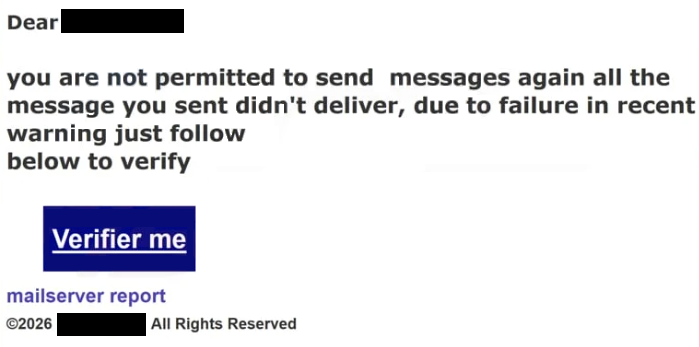
The subject line or main text uses the exact phrase “you are not permitted to send messages again.” The message tells the recipient that outgoing mail has been blocked and that action is required to restore sending access. It presents this as a current account problem. This claim is false and not based on any real server action.
The email does not contain real proof of a sending block. It does not list failed delivery reports, timestamps, or server responses. It does not identify which messages were affected. These details are missing because the sender has no access to the recipient’s account.
A link is included and is described as the way to restore sending ability. The recipient is told to confirm their account. This link does not lead to the official site of the email provider. It opens a phishing page controlled by scammers.
The phishing page is designed to look like a mailbox sign-in screen. It asks for the email address and password. Entering this information does not restore sending ability. The credentials are captured by scammers.
After details are entered, the page may show a message claiming that access will be restored. This response is only visual and not connected to any real system. No change is made to the account.
If scammers obtain valid credentials, they can access the real mailbox. They can read emails, collect stored information, and search for personal or financial data. They can also send emails from the compromised account. Messages sent from a real account appear credible to other people.
Control of a mailbox also allows password resets for other services. Many accounts rely on email for recovery. Access to the inbox can therefore lead to additional account takeovers. Shopping accounts, social platforms, and financial services can be affected if they use the same email.
The situation described in the “you are not permitted to send messages again” email is fabricated. Email providers do not remove the sending ability through random emails that require a login on external pages. Real sending problems appear inside the account after signing in through the official website or app.
The full “you are not permitted to send messages again” phishing email is below:
Subject: EMAIL CANT BE DELIVERED
Dear
you are not permitted to send messages again all the message you sent didn’t deliver, due to failure in recent warning just follow
below to verifyVerifier me
mailserver report
©2026 – All Rights Reserved
How the “you are not permitted to send messages again” email is sent, and how to recognize it
The “you are not permitted to send messages again” email scam is distributed through bulk phishing campaigns. The same message is sent to many addresses without checking the account status. The wording is broad, so it can apply to almost any user.
The sender name may mention support or administration, but the actual sender address does not match a real provider’s domain. It often comes from unrelated domains. Viewing the full sender address reveals this mismatch.
The content stays general. It does not identify which messages were blocked or when the issue started. Legitimate providers include specific information that can be reviewed after signing in through official channels. This scam does not.
The link in the email leads to a domain that is not operated by the provider. Even if the page looks like a real login screen, the web address is different. Any login page reached from a “you are not permitted to send messages again” email should be treated as fraudulent.
The message also does not provide normal support options. It does not guide the user to check settings directly inside their mailbox or contact official support. It only directs the user to the link. Real providers allow account review from within the authenticated mailbox.
The “you are not permitted to send messages again” email scam relies on fear of losing email functions to push quick action. Checking sender domains, avoiding login links in unexpected emails, and signing in only through the official provider website are effective ways to avoid this phishing attempt.
Site Disclaimer
2-remove-virus.com is not sponsored, owned, affiliated, or linked to malware developers or distributors that are referenced in this article. The article does not promote or endorse any type of malware. We aim at providing useful information that will help computer users to detect and eliminate the unwanted malicious programs from their computers. This can be done manually by following the instructions presented in the article or automatically by implementing the suggested anti-malware tools.
The article is only meant to be used for educational purposes. If you follow the instructions given in the article, you agree to be contracted by the disclaimer. We do not guarantee that the artcile will present you with a solution that removes the malign threats completely. Malware changes constantly, which is why, in some cases, it may be difficult to clean the computer fully by using only the manual removal instructions.