The “Your Device Was Compromised By My Private Malware” email is a sextortion scam that attempts to frighten recipients into sending cryptocurrency by falsely claiming that their device has been infected with malware. The message usually states that the sender has gained full access to the victim’s computer, personal files, browsing activity, and webcam. Although the email is written to appear threatening and convincing, the claims are fabricated and are intended solely to pressure recipients into making a payment.
The scam commonly begins with the attacker claiming they installed a “private malware” program on the recipient’s device after they supposedly visited an adult website or interacted with compromised content online. The “Your Device Was Compromised By My Private Malware” email often alleges that this malware allowed the attacker to monitor all activity on the computer, including passwords, browsing history, and webcam recordings. The message may further claim that compromising material or embarrassing videos have been collected.
To intensify fear, the email usually threatens to send the alleged recordings or personal information to friends, family members, or coworkers unless a ransom is paid within a short period of time. The demanded payment is typically requested in cryptocurrency because digital currency transactions are difficult to trace and cannot easily be reversed. Some versions of the scam include countdown timers or strict deadlines to create additional pressure.
Despite the alarming claims, these emails are generally part of large-scale spam campaigns rather than genuine hacking incidents. Attackers do not possess any compromising videos, malware access, or stolen files at all. Instead, the scam relies heavily on psychological manipulation, embarrassment, and fear. The sender hopes recipients will panic and pay quickly without verifying whether the claims are legitimate.
The “Your Device Was Compromised By My Private Malware” scam may appear more convincing if it includes leaked passwords or personal details. Attackers sometimes obtain old credentials from previously exposed data breaches and insert them into the email to create the impression that the device was actually compromised. However, the presence of an old password does not necessarily mean malware is currently installed on the system.
Another common tactic involves technical language intended to make the sender appear knowledgeable. The email may reference malware deployment, remote access tools, spyware, or encrypted communication channels. These details are included to make the message sound more realistic and intimidating, even though the scammer usually has no actual access to the recipient’s device.
Victims who respond or send payment are unlikely to resolve the situation. Since the claims are typically false, paying the ransom only rewards the scammers and may encourage further extortion attempts. In some cases, victims who pay once are targeted again because the attackers know they are willing to respond to threats.
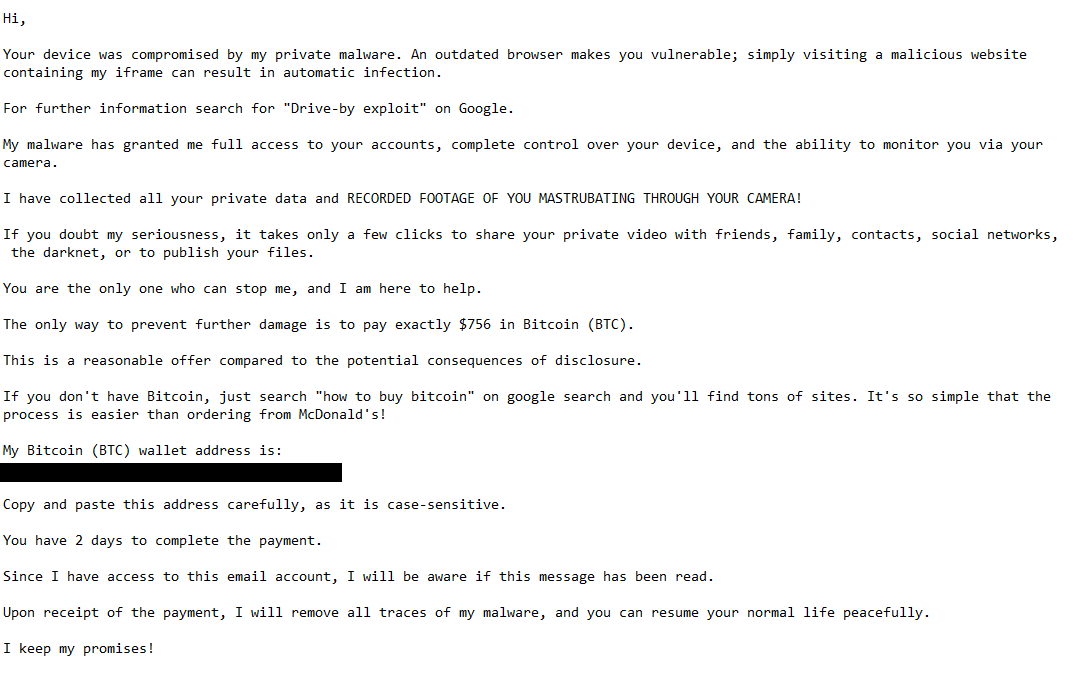
The full “Your Device Was Compromised By My Private Malware” sextortion email is below:
Subject: Hello, how are you ?
Hi,
Your device was compromised by my private malware. An outdated browser makes you vulnerable; simply visiting a malicious website containing my iframe can result in automatic infection.
For further information search for “Drive-by exploit” on Google.
My malware has granted me full access to your accounts, complete control over your device, and the ability to monitor you via your camera.
I have collected all your private data and RECORDED FOOTAGE OF YOU MASTRUBATING THROUGH YOUR CAMERA!
If you doubt my seriousness, it takes only a few clicks to share your private video with friends, family, contacts, social networks, the darknet, or to publish your files.
You are the only one who can stop me, and I am here to help.
The only way to prevent further damage is to pay exactly $756 in Bitcoin (BTC).
This is a reasonable offer compared to the potential consequences of disclosure.
If you don’t have Bitcoin, just search “how to buy bitcoin” on google search and you’ll find tons of sites. It’s so simple that the process is easier than ordering from McDonald’s!
My Bitcoin (BTC) wallet address is:
–Copy and paste this address carefully, as it is case-sensitive.
You have 2 days to complete the payment.
Since I have access to this email account, I will be aware if this message has been read.
Upon receipt of the payment, I will remove all traces of my malware, and you can resume your normal life peacefully.
I keep my promises!
How to recognize phishing and sextortion emails
Recognizing scams like the “Your Device Was Compromised By My Private Malware” email requires understanding the warning signs commonly associated with sextortion and phishing campaigns. Although these messages are designed to create panic, they often contain clear indicators that reveal their fraudulent nature.
One of the strongest warning signs is the use of fear and urgency. Sextortion scams typically threaten to expose embarrassing information or private content unless payment is made immediately. The “Your Device Was Compromised By My Private Malware” email relies almost entirely on emotional pressure to prevent recipients from thinking critically about the claims being made.
Another indicator is the demand for cryptocurrency payments. Scammers frequently request Bitcoin or other digital currencies because these transactions are difficult to recover and provide a level of anonymity. Legitimate organizations do not demand cryptocurrency in exchange for resolving alleged security incidents or preventing public exposure.
The sender’s address can also reveal signs of fraud. Many sextortion emails originate from suspicious or unrelated domains that have no connection to legitimate security companies or service providers. Some attackers even spoof the recipient’s own email address to create the illusion that the account itself has been compromised.
Technical claims inside the email should also be approached skeptically. Scammers often use exaggerated descriptions of malware capabilities, remote surveillance, or account monitoring to sound convincing. However, these claims are usually vague and unsupported by actual evidence. Genuine security incidents typically involve verifiable signs of compromise rather than broad threats and ransom demands.
Another common characteristic is the lack of personalization. Although the email may include an old password or basic personal information, the overall message is usually generic and mass-distributed. Attackers rely on the fact that many recipients will feel alarmed simply because the message references malware or personal exposure.
Recipients should also remember that data breaches are common, and exposed passwords may circulate online for years after the original incident. If an old password appears in the email, it does not necessarily mean the attacker currently controls the device. Instead, it often indicates that the information was obtained from a previously leaked database.
A safer response is to avoid replying to the email, avoid sending any payment, and ignore the threats entirely. Users concerned about account security should change passwords associated with any mentioned credentials and enable multi-factor authentication where possible. Running a legitimate antivirus or security scan can also help provide reassurance that no malware is present on the device.
Awareness remains one of the most effective defenses against sextortion scams. The “Your Device Was Compromised By My Private Malware” campaign relies on fear, embarrassment, and intimidation rather than actual technical compromise. Taking time to evaluate the message rationally and understanding how these scams operate can help prevent unnecessary panic and financial loss.
Incoming search terms:
Site Disclaimer
2-remove-virus.com is not sponsored, owned, affiliated, or linked to malware developers or distributors that are referenced in this article. The article does not promote or endorse any type of malware. We aim at providing useful information that will help computer users to detect and eliminate the unwanted malicious programs from their computers. This can be done manually by following the instructions presented in the article or automatically by implementing the suggested anti-malware tools.
The article is only meant to be used for educational purposes. If you follow the instructions given in the article, you agree to be contracted by the disclaimer. We do not guarantee that the artcile will present you with a solution that removes the malign threats completely. Malware changes constantly, which is why, in some cases, it may be difficult to clean the computer fully by using only the manual removal instructions.