The “Your Mailbox Needs Attention” phishing email is designed to trick recipients into giving away their email login details. The email claims that the recipient’s mailbox has a problem that requires immediate attention. It states that the account must be reviewed to prevent disruption or limited access. This email is not sent by a legitimate email provider, and the issue it describes does not exist.
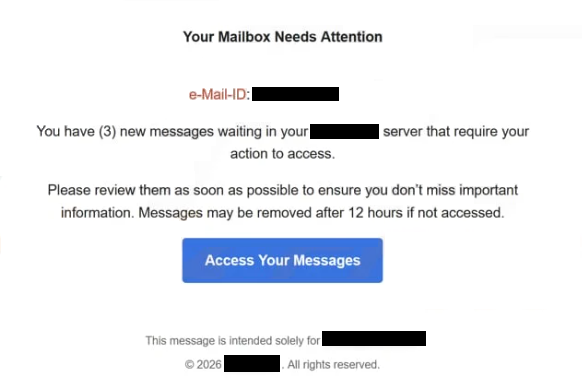
The phishing email presents the situation as a current mailbox problem. It can mention account errors, verification requirements, or security checks. These claims are fabricated. The sender has no connection to the recipient’s mailbox and cannot see its status.
The email does not contain real account information. It does not include storage figures, recent login activity, or provider-specific references that could be checked inside the mailbox. The absence of these details shows that the sender does not have access to the account.
A link is included in the phishing email and is presented as the step required to review or fix the mailbox. The text around the link pushes the recipient to act quickly. This link does not lead to the official website of an email provider. It opens a fraudulent login page.
The phishing page copies the look of a webmail sign-in screen. It asks for the email address and password. Entering these details does not review or repair the mailbox. The credentials are captured by scammers.
After login details are submitted, the phishing page can display a statement claiming the mailbox has been checked or updated. This statement is only part of the scam. It is not connected to any real email system, and no change is made to the account.
If scammers obtain access to an email account, they can read stored emails and collect personal information. They can search for financial records, invoices, or account data. They can also send phishing emails from the compromised account. Emails coming from a real account are more likely to be trusted.
Control of a mailbox also allows password resets for many online services. Access to the inbox can lead to further account takeovers involving shopping, social media, or financial accounts linked to that email address.
Email providers do not fix mailbox problems by asking users to enter passwords on pages reached through unsolicited emails. Real account issues are shown after signing in through the official website or app.
The full “Your Mailbox Needs Attention” phishing email is below:
Subject:
Your Mailbox Needs Attention
e-Mail-ID: –
You have (3) new messages waiting in your – server that require your action to access.
Please review them as soon as possible to ensure you don’t miss important information. Messages may be removed after 12 hours if not accessed.
Access Your Messages
This message is intended solely for –
© 2026 – . All rights reserved.
Signs of a phishing email
The “Your Mailbox Needs Attention” phishing email is sent in bulk to many recipients. The sender does not check whether the recipient has a mailbox problem. The same phishing email is used for different people and different email services.
The sender address is a strong warning sign. The display name may sound related to support or administration, but the sending domain is not owned by a real provider. Checking the full sender address reveals it comes from an unrelated domain.
The phishing email stays vague. It does not provide exact mailbox data or technical details that can be confirmed inside the account. Legitimate emails from providers include information that matches the user’s account. This phishing email cannot provide that.
The link inside the phishing email leads to a domain that does not belong to the recipient’s email provider. Even if the page looks like a real login screen, the web address shows it is fraudulent. Any login page opened through an unexpected email should be treated as unsafe.
The phishing email pushes urgency. It warns about possible disruption if action is not taken. Real providers do not pressure users to submit passwords through emailed links.
The phishing email also avoids directing users to sign in through the official website on their own. It focuses only on the embedded link. Legitimate providers allow users to check their account status by logging in normally.
The “Your Mailbox Needs Attention” phishing email relies on the fear of losing email access. Verifying sender domains, avoiding login through email links, and signing in only through the official provider website are reliable ways to avoid this phishing scam.
Site Disclaimer
2-remove-virus.com is not sponsored, owned, affiliated, or linked to malware developers or distributors that are referenced in this article. The article does not promote or endorse any type of malware. We aim at providing useful information that will help computer users to detect and eliminate the unwanted malicious programs from their computers. This can be done manually by following the instructions presented in the article or automatically by implementing the suggested anti-malware tools.
The article is only meant to be used for educational purposes. If you follow the instructions given in the article, you agree to be contracted by the disclaimer. We do not guarantee that the artcile will present you with a solution that removes the malign threats completely. Malware changes constantly, which is why, in some cases, it may be difficult to clean the computer fully by using only the manual removal instructions.