The “Your Mailbox Quota Is Nearly Exhausted” phishing email claims that the recipient’s email storage is close to full and that incoming messages may soon stop arriving. It presents the situation as a routine capacity issue rather than a security problem. The email suggests that the mailbox needs to be updated, expanded, or revalidated to continue receiving emails. However, the contents of the email are completely false.
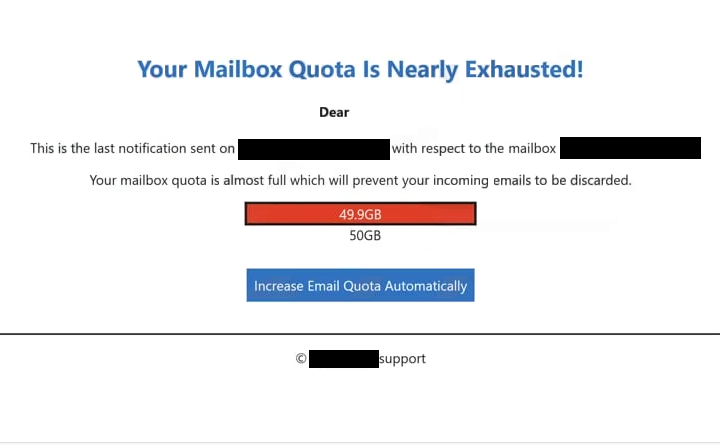
The message often includes a storage figure to make the claim appear realistic. It may state that the mailbox has reached a high usage level and that new emails will be blocked once the limit is exceeded. However, it does not show actual mailbox data, such as folders, message sizes, or account-specific usage details.
A link is provided as the solution. It is presented as a way to increase storage or restore normal mailbox function. Clicking it leads to a page that imitates a webmail login or upgrade screen. The page may include a short notice about mailbox capacity and ask the user to sign in to continue.
The page does not display any real mailbox information. There is no storage overview, no list of emails, and no account settings. The only available action is entering login credentials. This step is described as necessary to confirm the account or apply the upgrade.
Once the credentials are entered, they are sent to the scammers. The page may then reload, show a confirmation message, or redirect to a legitimate login page. This behavior is intended to make the process appear successful, even though no storage change has occurred.
The quota warning is not based on real account data. There is no issue with the mailbox, and no upgrade is required. The message is designed to create a practical problem that encourages the user to follow the link without verifying it.
If attackers obtain valid login details, they can attempt to access the email account. This may expose stored messages, attachments, and contacts. Email accounts are often linked to other services, which means access can be used to reset passwords and reach additional accounts.
How to recognize phishing emails like “Your Mailbox Quota Is Nearly Exhausted”
Phishing emails that use storage warnings such as “Your Mailbox Quota Is Nearly Exhausted” can be identified by how they present the issue. One of the main signs is the absence of verifiable data. The email claims that storage is nearly full, but does not provide detailed information about mailbox usage that can be checked.
The link included in the email is another important indicator. Instead of directing users to access their mailbox through the official website, the email provides a direct link to a login or upgrade page. This page is hosted on a domain that does not belong to the actual email provider.
The sender address should also be examined. While the display name may appear to represent a mail service or administrator, the actual email address often comes from a different domain. This mismatch indicates that the email is not legitimate.
Another sign is the general wording used in the email. It does not include the recipient’s name or account-specific details. Legitimate service notifications usually include identifying information that confirms the message is genuine.
The message also encourages immediate action by suggesting that email delivery will be interrupted. This creates pressure to respond quickly without verifying the source of the email.
Recognizing these patterns helps identify phishing emails before interacting with them. Emails that combine vague storage warnings, external login links, and inconsistent sender details should be treated with caution.
Site Disclaimer
2-remove-virus.com is not sponsored, owned, affiliated, or linked to malware developers or distributors that are referenced in this article. The article does not promote or endorse any type of malware. We aim at providing useful information that will help computer users to detect and eliminate the unwanted malicious programs from their computers. This can be done manually by following the instructions presented in the article or automatically by implementing the suggested anti-malware tools.
The article is only meant to be used for educational purposes. If you follow the instructions given in the article, you agree to be contracted by the disclaimer. We do not guarantee that the artcile will present you with a solution that removes the malign threats completely. Malware changes constantly, which is why, in some cases, it may be difficult to clean the computer fully by using only the manual removal instructions.