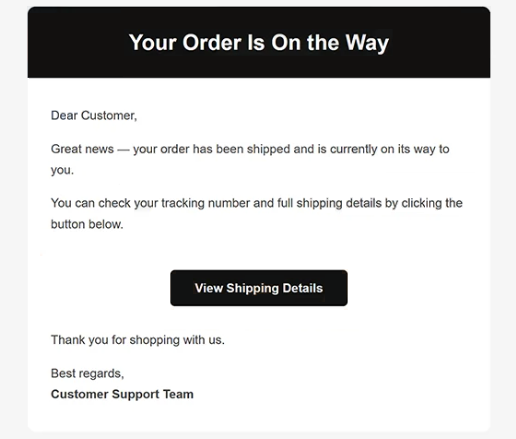
The Your Order Is On The Way email virus is a malware distribution campaign disguised as a shipment confirmation notification. The email informs recipients that a package has been shipped and instructs them to check delivery information through a provided hyperlink. The campaign uses fake shipping details to lure users into downloading remote access malware onto their systems.
The email redirects recipients to increminder.com, a malicious website used as part of the infection chain. The page presents a download disguised as shipment-related information connected to the alleged order. Visitors are instructed to download the file in order to access delivery details or tracking data.
The downloaded file is named ScreenConnect.ClientSetup.msi. Instead of containing legitimate shipment information, the installer deploys a trojanized version of ScreenConnect. ScreenConnect is a real remote administration application frequently used for technical support and remote management. In this campaign, however, the software is abused to provide attackers with unauthorized remote access to infected systems.
Once installed, the malware allows cybercriminals to interact with the compromised device remotely. Attackers may browse files, monitor activity, steal stored credentials, deploy additional malware, or manipulate the system directly. Because the infection grants remote control capabilities, attackers can effectively operate the device without the user’s knowledge.
The Your Order Is On The Way email virus avoids using dramatic scare tactics commonly associated with phishing campaigns. Instead of threatening account suspension or financial loss, the message imitates a routine shipping notification that blends naturally with legitimate delivery emails users receive every day. This familiarity makes the campaign more convincing because recipients may interact with the shipment notice automatically without carefully reviewing the sender or destination.
The infection process itself is structured to appear believable. The email first establishes trust through a shipment notification. The malicious page on increminder.com then reinforces that trust by presenting the download as package-related information rather than malware. Finally, the installer file uses a name that resembles legitimate software instead of an obviously suspicious executable.
Another important aspect of the Your Order Is On The Way email virus is the misuse of legitimate software. Since ScreenConnect is widely recognized as a real remote management platform, some users may not immediately recognize the installation as dangerous. This allows attackers to hide malicious activity behind software that appears authentic and professionally developed.
Anyone who downloaded or executed ScreenConnect.ClientSetup.msi should treat the system as potentially compromised. Remote access malware can expose personal files, stored passwords, browser data, financial information, and workplace credentials. Devices affected by the malware should be disconnected from networks, scanned with reputable security software, and reviewed for unauthorized activity. Passwords connected to sensitive accounts should also be changed using a separate, clean device.
The full “Your Order Is On The Way” malicious email is below:
Subject: Delivery update: order #[145133] dispatched – Ref: #F88410
Dear Customer,
Great news — your order has been shipped and is currently on its way to you.
You can check your tracking number and full shipping details by clicking the button below.
[View Shipping Details]
Thank you for shopping with us.
Best regards,
Customer Support Team
How to recognize malicious emails
Emails connected to malware campaigns like the Your Order Is On The Way email virus often appear convincing because they imitate familiar services and routine online activity. Shipment notifications are especially effective because many users regularly receive delivery updates from retailers and couriers.
One important warning sign is receiving a shipment confirmation for an order that was never placed. Attackers rely on curiosity and routine behavior, hoping recipients will assume the message relates to a forgotten or recent purchase. Unexpected delivery notifications should always be approached carefully, particularly when no matching order exists.
The destination website is another critical indicator. In this campaign, the email redirects users to increminder.com, not to a legitimate retailer or recognized shipping company. Before interacting with links inside emails, users should inspect the domain carefully to determine whether it belongs to the expected service.
Another major warning sign is the request to download installer files connected to shipment tracking. Legitimate delivery companies provide tracking information directly through their official websites and do not require users to install MSI packages or remote administration software to review delivery details. The presence of a file named ScreenConnect.ClientSetup.msi should immediately raise suspicion because shipment notifications do not normally distribute remote management installers.
The sender’s address can also reveal signs of fraud. Phishing campaigns frequently use unrelated domains, random addresses, or names that imitate support departments without belonging to legitimate organizations. Even when the sender’s name appears professional, the actual address may indicate that the email did not originate from a trusted source.
Another warning sign is vague shipment information. The Your Order Is On The Way email virus relies on generic references to package tracking and delivery updates instead of providing detailed order information associated with legitimate purchases. Many malicious shipment emails intentionally avoid including specific product names or retailer information because they are distributed broadly to many recipients at once.
Users should also be cautious of any email encouraging immediate downloads. Malware campaigns frequently disguise harmful files as invoices, shipping documents, order confirmations, or tracking reports. Opening these files may infect the system or expose users to additional malicious activity.
The safest response to suspicious shipment notifications is to avoid using the links provided inside the email entirely. Package tracking should instead be verified directly through the retailer’s or courier’s official website using manually entered addresses or trusted bookmarks.
Incoming search terms:
Site Disclaimer
2-remove-virus.com is not sponsored, owned, affiliated, or linked to malware developers or distributors that are referenced in this article. The article does not promote or endorse any type of malware. We aim at providing useful information that will help computer users to detect and eliminate the unwanted malicious programs from their computers. This can be done manually by following the instructions presented in the article or automatically by implementing the suggested anti-malware tools.
The article is only meant to be used for educational purposes. If you follow the instructions given in the article, you agree to be contracted by the disclaimer. We do not guarantee that the artcile will present you with a solution that removes the malign threats completely. Malware changes constantly, which is why, in some cases, it may be difficult to clean the computer fully by using only the manual removal instructions.