The “Zoho – 2 new messages in your inbox” scam leads users to a fake mailbox screen that appears to show unread emails. The page is designed to look like a Zoho Mail inbox, but it does not function as a real email interface. It may display two message entries or a blurred preview of an inbox to create the impression that new emails are waiting. However, none of the content is accessible.
Instead of opening messages, the page blocks access and asks the user to sign in. A login form is presented with fields for an email address and a password. This step is framed as necessary to view the messages. The page does not retrieve any real emails. Its only purpose is to collect login credentials for malicious purposes.
After credentials are entered, the page does not display the promised messages. It may refresh, show an error, or redirect to a legitimate Zoho login page. This behavior is intended to make the interaction appear normal. In reality, the entered information has already been sent to the scammers.
Access to a Zoho account by malicious actors can expose sensitive data. Email accounts often contain business communication, attachments, contact lists, and service-related notifications. If attackers gain control of the account, they may read stored emails, extract information, or send emails that appear to come from the victim. The account can also be used to reset passwords for other services connected to the same email address.
The fake inbox page is reached through a phishing email that claims new messages have been received. The two messages mentioned in the alert do not exist. The entire setup is intended to convince the user to log in on a page that is not connected to Zoho.
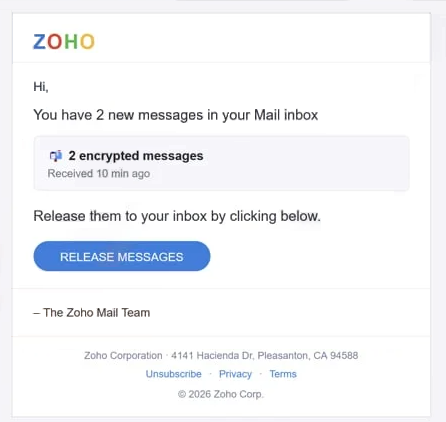
The full “Zoho – 2 new messages in your inbox” phishing scam is below:
Subject: Emails on Hold
ZOHO
Hi,
You have 2 new messages in your Mail inbox
2 encrypted messages
Received 10 min ago
Release them to your inbox by clicking below.
RELEASE MESSAGES– The Zoho Mail Team
Zoho Corporation · 4141 Hacienda Dr, Pleasanton, CA 94588
Unsubscribe · Privacy · Terms
© 2026 Zoho Corp.
How the “Zoho – 2 new messages in your inbox” email operates
The email used in the “Zoho – 2 new messages in your inbox” scam is minimal and direct. It informs the recipient that two new messages have arrived and provides a link to view them. The message does not include sender names, subject lines, or any preview of the supposed emails. This lack of detail is a key trait of the scam.
The link is presented as a shortcut to the inbox. It may appear as a button or simple text directing the user to open messages. When clicked, it leads to a web page that imitates a Zoho Mail interface. The domain used for this page is not related to Zoho, even though the layout may look similar.
Another detail is how the email is addressed. It may use a generic greeting or no greeting at all. Legitimate email notifications typically include identifiable information or allow users to access their inbox through the official Zoho website.
The sender address is also inconsistent with Zoho’s official domain. While the display name may suggest a Zoho notification, the actual email address often belongs to an unrelated domain.
The message relies on curiosity rather than urgency. It encourages the recipient to click the link to check what the messages contain. Because no information is provided about the emails, the user must follow the link to find out. This approach increases the likelihood of interaction.
The combination of a vague message notification, a link leading to a non-Zoho domain, and a login form that does not provide access to real emails defines the “Zoho – 2 new messages in your inbox” scam.
Site Disclaimer
2-remove-virus.com is not sponsored, owned, affiliated, or linked to malware developers or distributors that are referenced in this article. The article does not promote or endorse any type of malware. We aim at providing useful information that will help computer users to detect and eliminate the unwanted malicious programs from their computers. This can be done manually by following the instructions presented in the article or automatically by implementing the suggested anti-malware tools.
The article is only meant to be used for educational purposes. If you follow the instructions given in the article, you agree to be contracted by the disclaimer. We do not guarantee that the artcile will present you with a solution that removes the malign threats completely. Malware changes constantly, which is why, in some cases, it may be difficult to clean the computer fully by using only the manual removal instructions.