The “Zoho Account Security Verification” scam is a phishing email that pretends to be an official notice about account protection. It typically claims that unusual activity, a login issue, or a security check requires the recipient to verify their account. The message is designed to appear routine and trustworthy, even though it is not related to any real Zoho service.
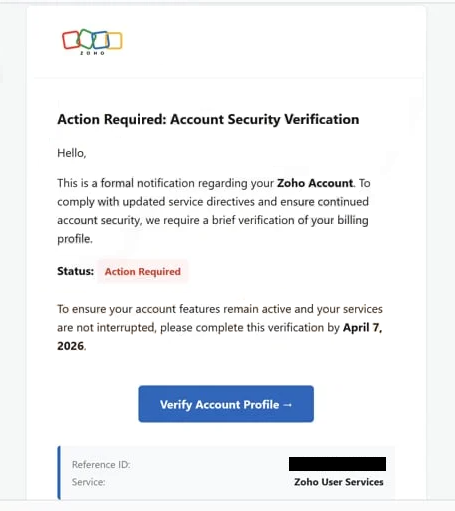
Instead of providing clear details about the supposed issue, the email focuses on directing the recipient to act quickly. It includes a link that leads to a fake verification page. This page is made to resemble a Zoho login or security portal, but it does not display any real account information or activity.
The purpose of this page is to collect login credentials. Users are asked to enter their email address and password under the impression that they are confirming their account. In reality, the information is sent directly to scammers. No verification takes place, and the account is not being checked or secured.
After submitting the details, the page may show a confirmation message or redirect to a legitimate Zoho page. This step is used to make the process seem normal and complete. However, the only outcome is that the login credentials have been exposed.
The warning about account security is not based on real activity. Phishing emails often use the name of legitimate services like Zoho to create trust and trick users into sharing sensitive information. These scams are not associated with the actual company.
If attackers obtain valid credentials, they can attempt to access the account and any connected services. This may expose emails, stored data, and contact information. In some cases, access to one account can be used to reset passwords for others.
The full “Zoho Account Security Verification” phishing email is below:
Subject: [Zoho Service] Verification Required: Reference ID –
Zoho
Action Required: Account Security VerificationHello,
This is a formal notification regarding your Zoho Account. To comply with updated service directives and ensure continued account security, we require a brief verification of your billing profile.
Status: Action Required
To ensure your account features remain active and your services are not interrupted, please complete this verification by April 7, 2026.
Verify Account Profile →
Reference ID: –
Service: Zoho User ServicesRegards,
The Zoho Accounts & Compliance Team
Zoho Corp. 4141 Hacienda Drive, Pleasanton, CA 94588
This is an automated mandatory service communication.
© 2026 Zoho Corp. | Privacy Policy | Terms of Service
How to recognize phishing emails like “Zoho Account Security Verification”
Phishing emails that use themes like “Zoho Account Security Verification” can be identified by several common characteristics. One of the most important signs is the lack of specific details. The email may mention a security issue, but it does not provide information such as login time, device, or location that can be verified.
Another key indicator is the request to confirm account details through a link. Legitimate services do not ask users to provide passwords or sensitive information via email links. In fact, official guidance states that Zoho will not request such information through email.
The sender address can also reveal inconsistencies. While the display name may appear to represent Zoho, the actual email address often comes from a different or unrelated domain. This mismatch is a strong indication that the email is not genuine.
Phishing emails are usually written in a general format. They often do not include the recipient’s name or account-specific details, making them easy to send to a large number of people. This lack of personalization is another warning sign.
The wording is intended to prompt quick action. By suggesting that account access may be restricted or that security is at risk, the email encourages the recipient to act without verifying the source. This sense of urgency is a common tactic used in phishing attacks.
Recognizing these patterns makes it easier to identify phishing emails and avoid interacting with them. Emails that request account verification through external links, especially without clear and verifiable details, should always be treated with caution.
Site Disclaimer
2-remove-virus.com is not sponsored, owned, affiliated, or linked to malware developers or distributors that are referenced in this article. The article does not promote or endorse any type of malware. We aim at providing useful information that will help computer users to detect and eliminate the unwanted malicious programs from their computers. This can be done manually by following the instructions presented in the article or automatically by implementing the suggested anti-malware tools.
The article is only meant to be used for educational purposes. If you follow the instructions given in the article, you agree to be contracted by the disclaimer. We do not guarantee that the artcile will present you with a solution that removes the malign threats completely. Malware changes constantly, which is why, in some cases, it may be difficult to clean the computer fully by using only the manual removal instructions.