The “Zoho File Shared With You” phishing email is built around a fake document access page that appears after the recipient clicks a link. The email claims that someone has shared a file through Zoho and invites the recipient to open it. Instead of showing a real document, the link leads to a page that asks the user to sign in before viewing the file.
This page is not connected to Zoho. It is designed to look like a document preview screen with a prompt to log in. It may display a file name, a blurred preview, or a short message suggesting that access is restricted until the user signs in. However, there is no actual file behind it.
The only working part of the page is the login form. It requests an email address and password, presenting this step as necessary to view the shared content. Once the details are entered, they are sent directly to the scammers. The page may then reload or redirect to a legitimate Zoho login page to make the process appear normal.
No document is ever displayed because none exists. The file sharing claim is used only to guide the user to the login form. The entire process is focused on collecting account credentials.
If the captured credentials are valid, attackers can attempt to access the real email account. This can expose stored messages, attachments, and contact lists. Email accounts are also commonly used to reset passwords for other services, which means access can lead to further account compromise.
The file sharing notification is not based on any real activity. It is a generic email sent to many recipients, relying on curiosity to prompt interaction.
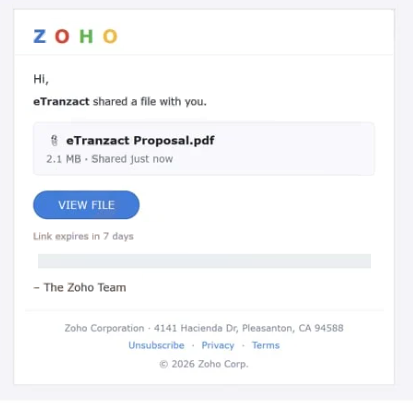
The full “Zoho – File Shared With You” phishing email is below:
Subject: A document was shared with you
Z O H O
Hi,
eTranzact shared a file with you.
eTranzact Proposal.pdf
2.1 MB · Shared just now
VIEW FILELink expires in 7 days
– The Zoho Team
Zoho Corporation · 4141 Hacienda Dr, Pleasanton, CA 94588
Unsubscribe · Privacy · Terms
© 2026 Zoho Corp.
How to recognize phishing emails like “Zoho File Shared With You”
Emails such as “Zoho File Shared With You” can be identified by how they present shared content without providing real details. The email usually does not include a clear description of the file, such as its full name, size, or context. Legitimate file-sharing notifications often include recognizable information about the document or the sender.
The link included in the email is another important sign. Instead of directing users to the official Zoho website, the email provides a direct link to a page that imitates a document preview. The domain used for this page does not match Zoho’s official domain.
The sender’s address should also be checked carefully. While the display name may appear to represent Zoho or a known contact, the actual email address often comes from an unrelated domain. This mismatch indicates that the email is not genuine.
Another detail is the lack of personalization. The email may not include the recipient’s name or any context about why the file was shared. It is written in a general way so it can be sent to many people.
The message relies on curiosity rather than urgency. It suggests that a file is waiting to be opened, encouraging the recipient to click the link to see what it contains. This approach increases the chance of interaction without raising immediate suspicion.
Site Disclaimer
2-remove-virus.com is not sponsored, owned, affiliated, or linked to malware developers or distributors that are referenced in this article. The article does not promote or endorse any type of malware. We aim at providing useful information that will help computer users to detect and eliminate the unwanted malicious programs from their computers. This can be done manually by following the instructions presented in the article or automatically by implementing the suggested anti-malware tools.
The article is only meant to be used for educational purposes. If you follow the instructions given in the article, you agree to be contracted by the disclaimer. We do not guarantee that the artcile will present you with a solution that removes the malign threats completely. Malware changes constantly, which is why, in some cases, it may be difficult to clean the computer fully by using only the manual removal instructions.