The “Zoho Mail Upgrade 2.0” email scam is a phishing email that claims the recipient’s Zoho Mail account must be upgraded to a new version called “Zoho Mail Upgrade 2.0.” The message presents this upgrade as a required step to keep the mailbox active and fully functional. The email is not sent by Zoho and is not connected to any real Zoho Mail upgrade.
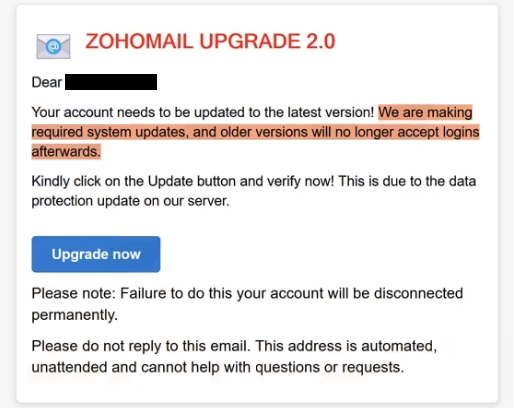
The email states that Zoho Mail is moving to “Zoho Mail Upgrade 2.0” and that all users must confirm their accounts as part of this change. It explains that mailboxes that are not upgraded will experience service interruptions, limited features, or deactivation. These statements are presented as official policy, but they are false.
The message does not provide account specific details. It does not include the recipient’s Zoho plan name, storage usage, admin notices, or recent account activity. It simply states that the upgrade is required. This is because the sender does not have access to real Zoho account information.
The email instructs the recipient to complete the “Zoho Mail Upgrade 2.0” by clicking a link. The link is presented as the official upgrade page. The email does not direct the user to sign in through the normal Zoho website or to check updates from inside the Zoho Mail interface. All action is pushed through the embedded link.
Clicking the link opens a phishing page that imitates a Zoho Mail login screen. The page asks the recipient to enter their Zoho Mail address and password to continue with “Zoho Mail Upgrade 2.0.” Entering this information does not upgrade the mailbox. The credentials are captured by scammers.
After credentials are entered, the page may display a message stating that the upgrade is complete or that the mailbox has been successfully moved to the new version. This message is only visual feedback. No upgrade takes place, and no connection to Zoho systems is made.
The “Zoho Mail Upgrade 2.0” email scam does not involve real software changes, migrations, or account improvements. Zoho does not upgrade accounts by sending emails that ask for passwords on external pages. Real upgrades and changes are announced inside the authenticated Zoho environment or through official domains.
If scammers obtain valid Zoho credentials, they can attempt to sign in to the real mailbox. Access allows them to read stored emails, download attachments, and search for sensitive information. They can also request password resets for other services connected to that email address.
A compromised Zoho mailbox can be used to send additional phishing emails. Messages sent from a real account appear more credible to recipients. This allows scammers to continue targeting other people using the victim’s identity.
The “Zoho Mail Upgrade 2.0” email scam relies on the idea that email services evolve and require updates. This makes the claim sound believable. However, Zoho does not require users to confirm upgrades by submitting passwords through emailed links.
The full “Zoho Mail Upgrade 2.0” phishing email is below:
Subject: Complete Action: UPGRADE 2.0 nOW
ZOHOMAIL UPGRADE 2.0
Dear -,
Your account needs to be updated to the latest version! We are making required system updates, and older versions will no longer accept logins afterwards.
Kindly click on the Update button and verify now! This is due to the data protection update on our server.
Upgrade now
Please note: Failure to do this your account will be disconnected permanently.
Please do not reply to this email. This address is automated, unattended and cannot help with questions or requests.
How the “Zoho Mail Upgrade 2.0” email scam is distributed
The “Zoho Mail Upgrade 2.0” email scam is sent through bulk phishing campaigns. The same message is delivered to many addresses without confirming whether the recipient uses Zoho Mail. The message is written to apply to any user.
The sender name may reference Zoho or a mail team, but the sending address does not belong to Zoho. The domain used to send the message is unrelated to official Zoho domains. Checking the full sender address reveals this mismatch.
The email content does not include verifiable Zoho details. There are no admin announcements, tenant information, or service dashboard references. Legitimate Zoho communications include context tied to real accounts.
The link in the email leads to a domain that is not owned by Zoho. Even if the page looks similar to Zoho Mail, the web address shows it is unrelated. Any page asking for credentials for “Zoho Mail Upgrade 2.0” outside the official Zoho domain is fraudulent.
The email also provides no alternative way to confirm the upgrade. It does not suggest checking the Zoho dashboard, signing in normally, or reviewing notifications inside the account. The only path offered is clicking the link and entering credentials.
The “Zoho Mail Upgrade 2.0” email scam uses a false version upgrade to steal login details. Reviewing sender domains, avoiding embedded login links, and accessing Zoho Mail only through the official website are effective ways to avoid this scam.
Site Disclaimer
2-remove-virus.com is not sponsored, owned, affiliated, or linked to malware developers or distributors that are referenced in this article. The article does not promote or endorse any type of malware. We aim at providing useful information that will help computer users to detect and eliminate the unwanted malicious programs from their computers. This can be done manually by following the instructions presented in the article or automatically by implementing the suggested anti-malware tools.
The article is only meant to be used for educational purposes. If you follow the instructions given in the article, you agree to be contracted by the disclaimer. We do not guarantee that the artcile will present you with a solution that removes the malign threats completely. Malware changes constantly, which is why, in some cases, it may be difficult to clean the computer fully by using only the manual removal instructions.