The “Zoho Workspace Password Expired” phishing email impersonates Zoho Workspace and falsely warns recipients that their mailbox password has expired. Its purpose is to convince Zoho users to enter their account credentials on a fake login page controlled by scammers.
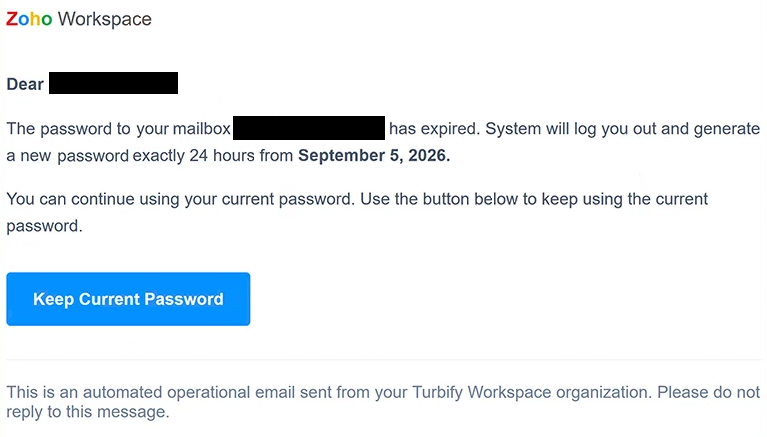
The subject says “Protect Your Account:” followed by the recipient’s email address. The email is presented as a Zoho Workspace notification and addresses the recipient directly before claiming that the password for their mailbox is no longer valid.
According to the warning, the system will automatically sign the user out and generate a new password exactly 24 hours after September 5, 2026. The email then offers a way to prevent this from happening. It says recipients can continue using their existing password if they confirm that choice before the deadline.
To supposedly retain the existing password, recipients are told to select “Keep Current Password.” This does not change any Zoho account settings. It opens a phishing website designed to look like the real Zoho Accounts login portal.
The fake site copies Zoho branding and includes several third-party sign-in options to make the page appear more convincing. Anyone who enters their Zoho credentials there gives the information directly to the scammers. The password is not being renewed, confirmed, or protected.
There are also inconsistencies within the email itself. Although the main content presents the warning as a Zoho Workspace notification, the footer says it is an automated operational email from the recipient’s “Turbify Workspace organization.” Turbify is a separate web hosting service and has no connection to Zoho. The email is also sent from an address associated with an unrelated service.
Zoho Corporation is not involved in this phishing attempt. Its name and branding are being misused to make the password-expiration claim appear legitimate.
A compromised Zoho account could expose emails and other information available through the account. Scammers may search the mailbox for sensitive data or use the account to impersonate its owner when contacting colleagues, customers, friends, or other contacts.
Access to the mailbox can also help attackers target accounts connected to the same email address. Password-reset emails and other account recovery information may allow them to attempt unauthorized access to additional services.
The full “Zoho Workspace – Protect Your Account” phishing email is below:
Subject: Protect Your Account:-
Zoho Workspace
Dear -,
The password to your mailbox – has expired. System will log you out and generate a new password exactly 24 hours from September 5, 2026.
You can continue using your current password. Use the button below to keep using the current password.
[Keep Current Password]
This is an automated operational email sent from your Turbify Workspace organization. Please do not reply to this message.
How to recognize the “Zoho Workspace Password Expired” phishing email
The password-expiration warning is designed to create a simple choice: confirm the current password now or lose access to it within 24 hours. This artificial deadline gives recipients little time to question why Zoho would suddenly replace their password automatically.
The contradiction between Zoho Workspace and Turbify Workspace is one of the clearest problems with the email. A genuine Zoho account notification would not identify itself in the footer as coming from an unrelated hosting product. The sender address also does not correspond with the service the email claims to represent.
Recipients should also be suspicious of the request to “Keep Current Password” through a link in an unexpected email. There is no reason to submit an existing password to an unfamiliar website simply to continue using it. Password and security settings should be managed from within the actual account.
The phishing page may look similar to Zoho’s real sign-in portal, but copied logos and familiar login options do not prove that it belongs to Zoho. Scammers can reproduce these visual elements while sending any credentials entered into the form to their own systems.
Anyone concerned that a Zoho password has expired should open Zoho independently and sign in through the legitimate service. If a password change or another security action is genuinely required, the account itself should provide the relevant information.
Receiving or reading the “Zoho Workspace Password Expired” phishing email does not compromise the Zoho account. The main risk occurs when the recipient follows the supplied instructions and enters login credentials on the fake page.
Site Disclaimer
2-remove-virus.com is not sponsored, owned, affiliated, or linked to malware developers or distributors that are referenced in this article. The article does not promote or endorse any type of malware. We aim at providing useful information that will help computer users to detect and eliminate the unwanted malicious programs from their computers. This can be done manually by following the instructions presented in the article or automatically by implementing the suggested anti-malware tools.
The article is only meant to be used for educational purposes. If you follow the instructions given in the article, you agree to be contracted by the disclaimer. We do not guarantee that the artcile will present you with a solution that removes the malign threats completely. Malware changes constantly, which is why, in some cases, it may be difficult to clean the computer fully by using only the manual removal instructions.