

The “Account Security Notification” phishing email claims that a recent security check found an issue with the recipient’s account. It may suggest that access has been limited, that unusual activity was detected, or that the account needs to be reviewed to remain active. The email presents this as a routine security process, even though no real check has taken place.
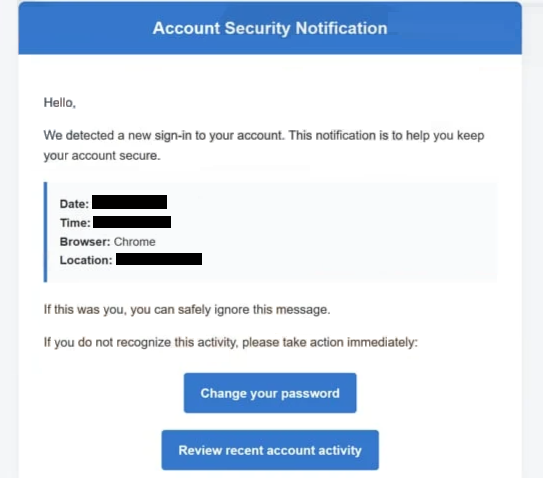
Instead of providing details about what triggered the alert, the email moves directly to a required action. It instructs the recipient to confirm their account through a link. The explanation is kept broad, with no clear reference to specific activity, devices, or login attempts. This makes the alert difficult to verify.
The link leads to a page that imitates a login or account verification screen. It may look similar to a known service, but it does not display real account information. There is no dashboard, no list of security events, and no settings to review. The only available option is to enter login credentials.
Submitting those details does not complete any verification. The information is sent to the scammers, and the page may then show a generic confirmation or redirect to a legitimate site. This sequence is meant to make the process appear normal while the credentials have already been collected.
The alert itself is not based on real account activity. It is a generic warning used to prompt interaction. The email is sent to many recipients, relying on the chance that some will respond without checking the source.
If attackers gain access to the account, they can review stored data, change settings, or use the account for further activity. In cases where the account is connected to other services, access can extend beyond a single platform.
How to recognize phishing emails like “Account Security Notification”
Phishing emails, such as “Account Security Notification”, can be identified by the way they present security issues without clear details. The email refers to a problem, but does not include information that allows the recipient to confirm it. Legitimate security notifications usually provide specific data about the event.
The link included in the email is another important sign. Instead of directing users to log in through the official website, the email provides a direct link to a login page. This page is hosted on a domain that does not belong to the real service.
The sender’s address should also be checked carefully. While the display name may appear to represent a support or security team, the actual email address often comes from a different domain. This mismatch indicates that the email is not genuine.
Another indicator is the lack of personalization. Phishing emails are usually written in a general way so they can be sent to many recipients. They do not include names or account-specific details that would confirm the message is legitimate.
The wording is designed to prompt quick action. By mentioning a security issue, the email creates concern and encourages the recipient to follow the link without verifying it.
Recognizing these patterns helps identify phishing emails before interacting with them. Emails that combine vague security alerts, external login links, and inconsistent sender details should be treated with caution.
Site Disclaimer
2-remove-virus.com is not sponsored, owned, affiliated, or linked to malware developers or distributors that are referenced in this article. The article does not promote or endorse any type of malware. We aim at providing useful information that will help computer users to detect and eliminate the unwanted malicious programs from their computers. This can be done manually by following the instructions presented in the article or automatically by implementing the suggested anti-malware tools.
The article is only meant to be used for educational purposes. If you follow the instructions given in the article, you agree to be contracted by the disclaimer. We do not guarantee that the artcile will present you with a solution that removes the malign threats completely. Malware changes constantly, which is why, in some cases, it may be difficult to clean the computer fully by using only the manual removal instructions.