

The “Account Security Update” email scam is a phishing attack that aims to collect account credentials by impersonating routine security maintenance notices. The email claims that an account requires a security update in order to remain protected or accessible. The message is written to sound administrative rather than alarming, which helps it blend in with legitimate account communications.
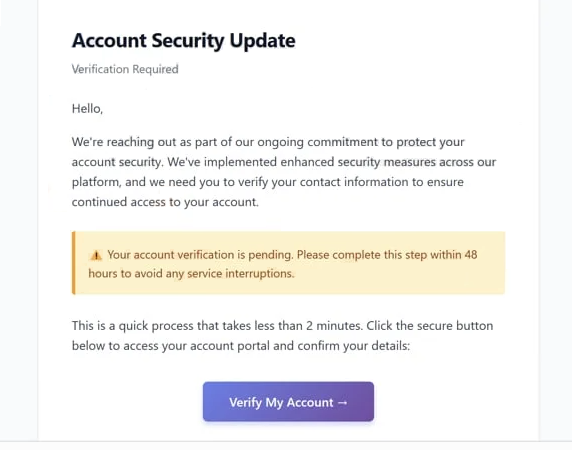
The email presents itself as an official notification from a service provider. It states that changes to security settings or internal policies require confirmation. No specific incident is described. The message does not explain what triggered the update, which features are affected, or when the change was implemented. This lack of detail is intentional and prevents recipients from verifying the claim through memory or account activity.
A link included in the email invites the recipient to complete the update. Clicking the link redirects the user to a phishing website rather than an official account page. The fraudulent site imitates a login or security confirmation screen using familiar layouts, generic branding elements, and sign-in forms that resemble those of legitimate services.
The phishing page requests the recipient’s account credentials, specifically the email address and password. Some versions also request contact details or secondary verification information under the explanation that it is required to finalise the update. Any information entered into these fields is transmitted to the attackers.
After the data is submitted, the page may display a message stating that the update has been completed or redirect the user elsewhere. This behaviour is meant to make the interaction appear routine and successful. No real security update occurs, and the legitimate account remains unchanged.
With access to the stolen credentials, attackers can sign in to the victim’s account, review private information, and modify security settings. Because email addresses are often used for account recovery, attackers may attempt to reset passwords on additional services linked to the same address. This allows a single phishing email to result in multiple account compromises.
The “Account Security Update” scam does not involve attachments or malicious downloads. It relies entirely on impersonation and timing. Security updates are common, and users are accustomed to responding to them. The attackers exploit this familiarity while bypassing the safeguards used by real service providers.
The email is sent to a wide audience. The attackers do not verify whether the recipient actually uses the impersonated service. The message is deliberately broad, allowing recipients to associate it with any account they manage.
The full “Account Security Update” phishing email is below:
Subject: Confirm Your Email : –
Security Verification
Account Security UpdateVerification Required
Hello,
We’re reaching out as part of our ongoing commitment to protect your account security. We’ve implemented enhanced security measures across our platform, and we need you to verify your contact information to ensure continued access to your account.
Your account verification is pending. Please complete this step within 48 hours to avoid any service interruptions.
This is a quick process that takes less than 2 minutes. Click the secure button below to access your account portal and confirm your details:
Verify My Account
How to recognise phishing emails claiming account security updates
Recognising phishing emails like “Account Security Update” requires examining how the message requests action rather than trusting its appearance. One of the clearest indicators is vagueness. The email claims that a security update is required, but does not describe what is being updated or why.
Another warning sign is the instruction to complete the update through an embedded link. Legitimate providers do not ask users to enter credentials through links sent in unsolicited emails. Security updates are completed after signing in through official websites or applications that users access independently.
The sender’s information should be reviewed carefully. While the display name may appear legitimate, the actual sender address often belongs to an unrelated domain. Minor differences in domain structure or spelling can indicate impersonation.
The destination of the link provides further evidence. Hovering over the link may reveal a domain that does not match the official service domain. Phishing sites often use unrelated or misleading domains. The presence of HTTPS or a lock icon does not guarantee authenticity.
Phishing emails linked to this scam also lack personalisation. They do not address the recipient by name or reference specific account details. Authentic security notifications usually include identifiable information that confirms the message is linked to a particular account.
Language and formatting inconsistencies can also expose the scam. Even when the email looks professional, subtle differences in tone, phrasing, or layout may be noticeable when compared to genuine communications from major providers.
Another indicator is the absence of alternative verification methods. Legitimate services encourage users to review account status by signing in directly through official dashboards. A message that restricts resolution to a single email link limits the ability to verify the claim independently.
Context should also be considered. If there has been no recent account change or security notice, an unexpected update request should raise suspicion. Phishing emails often arrive without any legitimate trigger.
The safest response is to avoid clicking links or entering information. Users should manually navigate to the service provider’s official website and review account security settings directly. If no update is required, the email was not legitimate.
Understanding how genuine security updates are delivered helps users identify fraudulent messages like the “Account Security Update” email and avoid unauthorised account access.
Incoming search terms:
Site Disclaimer
2-remove-virus.com is not sponsored, owned, affiliated, or linked to malware developers or distributors that are referenced in this article. The article does not promote or endorse any type of malware. We aim at providing useful information that will help computer users to detect and eliminate the unwanted malicious programs from their computers. This can be done manually by following the instructions presented in the article or automatically by implementing the suggested anti-malware tools.
The article is only meant to be used for educational purposes. If you follow the instructions given in the article, you agree to be contracted by the disclaimer. We do not guarantee that the artcile will present you with a solution that removes the malign threats completely. Malware changes constantly, which is why, in some cases, it may be difficult to clean the computer fully by using only the manual removal instructions.