

The “American Express – Your Account Is Temporarily Limited” email is part of a phishing campaign designed to impersonate official correspondence from American Express. The email claims that access to an account has been restricted due to suspicious activity or a security review. It instructs the recipient to follow a link to restore access or complete verification. The email aims to create urgency by suggesting that failure to respond promptly may result in further account limitations. The main point of this phishing email is to steal users’ login credentials.
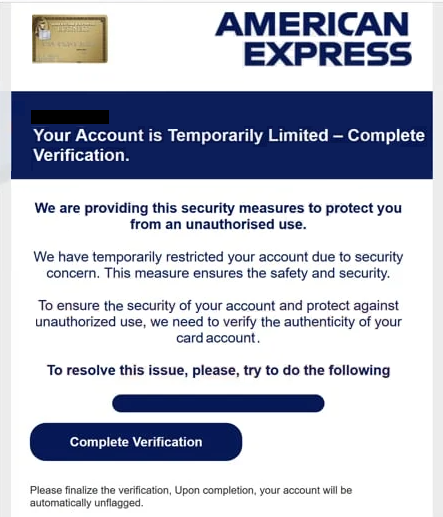
Scammers replicate the visual design of legitimate American Express communication. They use similar colours, formatting and branding elements to make the email appear authentic. The body of the email often includes a short notice describing the alleged limitation and a request for immediate action. Although the email resembles a legitimate alert, the embedded link directs the recipient to a phishing website. That site is designed to collect account login credentials, personal information or financial details.
Once credentials are entered on the phishing page, attackers can try to access the account or use the information for other forms of identity fraud. In some cases, the website may request additional data, including address information or payment card details. Victims may not realise they have provided sensitive information until unauthorised activity occurs.
This type of scam relies heavily on the appearance of legitimacy. American Express is a widely recognised financial institution, and many recipients may hold accounts or have used the service in the past. The familiarity of the brand increases the likelihood that the email will be opened and trusted. The wording of the email is usually concise and direct, repeating the claim that the account is temporarily limited and must be verified. The intent is to reduce the time a recipient spends evaluating the email and increase the chance of compliance.
Attackers often distribute these emails in high volumes. They may also use compromised servers or spoofed domains that resemble official American Express addresses. Because the scam does not rely on targeted knowledge of the victim, any individual who receives the email can be exposed. For that reason, many phishing attempts of this type are detected only after multiple reports from recipients who noticed inconsistencies in the email or recognised that the links did not match official American Express websites.
Although the scam imitates a real security alert, American Express does not request credential updates or personal information through unsolicited emails. The institution directs users to log in through its official website or app if account verification is required. That distinction is important because phishing campaigns often attempt to persuade users to click a link rather than use established sign-in procedures.
The full “American Express – Your Account Is Temporarily Limited” scam email is below:
Subject: Security Hold: Action Needed to Restore Full Account Access.
American Express Alert – New Additional Card Member
-,
Your Account is Temporarily Limited – Complete Verification.
We are providing this security measures to protect you from an unauthorised use.
We have temporarily restricted your account due to security concern. This measure ensures the safety and security.
To ensure the security of your account and protect against unauthorized use, we need to verify the authenticity of your card account.
To resolve this issue, please, try to do the following
Complete Verification
Please finalize the verification, Upon completion, your account will be automatically unflagged.
How to recognise phishing emails
Phishing emails that impersonate financial institutions share common indicators that can help recipients identify fraudulent communication. One of the most reliable checks involves reviewing the sender’s address. Emails from banks and payment companies originate from verified domains. If an address contains spelling errors, unusual characters or unfamiliar domain endings, the email should be approached with caution.
Formal communication from a financial institution normally addresses the customer by name. Phishing emails often begin with generic greetings, which indicate that the sender does not have verified account information. The tone of the email can also signal fraud. Threats of immediate account suspension or urgent demands for action are common phishing tactics.
Links embedded in phishing emails may display text that appears legitimate, but the actual destination differs from the visible label. Hovering over a link without clicking reveals the real address. Fraudulent sites often contain extra numbers, misspellings or domains that do not match the institution’s official website. Any link that directs a recipient to enter credentials should be avoided.
Spelling and grammatical errors can also signal a phishing attempt. While some emails are polished, others contain awkward phrasing or inconsistent formatting. Attachments should be treated with particular care. Financial institutions rarely send unexpected attachments, and files received in unsolicited emails may contain malicious software.
Legitimate organisations do not request passwords, card numbers or other sensitive details by email. Any email that asks for such information should be treated as suspicious. When an email claims to be from American Express, verification should be completed only through the company’s official website or customer service line. Using independent contact information prevents interaction with fraudulent channels.
If a suspicious email is received, it can be forwarded to the appropriate reporting address for further review. Reporting helps institutions track ongoing campaigns and warn other customers who may be targeted.
Incoming search terms:
Site Disclaimer
2-remove-virus.com is not sponsored, owned, affiliated, or linked to malware developers or distributors that are referenced in this article. The article does not promote or endorse any type of malware. We aim at providing useful information that will help computer users to detect and eliminate the unwanted malicious programs from their computers. This can be done manually by following the instructions presented in the article or automatically by implementing the suggested anti-malware tools.
The article is only meant to be used for educational purposes. If you follow the instructions given in the article, you agree to be contracted by the disclaimer. We do not guarantee that the artcile will present you with a solution that removes the malign threats completely. Malware changes constantly, which is why, in some cases, it may be difficult to clean the computer fully by using only the manual removal instructions.