

A “Android Has Detected A Wiretap On Your Phone” fake alert is circulating online through misleading websites and pop-up ads. The alert is not generated by the Android operating system and has no connection to Google. It is part of a scam that attempts to convince users that their device is under surveillance, encouraging them to install unverified apps or visit unsafe websites.
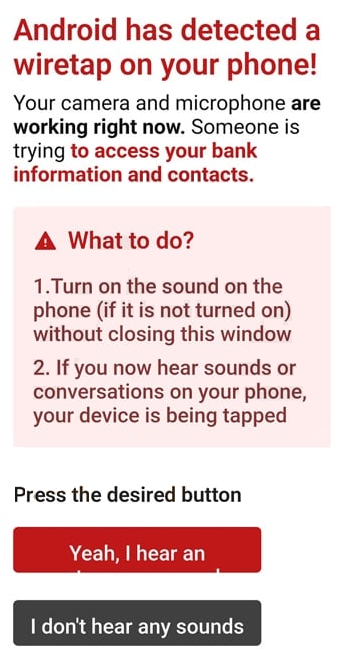
The alert typically appears in a browser window styled to resemble an official Android warning. It claims that the microphone or camera is being accessed remotely and that private conversations are being recorded. To appear legitimate, the page uses Android logos, interface colours, and message formatting similar to system notifications. Users are urged to tap a confirmation button to start a “security scan,” which redirects them to unrelated pages or software downloads.
In every case, the message is fake. It does not originate from the Android system, and it cannot detect or confirm the presence of any wiretap. Instead, it relies on fear and urgency to make users take actions that compromise their privacy.
How the “Android Has Detected A Wiretap On Your Phone” fake alert works
The Android wiretap scam is distributed through browser redirects, intrusive advertising networks, and websites that promote free downloads or questionable mobile utilities. Victims often encounter it after visiting low-trust domains that use aggressive advertising scripts. These sites open new tabs or windows displaying the fake warning, sometimes accompanied by vibration feedback or looping audio designed to imitate a real alert.
When the user follows the instructions, the page redirects to other domains that advertise system cleaners, antivirus apps, or phone protection services. Many of these promoted products are classified as potentially unwanted applications because they collect user data or display continuous advertisements. In other cases, the redirects lead to phishing forms that request contact details or credit card numbers under the pretext of verifying device security.
The warning may also appear as a mobile push notification if a user has previously granted permissions to a malicious website. These notifications resemble official Android alerts but originate from a browser, not the device’s security system. No legitimate Android feature ever instructs users to visit an external site to resolve a virus or wiretap issue.
Why does the fake alert appear
The “Android Has Detected A Wiretap On Your Phone” fake alert message is designed to generate revenue or collect data. Scam operators profit when users click advertisements, install promoted software, or submit personal information. Each interaction contributes to affiliate marketing schemes that reward traffic volume rather than legitimate sales.
The message may also serve as a gateway to more intrusive scams. Users who install suggested applications can experience frequent pop-ups, modified browser settings, and increased background activity that slows device performance. In some cases, such applications request broad permissions, giving them access to messages, call logs, and files.
Once installed, these apps can deliver additional fake virus alerts and redirect users to other fraudulent pages. Over time, the continuous stream of false notifications creates a cycle of fear that keeps victims engaged with unsafe services.
Interacting with the scam exposes users to several risks. The most immediate is the installation of unwanted software that displays intrusive advertisements or collects personal data. Some fake security tools promoted through these alerts can harvest browsing history, location data, and device information.
Another risk is phishing. Certain versions of the alert direct users to web forms that claim to verify identity or confirm subscription status. These forms request full names, email addresses, and sometimes payment details. Submitting this information can lead to unauthorized charges, identity theft, or spam campaigns targeting the victim’s contact information.
Continued exposure to malicious websites also increases the chance of downloading adware. Adware redirects search results, replaces browser homepages, and injects advertisements into regular web pages. This behaviour mirrors that of a browser hijacker and can persist even after closing the scam page.
Preventing future fake virus alerts
To avoid exposure to the Android wiretap scam, users should only rely on legitimate warnings issued by the Android system. Real security notifications appear through the device’s internal interface, not a web browser. Any website claiming to perform a virus scan or detect wiretapping activity should be closed immediately.
The safest way to protect against these scams is to limit exposure to unknown websites and advertising networks. Disabling browser notifications from unverified domains prevents pop-up prompts from appearing in the future. Downloading apps exclusively from the Google Play Store further reduces the risk of installing deceptive software.
If such messages appear frequently, clearing the browser cache and reviewing notification permissions can stop unwanted redirects. Installing trusted security software from verified publishers can also identify and block malicious website redirects.
The Android has detected a wiretap on your phone message is one of many fake alerts designed to exploit fear and confusion. While it cannot harm the device directly, its goal is to convince users to install unnecessary apps or reveal private information. Recognizing the signs of a fake virus alert and closing suspicious browser tabs immediately is the most effective way to avoid falling victim to these scams.
Site Disclaimer
2-remove-virus.com is not sponsored, owned, affiliated, or linked to malware developers or distributors that are referenced in this article. The article does not promote or endorse any type of malware. We aim at providing useful information that will help computer users to detect and eliminate the unwanted malicious programs from their computers. This can be done manually by following the instructions presented in the article or automatically by implementing the suggested anti-malware tools.
The article is only meant to be used for educational purposes. If you follow the instructions given in the article, you agree to be contracted by the disclaimer. We do not guarantee that the artcile will present you with a solution that removes the malign threats completely. Malware changes constantly, which is why, in some cases, it may be difficult to clean the computer fully by using only the manual removal instructions.