

The “Apple ID was recently used at Apple Store” pop-up scam is a tech support scam that appears in a web browser on a Mac. It claims that an Apple ID was recently used at an Apple Store and presents the activity as suspicious or unauthorized. The alert is not a real Apple notification. It is a fake warning designed to frighten visitors into taking immediate action.
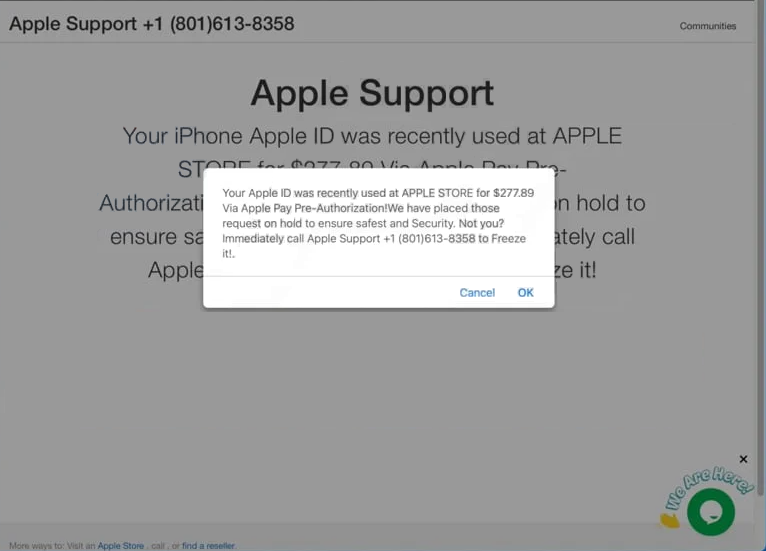
This tech support scam uses account security language to make the situation feel urgent. It may suggest that someone has accessed the Apple ID, that purchases were made, or that the account is at risk of being locked. The page can also use Apple branding, icons, or official-looking design elements to appear trustworthy. None of this confirms legitimacy. The message is simply text displayed by a web page.
The goal of the “Apple ID was recently used at Apple Store” pop-up scam is to push contact with scammers posing as support staff. The page may display a phone number and instruct the visitor to call right away. It may also include buttons that claim to secure the account or stop the suspicious activity. These actions are intended to start a conversation where scammers attempt to take money or collect sensitive information.
Once contact is made, tech support scammers typically try to convince the victim that the Mac has a serious security issue. The scam may escalate into requests for remote access, payment for a fake service plan, or “verification” steps that involve entering Apple ID credentials. Some versions attempt to collect personal details or payment information under the excuse of account protection. These requests are part of the scam and do not restore security.
A real Apple account warning would not be delivered as a random browser pop-up. Apple security notifications are normally delivered through official channels, such as an email to the address on file, a notice in the Apple ID account settings, or a device-level notification. Apple does not rely on unsolicited web pages to request calls to support numbers or demand immediate action through a browser alert.
The “Apple ID was recently used at Apple Store” pop-up scam also does not prove that the Apple ID has been compromised. A website cannot confirm account activity or read Apple login history. It cannot detect real purchases, store visits, or authentication events. The page is designed to look authoritative, but it has no connection to Apple systems.
Why users are shown this scam
The “Apple ID was recently used at Apple Store” pop-up scam is usually reached through redirects and aggressive advertising. Many visitors land on this type of page after browsing websites that rely on low-quality ad networks, pop-ups, or forced redirects. These networks can deliver scam pages as part of their advertising rotation.
Clicks on deceptive ads are a common trigger. A button that looks like a video control, a download link, or a navigation element can redirect the browser to the scam page instead of performing the expected action. The redirect may happen instantly, which can make it seem like the alert came from the browser or the system.
Some redirects happen without a clear click. Certain pages load third-party scripts that automatically forward visitors to scam content. This can occur on page load or after a short delay. The scam page may then open in the same tab or in a new window, making it harder to identify where it came from.
Adware and unwanted browser extensions can increase exposure to tech support scams. If adware is present, it can inject additional advertisements into web pages, open sponsored tabs, or cause redirects during ordinary browsing. Unwanted extensions can also interfere with browsing by inserting ads or directing traffic to promoted pages. In these cases, the scam may appear more frequently and across a wider range of websites.
Misleading download pages can also contribute. Some sites display fake prompts suggesting that an update is required or that a component is missing. Following these prompts can lead to pages that display tech support scam alerts, including the “Apple ID was recently used at Apple Store” pop-up message.
The common factor is not a real Apple security issue. The page is delivered through unsafe advertising routes and is designed to pressure visitors into contacting scammers. The alert exists only in the browser and is not proof of account compromise or device infection.
Site Disclaimer
2-remove-virus.com is not sponsored, owned, affiliated, or linked to malware developers or distributors that are referenced in this article. The article does not promote or endorse any type of malware. We aim at providing useful information that will help computer users to detect and eliminate the unwanted malicious programs from their computers. This can be done manually by following the instructions presented in the article or automatically by implementing the suggested anti-malware tools.
The article is only meant to be used for educational purposes. If you follow the instructions given in the article, you agree to be contracted by the disclaimer. We do not guarantee that the artcile will present you with a solution that removes the malign threats completely. Malware changes constantly, which is why, in some cases, it may be difficult to clean the computer fully by using only the manual removal instructions.