

The “Chase – Verification To Protect Your Account” scam is a phishing email that pretends to be a security notice from a bank. It typically informs the recipient that unusual activity has been detected or that their account needs to be verified to remain secure. The wording is designed to sound routine and protective, but the situation described is not real.
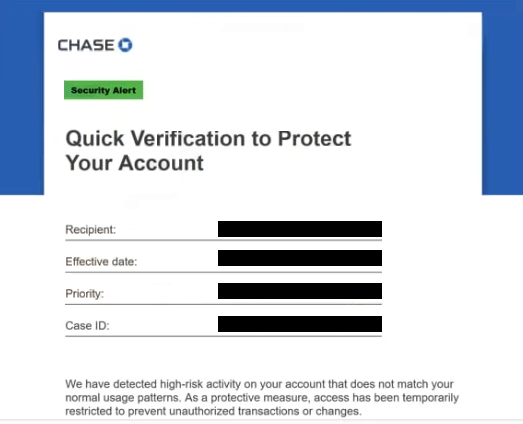
Rather than providing clear details about the supposed issue, the email quickly directs the recipient to take action. It includes a link labeled with phrases such as “Verify Now” or “Protect Your Account.” This link leads to a fraudulent website that imitates a Chase login page. The page may look convincing, but it is not connected to any legitimate banking system.
The purpose of this page is to collect login credentials. When users enter their username and password, the information is sent directly to scammers. No verification actually takes place. In some cases, the page may display a confirmation message or redirect to the official Chase website to make the process appear legitimate.
The claims made in the email are false. Messages like these are not sent by the real bank, and they are not connected to any actual account activity. According to security analysis, such phishing emails are specifically designed to trick recipients into disclosing sensitive information, which can then be used for unauthorized access and fraudulent transactions.
If attackers gain access to banking credentials, the consequences can be serious. They may use the account to transfer funds, make purchases, or gather additional personal information. In some cases, compromised accounts are also used for further scams or identity-related misuse.
The full “Chase – Verification To Protect Your Account” phishing email is below:
Subject: Chase security alert: Your Account Requires Verification
Chase
Security Alert
Quick Verification to Protect Your Account
Recipient: –
Effective date: –
Priority: –
Case ID: –We have detected high-risk activity on your account that does not match your normal usage patterns. As a protective measure, access has been temporarily restricted to prevent unauthorized transactions or changes.
To restore access:
Sign in to your account using the Review account button below.
Follow the on-screen instructions and provide your information to complete verification.For your protection:
Do not change your User ID or password until the verification process is complete, as this may interrupt the security review.
Thank you for your prompt attention to this issue.
Review Account
Securely access your accounts in the Chase Mobile® app or at chase.com.
How to recognize phishing emails like “Chase – Verification To Protect Your Account”
Phishing emails of this type follow a predictable pattern, even if the wording changes. One of the most common signs is urgency. The email may suggest that immediate action is required to prevent account suspension or unauthorized access. This pressure is meant to reduce hesitation and encourage quick interaction.
Another key indicator is the use of external links for login or verification. Legitimate banks do not ask users to enter sensitive information through links in unsolicited emails. Instead, they advise accessing accounts directly through official websites or mobile apps.
The lack of detailed, verifiable information is also important. These emails often mention “suspicious activity” but do not provide specifics such as transaction details, device information, or timestamps. This makes it impossible to confirm whether the alert is genuine.
The sender address can reveal inconsistencies as well. While the display name may appear to represent a bank, the actual email address often comes from a domain that does not match the official organization. This mismatch is a strong indication of a phishing attempt.
Another common trait is generic wording. The email may not include the recipient’s name or any account-specific details. This allows the same email to be sent to a large number of recipients.
Phishing attempts involving banks often rely on trust and familiarity. By using recognizable branding and a security-related message, they create a sense of legitimacy. However, banks do not request confidential information such as passwords or PINs through email.
Recognizing these warning signs can help prevent interaction with fraudulent emails. Any email that requests account verification through a link, especially without clear and verifiable details, should be treated with caution.
Site Disclaimer
2-remove-virus.com is not sponsored, owned, affiliated, or linked to malware developers or distributors that are referenced in this article. The article does not promote or endorse any type of malware. We aim at providing useful information that will help computer users to detect and eliminate the unwanted malicious programs from their computers. This can be done manually by following the instructions presented in the article or automatically by implementing the suggested anti-malware tools.
The article is only meant to be used for educational purposes. If you follow the instructions given in the article, you agree to be contracted by the disclaimer. We do not guarantee that the artcile will present you with a solution that removes the malign threats completely. Malware changes constantly, which is why, in some cases, it may be difficult to clean the computer fully by using only the manual removal instructions.