

The “CIMB Bank – Transfer To Your Account” email scam is a phishing email that falsely claims a bank transfer has been initiated in the recipient’s name. The message presents itself as a payment or remittance notice from CIMB Bank and states that funds are being transferred to the recipient’s account. The email is not sent by CIMB Bank and is not connected to any real transaction.
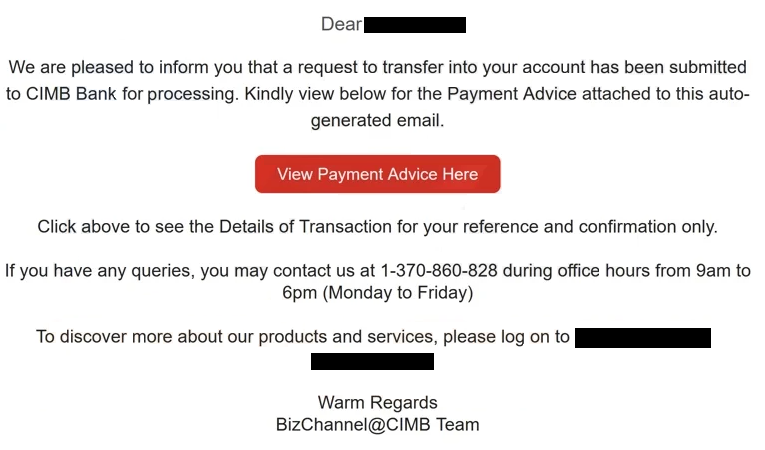
The email states that a transfer request has been submitted and that a payment advice or transfer document is available for review. The wording is transactional rather than promotional. It is written to look like a routine banking notification, not a warning or alert. The email often includes the recipient’s email address in the message body to make it appear personalised, but no real banking details are present.
The message instructs the recipient to view the transfer details by clicking a link or opening a payment advice document. The email does not provide a transaction number that can be verified through official channels. It does not list a real sender account, a transfer amount that matches any known activity, or a confirmed destination account. All claims about the transfer are fabricated.
Clicking the link opens a fraudulent page designed to look like a secure document viewer or banking portal. The page often displays a blurred document preview and states that authentication is required to access the payment advice. The user is then prompted to enter their email password to view the file. This request is the core of the scam.
Entering an email password on this page does not unlock a document or confirm a transfer. The credentials are captured by scammers. The page does not connect to CIMB Bank systems, and no banking information is retrieved. The document preview is static and does not represent a real transfer record.
This scam targets email credentials rather than direct banking logins. Once scammers obtain access to the email account, they can search for banking messages, intercept one-time codes, and request password resets for other services. The compromised account can also be used to send additional phishing emails that appear legitimate.
The “CIMB Bank – Transfer To Your Account” email scam relies on the assumption that recipients may be concerned about unexpected incoming funds or may want to verify a transaction quickly. The use of CIMB Bank branding is intended to lower suspicion, but the email does not follow real bank communication practices. Banks do not distribute payment advice documents through unsolicited email links that require email passwords.
The full “CIMB Bank – Transfer To Your Account” phishing email is below:
Subject: Payment Advice for –
Dear -,
We are pleased to inform you that a request to transfer into your account has been submitted to CIMB Bank for processing. Kindly view below for the Payment Advice attached to this auto-generated email.
View Payment Advice Here
Click above to see the Details of Transaction for your reference and confirmation only.
If you have any queries, you may contact us at 1-370-860-828 during office hours from 9am to 6pm (Monday to Friday)
To discover more about our products and services, please log on to –
Warm Regards
BizChannel@CIMB Team
How the “CIMB Bank – Transfer To Your Account” email scam is distributed
The “CIMB Bank – Transfer To Your Account” email scam is distributed through bulk phishing campaigns. The same message is sent to many email addresses without checking whether the recipient has a CIMB Bank account or any banking relationship at all. The scam works because the email claims money is being transferred to the recipient, which can seem relevant to anyone.
The sender’s name often references CIMB Bank or a payment department, but the sending address does not belong to CIMB Bank. The domain used to send the message is unrelated to the bank and can be identified by viewing the full sender details. This mismatch is a clear indicator that the message is not legitimate.
The email content lacks verifiable transaction details. No confirmed transfer reference can be matched inside a real banking app or website. Legitimate CIMB Bank notifications direct customers to log in through the official website or mobile application, not through embedded email links.
The link included in the email leads to a domain that is not owned by CIMB Bank. Even if the page looks professional, the address bar reveals it is hosted elsewhere. Any page that requests an email password to view a banking document is fraudulent.
The scam page does not provide alternative verification options. It does not suggest contacting CIMB Bank support through known phone numbers or checking account activity through official channels. All interaction is routed through the fake document viewer.
The “CIMB Bank – Transfer To Your Account” email scam is specific in its use of transfer language and document-themed deception. Checking sender domains, avoiding document links in unexpected banking emails, and reviewing account activity only through official CIMB Bank platforms are effective ways to avoid this scam.
Site Disclaimer
2-remove-virus.com is not sponsored, owned, affiliated, or linked to malware developers or distributors that are referenced in this article. The article does not promote or endorse any type of malware. We aim at providing useful information that will help computer users to detect and eliminate the unwanted malicious programs from their computers. This can be done manually by following the instructions presented in the article or automatically by implementing the suggested anti-malware tools.
The article is only meant to be used for educational purposes. If you follow the instructions given in the article, you agree to be contracted by the disclaimer. We do not guarantee that the artcile will present you with a solution that removes the malign threats completely. Malware changes constantly, which is why, in some cases, it may be difficult to clean the computer fully by using only the manual removal instructions.