

The “Cloud Storage Renewal Failed” phishing email claims that the recipient’s cloud storage plan could not be renewed and that access to stored files may be affected. It presents the issue as a billing or subscription failure, suggesting that backups, syncing, or file access are at risk. The email does not explain what caused the failure, but directs the recipient to fix it through a provided link.
The link leads to a page that appears to be related to account billing or subscription management. Instead of showing real account details, the page displays a simple prompt asking the user to sign in or update payment information. There is no visible storage data, no subscription history, and no confirmation that a renewal actually failed.
The page is designed to collect sensitive information. It may ask for login credentials, payment details, or both. Entering this information does not restore any service. The data is sent to the scammers, and the page may then show a confirmation or redirect to a legitimate website to make the interaction seem complete.
The renewal failure described in the email is not real. There is no interruption in the cloud service and no need to update payment details through an external page. The email is used to create a believable reason for the user to provide information.
If login credentials are captured, attackers can attempt to access the cloud account. This can expose stored files, personal data, and backups. If payment information is entered, it can be used for unauthorized transactions. The impact depends on the type of data linked to the account.
The full “Cloud Storage Renewal Failed” phishing email is below:
Subject: Final Notice: Files Scheduled for Deletion – Upgrade Required | ID:-
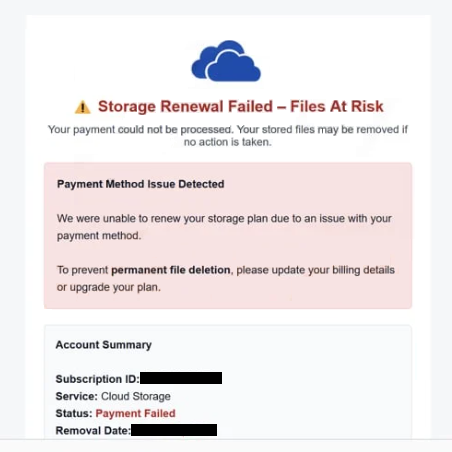
Storage Renewal Failed – Files At Risk
Your payment could not be processed. Your stored files may be removed if no action is taken.
Payment Method Issue DetectedWe were unable to renew your storage plan due to an issue with your payment method.
To prevent permanent file deletion, please update your billing details or upgrade your plan.
Account SummarySubscription ID: –
Service: Cloud Storage
Status: Payment Failed
Removal Date: –
Without an active plan, your files—including photos, videos, and documents—may no longer be accessible and could be permanently removed from our servers.
Update Payment & Secure My Files
Takes less than 1 minute • Secure process
Thank you for using our storage service.Support Team
If you no longer wish to receive these emails, unsubscribe here .
How to recognize phishing emails like “Cloud Storage Renewal Failed”
Phishing emails, such as “Cloud Storage Renewal Failed”, can be identified by how they present billing problems without verifiable details. The email claims that a renewal failed, but does not include clear information such as transaction records, billing history, or account-specific data. Legitimate service notifications usually provide this type of detail.
The link included in the email is another key sign. Instead of directing users to manage their account through the official cloud service website, the email provides a direct link to a login or payment page. This page is hosted on a domain that does not belong to the real provider.
The sender address should also be reviewed. While the display name may appear to represent a cloud service, the actual email address often comes from a different domain. This mismatch indicates that the email is not genuine.
Another indicator is the general wording. The email is written in a way that could apply to any user, without including names or account identifiers. Legitimate billing emails usually include specific details related to the account.
The message may also encourage quick action by suggesting that storage access will be limited or disrupted. This creates pressure to respond without verifying the source of the email.
Recognizing these patterns helps identify phishing emails before interacting with them. Emails that combine vague billing issues, external login or payment links, and inconsistent sender details should be treated with caution.
Incoming search terms:
Site Disclaimer
2-remove-virus.com is not sponsored, owned, affiliated, or linked to malware developers or distributors that are referenced in this article. The article does not promote or endorse any type of malware. We aim at providing useful information that will help computer users to detect and eliminate the unwanted malicious programs from their computers. This can be done manually by following the instructions presented in the article or automatically by implementing the suggested anti-malware tools.
The article is only meant to be used for educational purposes. If you follow the instructions given in the article, you agree to be contracted by the disclaimer. We do not guarantee that the artcile will present you with a solution that removes the malign threats completely. Malware changes constantly, which is why, in some cases, it may be difficult to clean the computer fully by using only the manual removal instructions.