

The “Confirm Mailbox Access – Brief Service Interruption” email is a phishing attempt that presents itself as a follow-up to a temporary email service issue. Instead of warning about a serious problem, the message suggests that everything is already back to normal, but requires a quick confirmation step to restore full access. This framing makes the request feel routine rather than suspicious.
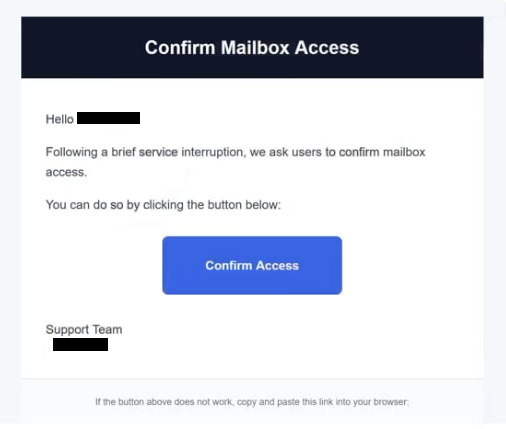
The email directs the recipient to confirm mailbox access through a link. It may explain that some messages were delayed or that the account needs to be reconnected after a short interruption. The explanation is kept vague, with no specific details about what actually happened or which part of the service was affected.
Clicking the link opens a page that looks like a standard email login screen. The design is simple and familiar, showing fields for an email address and password. There is no inbox, no message preview, and no system status. The page only asks for login details, claiming that this step will restore normal mailbox access.
Nothing is restored after entering the credentials. The information is sent directly to the scammers. The page may reload, display a short confirmation message, or redirect to a legitimate login page to avoid raising suspicion. By that point, the credentials have already been captured.
With access to the email account, attackers can review stored messages, download attachments, and send emails from the compromised address. Email accounts are often linked to other services, which means attackers can also attempt password resets for additional accounts tied to the same inbox.
The interruption described in the email does not exist. There is no system issue and no mailbox problem to fix. The message is designed to appear like a normal maintenance follow-up, so the user completes the login step without questioning it.
The full “Confirm Mailbox Access – Brief Service Interruption” phishing email is below:
Subject: Action Required
Confirm Mailbox Access
Hello -,
Following a brief service interruption, we ask users to confirm mailbox access.
You can do so by clicking the button below:
Confirm Access
Support Team
–
If the button above does not work, copy and paste this link into your browser:
Signs of a phishing email
The email avoids dramatic language and instead uses a calm, service-oriented tone. It may mention a temporary interruption that has already been resolved and present the confirmation step as a final check. This makes the request feel like part of standard system maintenance.
The message is usually short and does not include detailed information. It does not mention specific times, server names, or account activity. Real service notifications typically provide more context or direct users to access their accounts through official websites.
A single link is included to complete the process. It may be labeled with wording such as “Confirm Access,” “Reconnect Mailbox,” or “Continue.” This link leads to a page outside the official email provider, even though the page may look similar to a real login screen.
The sender’s address can also reveal the scam. While the display name may suggest a support or system team, the actual domain often does not match a legitimate email service provider.
The message relies on familiarity. Temporary service interruptions are common, so the explanation feels believable. By presenting the issue as minor and already resolved, the email lowers suspicion and encourages the recipient to follow the link without verifying it.
The combination of a routine-sounding update, limited technical detail, and a login page that only collects credentials defines the “Confirm Mailbox Access – Brief Service Interruption” scam.
Site Disclaimer
2-remove-virus.com is not sponsored, owned, affiliated, or linked to malware developers or distributors that are referenced in this article. The article does not promote or endorse any type of malware. We aim at providing useful information that will help computer users to detect and eliminate the unwanted malicious programs from their computers. This can be done manually by following the instructions presented in the article or automatically by implementing the suggested anti-malware tools.
The article is only meant to be used for educational purposes. If you follow the instructions given in the article, you agree to be contracted by the disclaimer. We do not guarantee that the artcile will present you with a solution that removes the malign threats completely. Malware changes constantly, which is why, in some cases, it may be difficult to clean the computer fully by using only the manual removal instructions.