

The “cPanel Insufficient Mailbox Synchronization” scam is a phishing email that claims the recipient’s mailbox has failed to synchronize properly with the server. The message states that a synchronization error has been detected and that incoming emails may not be delivered until the issue is resolved. It presents the situation as a technical problem within the hosting environment and instructs the recipient to correct it. This notification is fraudulent and is not issued by cPanel or a legitimate hosting provider.
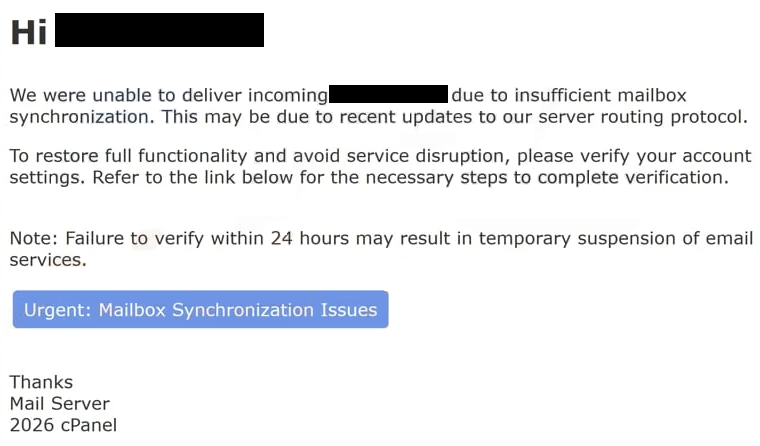
The email typically explains that mailbox synchronization between the server and the user’s account has stopped or is incomplete. It may claim that recent messages are being held or that the mailbox cannot continue receiving emails until synchronization is restored. The message frames the problem as a system limitation rather than a security issue, which can make the request appear routine.
A button or link is included, usually labeled with wording such as “Restore Synchronization,” “Fix Mailbox,” or “Update Account.” The message suggests that clicking this option will reconnect the mailbox to the server and resume normal email delivery. In reality, the link leads to a fraudulent login page designed to imitate a cPanel or webmail interface.
The fake page may display a simple login form requesting an email address and password. It may also show a brief notice about mailbox synchronization to make the request appear legitimate. However, the domain shown in the browser address bar does not match the official website of the hosting provider. The page does not provide access to any real mailbox settings.
When login credentials are entered, the information is transmitted to the scammers. The page does not restore synchronization or reconnect the mailbox to the server. Its only purpose is to collect account credentials. After submission, the page may display a confirmation message or redirect to a legitimate login page so the interaction appears normal.
If attackers obtain valid credentials, they can sign into the actual mailbox. Email accounts often contain sensitive data such as business correspondence, attachments, and account notifications. Access to the inbox can allow attackers to read messages, collect personal information, and initiate password reset requests for other services linked to the email address.
The synchronization error described in the email does not exist. The scammers are not connected to the hosting system and have no ability to detect or repair mailbox synchronization problems. The message is designed to prompt the recipient to submit login credentials without verifying the authenticity of the request.
The full “cPanel Insufficient Mailbox Synchronization” phishing email is below:
Subject: fwd : mails have been put on hold in the email server database.
Hi –
We were unable to deliver incoming – due to insufficient mailbox synchronization. This may be due to recent updates to our server routing protocol.
To restore full functionality and avoid service disruption, please verify your account settings. Refer to the link below for the necessary steps to complete verification.
Note: Failure to verify within 24 hours may result in temporary suspension of email services.
Urgent: Mailbox Synchronization Issues
Thanks
Mail Server
2026 cPanel
How to identify phishing emails
One of the clearest indicators of this scam is the sender address. While the display name may appear to belong to a system administrator or hosting support team, the actual email domain often does not match the legitimate hosting provider. Authentic service notifications are sent only from official domains.
The content of the email is another clue. The message generally lacks specific information about the hosting account, such as the domain name, server location, or account identifier. Legitimate maintenance or error notifications typically include details that allow users to confirm the message relates to their actual service.
The link included in the email is also revealing. When examined closely, the destination does not lead to the official hosting control panel. Instead, it points to a domain unrelated to the service provider. Legitimate hosting companies direct users to sign in through their established control panel pages rather than through external links in unsolicited emails.
The page opened by the link usually contains only a login form and a short message about synchronization. It does not display account dashboards, mailbox statistics, or technical reports. Genuine cPanel interfaces provide full access to hosting tools once a user logs in through the official site.
The email also encourages quick action by suggesting that incoming messages will remain blocked until synchronization is restored. This pressure is meant to push recipients into clicking the link without verifying the sender. In reality, mailbox synchronization and server maintenance are handled internally by hosting providers and do not require users to submit login credentials through email links.
By reviewing the sender domain, checking the link destination, and recognizing that synchronization issues are not resolved through unsolicited login pages, recipients can identify the “cPanel Insufficient Mailbox Synchronization” scam and avoid exposing their credentials.
Site Disclaimer
2-remove-virus.com is not sponsored, owned, affiliated, or linked to malware developers or distributors that are referenced in this article. The article does not promote or endorse any type of malware. We aim at providing useful information that will help computer users to detect and eliminate the unwanted malicious programs from their computers. This can be done manually by following the instructions presented in the article or automatically by implementing the suggested anti-malware tools.
The article is only meant to be used for educational purposes. If you follow the instructions given in the article, you agree to be contracted by the disclaimer. We do not guarantee that the artcile will present you with a solution that removes the malign threats completely. Malware changes constantly, which is why, in some cases, it may be difficult to clean the computer fully by using only the manual removal instructions.