

The “cPanel Roundcube – verify your email account to upgrade your security” scam is a phishing email that claims the recipient must verify their Roundcube webmail account to receive a security upgrade. The email presents this as a routine protection step required to keep the mailbox secure. It states that the upgrade will improve account safety and reliability. This claim is false and is not issued by cPanel, Roundcube, or a legitimate hosting provider.
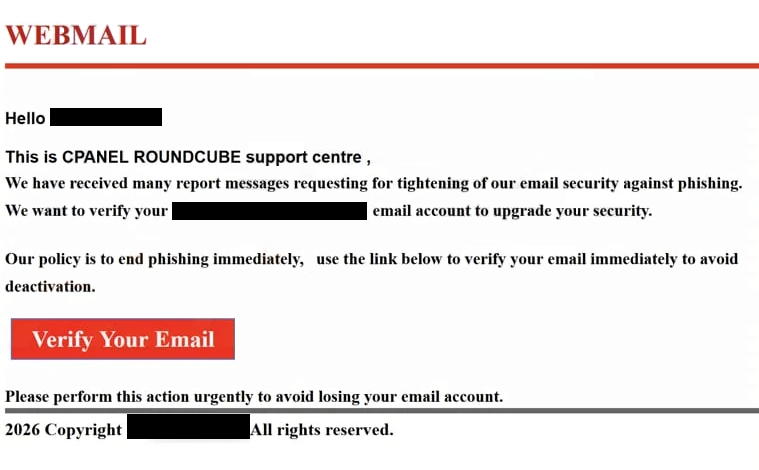
The email urges the recipient to complete verification through a provided link. The wording focuses on upgrading security, confirming the account, or validating the mailbox. That link does not lead to a real cPanel or Roundcube page. It opens a fraudulent web page designed to look like a webmail login. The page shows fields for an email address and password, and can include a simple cPanel or Roundcube-style layout to appear credible.
When login details are entered, the information is sent to the scammers. The page does not perform any upgrade and does not connect to the real mailbox. Its only role is credential collection. After submission, the site can display a login error or redirect to a legitimate webmail page so the activity appears normal. By then, the credentials are already captured.
The targeted data in the “cPanel Roundcube – verify your email account to upgrade your security” scam is the email account login. Access to a webmail account allows entry to stored emails, attachments, and contact lists. Many online services rely on email for password resets and confirmations. With inbox access, scammers can request password changes for other accounts and approve them through the compromised mailbox. This can expose business tools, shopping accounts, and social media profiles tied to that email.
A compromised mailbox also allows scammers to read past correspondence. They can search for invoices, contracts, or personal records. They can send emails from the account while pretending to be the owner. Those emails can repeat the same verification theme or introduce other false alerts. Since the emails come from a real domain, recipients can trust them and interact with the content. This extends the impact to coworkers, clients, or customers connected to the account.
The security upgrade story in this scam is fabricated. The scammers have no control over the real email service and cannot apply upgrades. The claim is used to create urgency and push the recipient to sign in on the fake page. Real cPanel and Roundcube-related updates are handled inside the hosting provider’s official environment, not through login requests in unsolicited emails.
How to identify phishing emails
The “cPanel Roundcube – verify your email account to upgrade your security” scam arrives as a standard email focused on a security upgrade. The subject line contains the same wording as the keyword or a close variation about verification and security. The sender’s name is written to appear linked to webmail support or system administration. A closer look at the full sender address shows a domain unrelated to the recipient’s hosting provider. This mismatch is a clear sign of this scam.
The email body is short and centered on the verification request. It states that a security upgrade is pending and that verification is required to complete it. The message does not include real account details, customer identifiers, or service history. Legitimate providers include recognizable information tied to the user’s account. This scam relies only on the verification claim and the link.
The phishing page linked in the email is minimal. It shows a login form and a title referencing Roundcube or webmail. The domain in the browser bar does not match the hosting provider and can include unrelated words or random characters. The page lacks navigation menus, help sections, and provider-specific branding across multiple pages. It exists only to request credentials.
Another sign is the narrow focus on the security upgrade. The same claim appears in the subject line, body text, and action link. The email does not mention billing, storage limits, or service plans. It stays centered on verification for security.
Legitimate hosting providers do not require users to verify accounts through external email links to receive upgrades. Real notifications direct users to sign in through their normal hosting dashboard. The combination of a security upgrade claim, a mismatched sender domain, and a login page on an unrelated site defines the “cPanel Roundcube – verify your email account to upgrade your security” scam.
Site Disclaimer
2-remove-virus.com is not sponsored, owned, affiliated, or linked to malware developers or distributors that are referenced in this article. The article does not promote or endorse any type of malware. We aim at providing useful information that will help computer users to detect and eliminate the unwanted malicious programs from their computers. This can be done manually by following the instructions presented in the article or automatically by implementing the suggested anti-malware tools.
The article is only meant to be used for educational purposes. If you follow the instructions given in the article, you agree to be contracted by the disclaimer. We do not guarantee that the artcile will present you with a solution that removes the malign threats completely. Malware changes constantly, which is why, in some cases, it may be difficult to clean the computer fully by using only the manual removal instructions.