The “cPanel Security Notice” email scam is a phishing campaign that targets email account users by impersonating a cPanel-related security notification. The message claims that the recipient must complete a password verification process to maintain account security and prevent service interruptions. In reality, the email is designed to steal login credentials through a fake authentication page controlled by cybercriminals.
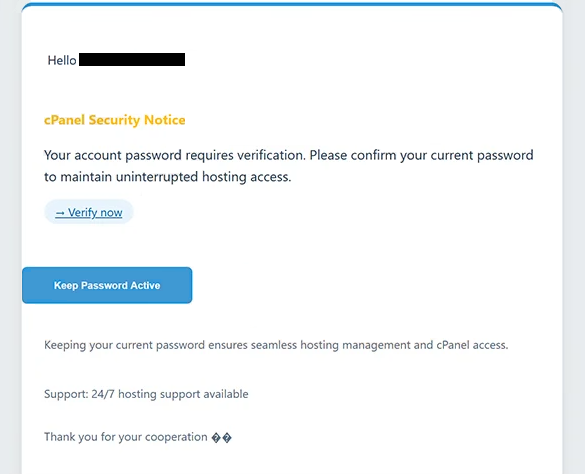
The phishing email presents itself as an important security alert concerning the recipient’s mailbox. It informs users that a password verification procedure is required due to recent security updates, account protection measures, or unusual account activity. The notification attempts to create urgency by warning that failure to complete the verification process may result in email delivery issues, restricted access, or account suspension.
To supposedly secure the account, the “cPanel Security Notice” email instructs recipients to click a button or hyperlink and verify their credentials. Instead of opening a legitimate cPanel portal, the link redirects users to a phishing website that imitates a webmail or hosting login page. The fraudulent portal is designed to appear authentic so that victims willingly enter their email addresses and passwords.
Once login credentials are submitted, the information is transmitted directly to the attackers operating the campaign. Cybercriminals can then access the compromised mailbox and potentially use it for additional malicious activities. A stolen email account may provide access to sensitive communications, stored documents, financial information, and password reset functions associated with other online services.
The “cPanel Security Notice” scam relies heavily on users’ trust in hosting providers and email administration systems. Since legitimate hosting companies occasionally send security-related notifications and account management alerts, many recipients may view the message as a routine maintenance request rather than a phishing attempt.
Another factor contributing to the effectiveness of the scam is its professional appearance. The email often uses technical terminology, security-related language, and official-looking formatting intended to resemble genuine cPanel or hosting provider communications. References to password verification, account protection, and security compliance are specifically designed to make the message appear credible.
Unlike some phishing campaigns that rely on dramatic warnings about hacked accounts or malware infections, the “cPanel Security Notice” email focuses on a routine verification process. This more subtle approach may lower suspicion because recipients are accustomed to occasional account verification requests from legitimate online services.
The phishing campaign can have serious consequences if attackers successfully obtain mailbox credentials. Access to an email account may allow cybercriminals to reset passwords for other services, impersonate the victim in communications, distribute additional phishing emails, or search for sensitive personal and business information stored within the mailbox.
Anyone who entered credentials into a website linked to the “cPanel Security Notice” scam should immediately change their password and review the account for suspicious activity. If the same password was used on other services, those accounts should also be secured to reduce the risk of further compromise.
The full “cPanel Security Notice” phishing email is below:
Subject: -: Please confirm to continue.
Hello -,
cPanel Security Notice
Your account password requires verification. Please confirm your current password to maintain uninterrupted hosting access.
[Verify now]
[Keep Password Active]Keeping your current password ensures seamless hosting management and cPanel access.
Support: 24/7 hosting support available
Thank you for your cooperationNote: Unverified accounts may experience service interruptions after 48 hours.
cPanel Security Team,
2025 cPanel Hosting
How to recognize phishing emails
Phishing campaigns like the “cPanel Security Notice” scam frequently imitate account management and security notifications in order to trick recipients into revealing sensitive information. Recognizing the warning signs associated with these emails can help prevent credential theft.
One common indicator is an unexpected request to verify account information. Legitimate providers rarely demand immediate password confirmation through links embedded in unsolicited emails. Messages claiming that credentials must be verified urgently should always be approached cautiously.
The sender’s address is another important detail to examine. Fraudulent emails often imitate support teams, hosting providers, or security departments while using unrelated domains or suspicious email addresses. Even when the sender name appears legitimate, the actual address may reveal that the message did not originate from the organization it claims to represent.
Links included inside phishing emails should always be inspected carefully before clicking. In scams like “cPanel Security Notice”, the verification link leads to a counterfeit login page rather than an official hosting or cPanel website. Hovering over links before interacting with them can often reveal suspicious destinations.
Another warning sign is the use of urgency. The email may claim that account functionality, email delivery, or security protections will be affected if the recipient does not act immediately. Attackers use these warnings to pressure users into responding quickly rather than verifying whether the message is authentic.
Users should also be cautious of login pages reached through email links. Legitimate service providers generally encourage users to access account settings through official websites instead of through authentication forms embedded in unsolicited communications. Any unexpected request for credentials should be treated with suspicion.
Generic wording can provide another clue. Many phishing campaigns avoid including personalized account information and instead use broad references to security updates, password verification, or account maintenance. This allows the same message to be distributed to large numbers of recipients.
The safest response to suspicious account-related notifications is to avoid interacting with links inside the email. Instead, users should manually navigate to their hosting provider’s official website and review account notifications there. If no corresponding alert exists, the message is likely fraudulent.
Incoming search terms:
Site Disclaimer
2-remove-virus.com is not sponsored, owned, affiliated, or linked to malware developers or distributors that are referenced in this article. The article does not promote or endorse any type of malware. We aim at providing useful information that will help computer users to detect and eliminate the unwanted malicious programs from their computers. This can be done manually by following the instructions presented in the article or automatically by implementing the suggested anti-malware tools.
The article is only meant to be used for educational purposes. If you follow the instructions given in the article, you agree to be contracted by the disclaimer. We do not guarantee that the artcile will present you with a solution that removes the malign threats completely. Malware changes constantly, which is why, in some cases, it may be difficult to clean the computer fully by using only the manual removal instructions.