

A malicious email campaign posing as DHL is distributing an attachment that installs malware when opened. The email uses the subject line “DHL Shipment Notification Ref ID: 44633179800” and claims that DHL is sending digital copies of shipping paperwork. The message instructs the recipient to download and open a file and to enable editing once the document is open. The email is malicious and should be ignored.
The email presents itself as a notice containing shipping documents. The attached file is a Word document named in a format resembling “Original Shipping Documents [random numbers].docx.” The attachment is the main part of the attack. When opened, the document tells the user to enable editing. Doing so activates malicious macro code embedded inside the file. Once active, the macro attempts to download additional malware from remote servers.
Analysis of samples from this campaign shows that the document is a Trojan downloader. After the macro runs, the malware retrieves files that may collect login credentials, read browser data, log keystrokes or allow remote access to the device. Some variants attempt to install further malware or connect the device to a remote command server. The operation relies on the user enabling editing, which gives the malicious code access to system functions.
The malicious email mimics DHL branding to make it appear credible. Attackers use DHL’s colours, layout structure and logo placement to create a message that resembles a shipping notice. The email displays a reference number in the subject line to further appear official. However, the content does not include tracking data, sender information, shipment origins or personalised details. The message does not contain links to DHL’s website and relies entirely on convincing the user to open the attachment.
The attackers behind this campaign rely on DHL’s global recognition. The name and branding encourage recipients to believe the message is legitimate, especially when they expect a delivery or have experience with shipping services. The scam relies on the recipient reacting quickly, believing the message and opening the file without verifying the source. Once the user enables editing, the device is exposed to the full malware payload.
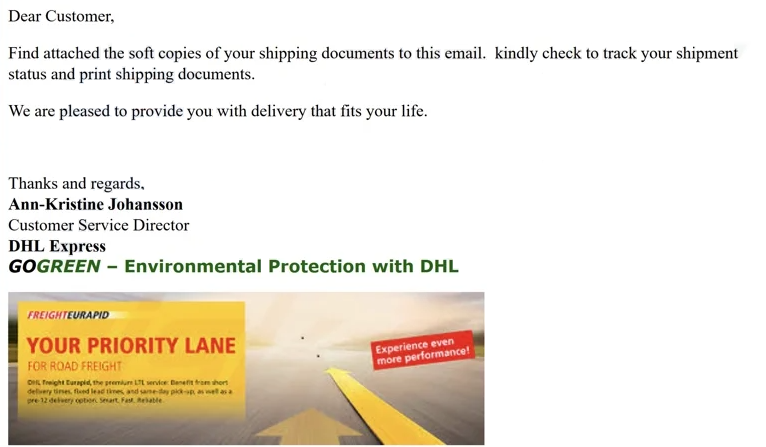
The full “DHL Shipment Notification Ref ID: 44633179800” email is below:
Subject: DHL Shipment Notification Ref ID: 44633179800
Dear Customer,
Find attached the soft copies of your shipping documents to this email. kindly check to track your shipment status and print shipping documents.
We are pleased to provide you with delivery that fits your life.
Thanks and regards,
Ann-Kristine Johansson
Customer Service Director
DHL Express
GOGREEN – Environmental Protection with DHL
How to identify malicious emails
Identifying malicious emails is essential for preventing malware infections. Several indicators can help users determine whether an email is suspicious or potentially harmful. One of the clearest signs is the sender’s address. DHL uses official domains for all customer communication. Any email that comes from a free email service, such as Gmail or from an unfamiliar domain should be treated with caution. Attackers may also use variations of legitimate domains to trick users, so close inspection of the address is important.
Another red flag is the use of generic greetings or vague statements about shipments. Legitimate companies typically refer to customers by name or include specific order details. Scammers often use broad phrases such as “Dear customer” or “Your shipment has arrived” without providing context. Users should be wary of unexpected emails about deliveries they did not request or packages they are not expecting.
Attachments are a major source of risk. DHL generally provides tracking information through links to their official website, not through attached documents. A file that requires the user to enable editing or enable macros is a strong indicator of malicious intent. Users should never activate editing or enable scripts for unsolicited attachments, especially those claiming to contain shipping documents. If the email contains an attachment, recipients should verify its authenticity through independent channels, such as checking existing orders or visiting the official DHL website manually.
Grammar, spelling and formatting errors can also signal malicious messages. Attackers may not follow corporate style guides, and their emails sometimes contain awkward phrasing or inconsistent formatting. While some scams are crafted with care and may appear polished, many include mistakes that indicate they are not legitimate corporate communications.
Users should also evaluate any links in the message. By hovering over a link, recipients can see the destination URL. If the address does not match DHL’s official domain, it should not be opened. Attackers often use links that mimic legitimate websites by including similar names or characters that are easy to overlook. These deceptive addresses can lead to phishing pages designed to steal login credentials or personal information.
Unexpected requests for payment, personal data or verification should also be treated as suspicious. DHL and other reputable carriers do not ask customers to provide sensitive information through unsolicited emails. Any message requesting login credentials, financial information or identity details should be considered fraudulent unless verified independently.
Recognising the signs of malicious email communication is vital, especially as attackers continue to refine their tactics. Parcel delivery-themed scams remain common because they exploit everyday experiences and can be difficult to distinguish from genuine messages. Careful inspection and cautious behaviour remain the best defences against these threats.
Incoming search terms:
Site Disclaimer
2-remove-virus.com is not sponsored, owned, affiliated, or linked to malware developers or distributors that are referenced in this article. The article does not promote or endorse any type of malware. We aim at providing useful information that will help computer users to detect and eliminate the unwanted malicious programs from their computers. This can be done manually by following the instructions presented in the article or automatically by implementing the suggested anti-malware tools.
The article is only meant to be used for educational purposes. If you follow the instructions given in the article, you agree to be contracted by the disclaimer. We do not guarantee that the artcile will present you with a solution that removes the malign threats completely. Malware changes constantly, which is why, in some cases, it may be difficult to clean the computer fully by using only the manual removal instructions.