

“DHL – Shipment Registered To Your Email” is a phishing email that imitates a DHL delivery notification. It claims that a parcel has been registered with the recipient’s email address and urges the user to open the attached documents or follow a link to view shipping information. The email is crafted to appear legitimate by using familiar delivery language and DHL branding, but it is not connected to the company in any way. The purpose of the email is to lure recipients into visiting a phishing page where they are asked to enter their email credentials. Because many people regularly receive parcel notifications, the scam relies on recipients reacting without verifying the sender.
If a user clicks the link, the email leads to a page that resembles a document viewer or login portal. The page prompts users to enter their email address and password to access the supposed shipment details. This login form has no connection to DHL or any legitimate service. Any information entered into it is sent to the scammers. The attackers gain access to the victim’s inbox and can view private messages, collect personal data, and take over other services connected to the email account. Since password reuse is common, the consequences can extend far beyond the inbox.
Scammers can misuse a compromised email account in several ways. They may search for financial information, use stored contacts to send more phishing messages, or reset passwords for other accounts. Some attackers remain hidden while monitoring the inbox for valuable data. This can lead to identity theft or unauthorized access to banking, shopping, and cloud accounts. The longer the attackers maintain access, the more damage they can cause. Emails like this one are designed to create urgency and encourage the user to act quickly without questioning the request.
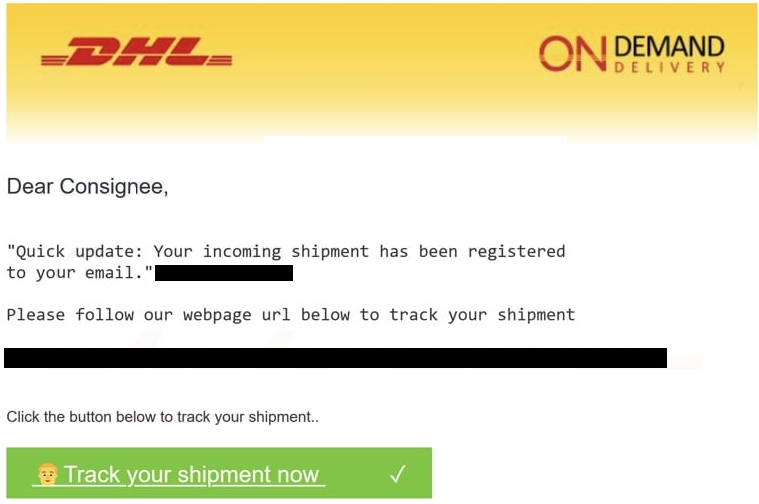
The full “DHL – Shipment Registered To Your Email” email is below:
Subject: Goods arrival confirmation
DHL – ON DEMAND DELIVERY
Dear Consignee,
“Quick update: Your incoming shipment has been registered
to your email.-Please follow our webpage url below to track your shipment
– shipment
Click the button below to track your shipment..
Track your shipment nowThank you for using On Demand Delivery.
DHL Express – Excellence. Simply delivered.
Signs that reveal the email is a scam
Several details in the message make it clear that it is not from DHL. Most versions of the email open with a generic greeting rather than using the recipient’s name, which is a common tactic in mass phishing campaigns. The sender address often looks unusual as well. It may include DHL’s name, but the domain usually has nothing to do with the company. The message also pushes recipients to open a link or attachment to view shipment documents, something DHL does not require for ordinary tracking updates.
Spotting phishing emails becomes easier when users know what to look for. Emails that arrive unexpectedly, especially those claiming to involve a shipment the recipient is not expecting, should be treated with caution. Examining the link before clicking can reveal whether it leads to the official DHL site or a suspicious third-party domain. The writing style can also be a giveaway. Many phishing messages contain odd phrasing, grammar issues, or formatting that feels off compared with legitimate company communication. Urgent language is another red flag because scammers often want to pressure recipients into acting quickly.
Delivery-themed scams take advantage of the fact that many people check shipping updates without thinking twice. Visiting the official carrier website directly is a safer way to confirm whether a parcel is on the way. Keeping email passwords unique and enabling multi-factor authentication can also limit the damage if credentials are exposed.
Preventing similar phishing attacks
Delivery-themed phishing emails continue to circulate because they are effective. Scammers know that many people expect parcels and will open such messages quickly. Staying cautious with unexpected delivery notices is essential for avoiding scams like “DHL – Shipment Registered To Your Email”. Users should check who sent the message, avoid opening unknown attachments, and never enter email credentials into pages opened through unsolicited links. Accessing shipment information through the official DHL website rather than through email links is a safer approach. Maintaining strong, unique passwords and enabling multi-factor authentication provides additional protection against account compromise.
Site Disclaimer
2-remove-virus.com is not sponsored, owned, affiliated, or linked to malware developers or distributors that are referenced in this article. The article does not promote or endorse any type of malware. We aim at providing useful information that will help computer users to detect and eliminate the unwanted malicious programs from their computers. This can be done manually by following the instructions presented in the article or automatically by implementing the suggested anti-malware tools.
The article is only meant to be used for educational purposes. If you follow the instructions given in the article, you agree to be contracted by the disclaimer. We do not guarantee that the artcile will present you with a solution that removes the malign threats completely. Malware changes constantly, which is why, in some cases, it may be difficult to clean the computer fully by using only the manual removal instructions.