

The “Email security reminder” email scam is a deceptive email that claims a recipient’s email account requires immediate action to remain secure. The message is crafted to look like an official alert from an email provider or system administrator, using language that suggests account access may be restricted or lost if the recipient does not respond. The intent behind this email is not to protect an account but to trick the recipient into revealing sensitive information, specifically their email login credentials.
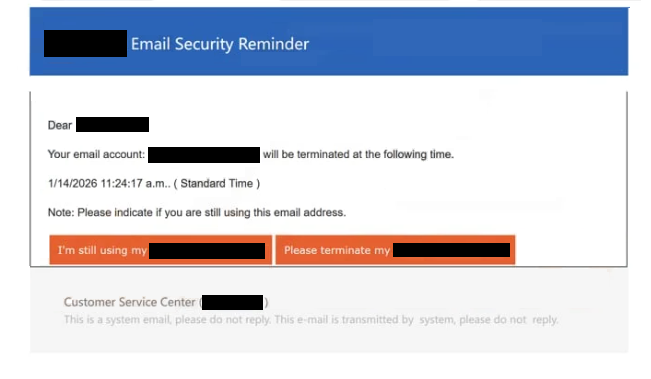
The message in the “Email security reminder” email states that the email account will soon be terminated. It asks that users either confirm they are still using their account or request termination. The email has a sense of urgency, making it clear that the recipient is expected to act quickly. This pressure tactic is designed to reduce scrutiny and prompt a hasty reaction.
Included in the email is a link that is presented as a secure sign-on page or a verification portal. When clicked, this link directs the recipient to a fake login page designed to resemble the real webmail provider’s sign-in interface. The page typically requests the full email address and password, and may also ask for additional personal information such as recovery email addresses, phone numbers, or security questions. Any information entered on this page is captured by the scammers rather than being submitted to a legitimate service.
Once the scammers collect the login credentials and any additional data requested, they can use that information to access the compromised email account. With access to the account, they can read private messages, intercept password reset links for other services, send further scam emails from a trusted address, and potentially gain access to connected accounts at banks, social networks, cloud services, and more.
The scam may also involve follow-up requests for payment information. After a credential submission, the fraudulent page might claim that a “final verification step” is required, which could involve entering credit card details or other financial information. This adds a second layer of risk, exposing victims not just to account takeover but also to financial fraud and identity theft.
The “Email security reminder” email scam relies on impersonation and social engineering rather than any technical vulnerability or threat to the recipient’s device. It exploits trust in notification language that resembles legitimate security messages, and it exploits the fact that many people have been conditioned to respond quickly to warnings about account access or security.
The full “Email Security Reminder” scam email is below:
Subject:[-] Update notification warning to revalidate your account
– Email Security Reminder
Dear -,
Your email account: – will be terminated at the following time.
1/14/2026 11:24:17 a.m.. ( Standard Time )
Note: Please indicate if you are still using this email address.
I’m still using my -Please terminate my –
Customer Service Center ( – )
This is a system email, please do not reply. This e-mail is transmitted by system, please do not reply.
How to recognize phishing emails
Scammers distribute the “Email security reminder” email through bulk email campaigns. These campaigns do not necessarily target a specific provider’s users; instead, they are sent to very large lists of email addresses gathered from breaches, public directories, automated address generation, or previous scam activity. Because the same template can work for users of many different services, the scam does not need to be narrowly targeted to be effective.
One key sign that an email like this is a scam is the sender’s information. The display name may reference the name of an email provider or suggest a support team, but careful inspection of the actual sending address often reveals a domain that does not match the legitimate provider’s domain. Legitimate security notices are sent from confirmed service addresses, and they do not use free domain names or unrelated domains to communicate with account holders.
The language of the email can also signal that it is fraudulent. Phishing emails often use generic greetings such as “Dear user” rather than addressing the account holder by name. They also rely on urgent or alarming phrasing that implies an imminent negative consequence if the recipient does not act. Authentic notifications from service providers tend to use clear, specific language, reference known account details, and include ways to verify the notice independently.
The link included in the “Email security reminder” email is another strong indicator of a scam. Hovering over the link (without clicking) can reveal the real web address it points to. If the link destination does not match the legitimate provider’s domain or uses a suspicious domain, that is a clear warning sign. Legitimate providers do not ask users to click unverified links in unsolicited emails to resolve account issues.
Phishing pages that mimic login interfaces often have subtle differences from the real site. Poor spacing, missing logos, incorrect fonts, or slight misspellings in the domain name can distinguish a fake page from a legitimate one. If a login page asks for information that the real service would not normally request in that context, such as full passwords, recovery information, or financial details immediately after a security notice, it is very likely fraudulent.
The “Email security reminder” email scam also relies on creating a false sense of urgency. Real service notifications usually give clear instructions on how to check account status by logging in through official apps or direct navigation to the provider’s site. They do not require immediate password entry through a link in an email. If the message pressures you to act without verification, it should be treated with suspicion.
Recognizing the signs of phishing (e.g., suspicious sender addresses, generic greetings, alarming language, inconsistent link destinations, and unexpected requests for credentials or financial information) is essential to avoiding scams like the “Email security reminder” email. By verifying independently through the official webmail provider’s website or support channels, recipients can confirm whether the alert is legitimate or a fraudulent attempt to steal their information.
Site Disclaimer
2-remove-virus.com is not sponsored, owned, affiliated, or linked to malware developers or distributors that are referenced in this article. The article does not promote or endorse any type of malware. We aim at providing useful information that will help computer users to detect and eliminate the unwanted malicious programs from their computers. This can be done manually by following the instructions presented in the article or automatically by implementing the suggested anti-malware tools.
The article is only meant to be used for educational purposes. If you follow the instructions given in the article, you agree to be contracted by the disclaimer. We do not guarantee that the artcile will present you with a solution that removes the malign threats completely. Malware changes constantly, which is why, in some cases, it may be difficult to clean the computer fully by using only the manual removal instructions.