

The “Email verification update” email scam is a phishing email that claims the recipient’s email account must be verified to remain active. The message states that an update is required because the account did not complete a verification process. The email is not linked to any real email provider and does not reflect a legitimate account requirement.
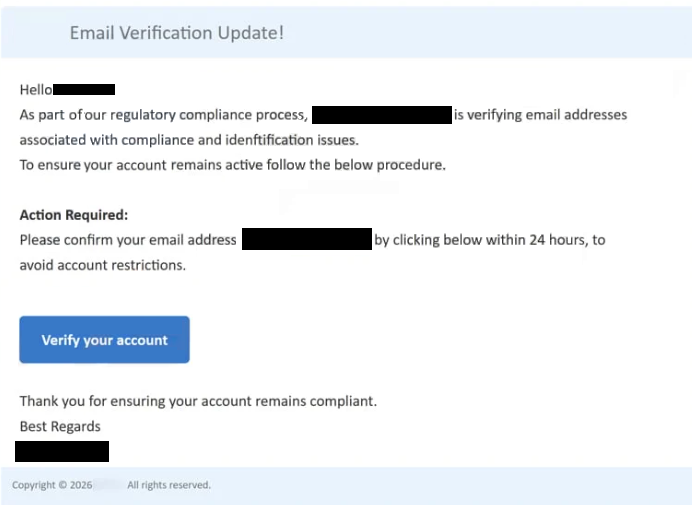
The email states that the recipient’s mailbox is pending verification and that access may be limited if the update is not completed. The wording frames the situation as an administrative requirement rather than a warning. This presentation is intended to make the request feel routine and mandatory. The email does not mention any specific provider name, account identifier, or recent activity because the sender has no access to real account information.
The message includes a single instruction: complete the email verification update by clicking a link. The email does not suggest signing in through a known provider website or using an official application. All action is directed through the embedded link, which is presented as the official verification page.
Clicking the link opens a phishing page designed to resemble a standard webmail sign-in screen. The page asks for the recipient’s email address and password. Entering this information does not verify the account or update any settings. The credentials are sent directly to scammers who operate the page.
After credentials are entered, the page may display a confirmation message or redirect to another page. These behaviors are meant to give the impression that the update was completed successfully. In reality, no verification occurs. The page does not connect to any real email service and does not perform checks of any kind.
The email does not reference real verification systems. Email providers do not require users to complete verification through links sent in unsolicited emails. Account verification is handled internally after signing in through the official website or app. The claim that an account is pending verification based on an emailed notice is false.
If valid credentials are captured, scammers can attempt to sign in to the real email account. Access allows them to read stored messages, collect personal information, and intercept password reset emails. This access can be used to compromise other accounts that rely on the same email address.
The “Email verification update” email scam relies on the idea that accounts can become inactive without verification. This concept is used to pressure recipients into acting quickly. The message does not provide any independent way to check account status because the situation it describes does not exist.
The full “Email Verification Update” phishing email is below:
Subject: Action Required: Verify – for System Email Compliance
Email Verification Update!
Hello ,
As part of our regulatory compliance process, – is verifying email addresses associated with compliance and idenftification issues.
To ensure your account remains active follow the below procedure.Action Required:
Please confirm your email address – by clicking below within 24 hours, to avoid account restrictions.Verify your account
Thank you for ensuring your account remains compliant.
Best Regards
–Copyright © 2026 -. All rights reserved.
How to recognize phishing emails
The “Email verification update” email scam is distributed through bulk phishing campaigns. The same message is sent to many email addresses without confirming which service the recipient uses. The wording is designed to apply to any mailbox, making the scam effective across different providers.
The sender name may reference verification or account services, but the sending address does not belong to a legitimate email provider. The domain used to send the email is unrelated to recognized mail services. Viewing the full sender address reveals this mismatch.
The message content avoids specific details. It does not mention the email provider, account creation date, or verification history. Legitimate verification notices include clear context and are visible after signing in through official channels. The absence of such information is a key indicator that the email is fraudulent.
The link included in the email leads to a domain that does not match official login pages. Even if the phishing page looks convincing, the web address shows that it is not part of a real service. Any request to enter credentials on a page reached from an unexpected verification email should be treated as unsafe.
Another indicator is the lack of alternative actions. The email does not suggest signing in through the provider’s website, checking account settings, or contacting support. The entire process depends on clicking the link and entering credentials.
The “Email verification update” email scam uses a specific claim of pending verification to prompt immediate action. Checking sender domains, avoiding embedded login links, and accessing email accounts only through official provider websites are effective ways to identify and avoid this scam.
Site Disclaimer
2-remove-virus.com is not sponsored, owned, affiliated, or linked to malware developers or distributors that are referenced in this article. The article does not promote or endorse any type of malware. We aim at providing useful information that will help computer users to detect and eliminate the unwanted malicious programs from their computers. This can be done manually by following the instructions presented in the article or automatically by implementing the suggested anti-malware tools.
The article is only meant to be used for educational purposes. If you follow the instructions given in the article, you agree to be contracted by the disclaimer. We do not guarantee that the artcile will present you with a solution that removes the malign threats completely. Malware changes constantly, which is why, in some cases, it may be difficult to clean the computer fully by using only the manual removal instructions.