

The “iCloud Payment Method Declined” email scam is a phishing email that claims a user’s payment method on file for an iCloud account has been declined. The email states that the user must update their payment information to avoid service interruption. It appears formatted like a routine billing notice and includes the Apple logo or design elements resembling official Apple communication. Despite this appearance, the email is not sent by Apple and does not reflect the status of any legitimate account. Its purpose is to trick recipients into visiting a phishing website where attackers attempt to collect sensitive information.
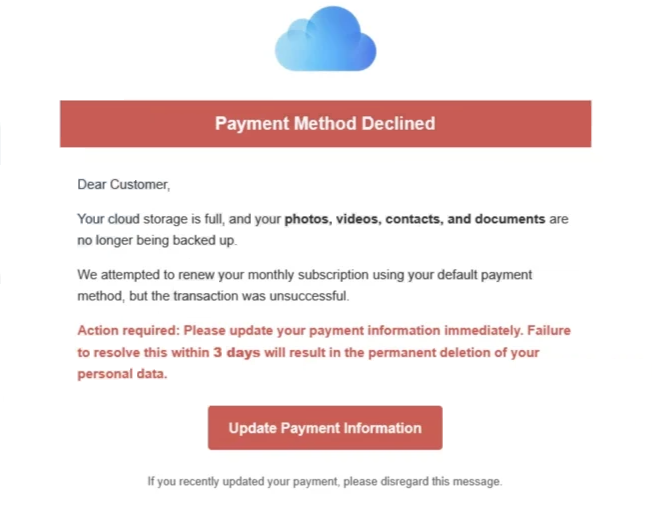
The scam email typically states that a recent attempt to charge the user’s payment method failed. It may mention a subscription renewal, purchase attempt, or outstanding balance. The email then instructs the recipient to follow a link to update the payment method. The provided link is the main tool used in this scam. When clicked, it directs the user to a website that imitates an Apple login or billing page. The website is designed to appear familiar, with layouts and logos that convey a sense of legitimacy. The site’s domain almost always differs from official Apple domains. Despite visual similarities, the website is not controlled by Apple and is used solely to capture information entered by the user.
On the phishing website, the user may be prompted to enter their Apple ID and password. After entering these, the site may request additional information, including full name, address, payment card numbers, expiry dates, and security codes. In some variants, attackers include drop-down menus or form fields formatted to appear like a secure payment update page. All details entered on this page are sent directly to the attacker.
Once attackers obtain login credentials and payment details, they can access the user’s iCloud account. Access to iCloud enables viewing of stored emails, photos, contacts, and backups. It may also allow access to other Apple services linked to the same Apple ID, including App Store purchases, iMessage, and personal files. With payment details, attackers may attempt unauthorised purchases or fraud. They may also use the login credentials to attempt access to other online accounts where the same email address and password are used.
The “iCloud Payment Method Declined” email includes urgent language. It warns that the account or associated services will be suspended or restricted and that personal data will be deleted if the user does not update payment information promptly. This urgency is intended to reduce critical evaluation of the email’s content. Scammers rely on the possibility that users will act quickly when they believe their account usage is at risk. A genuine payment notification from Apple would include clear references to the specific transaction and guidance for resolution within official channels, not through unsolicited link clicks in email.
Users who clicked the link and entered their information may suffer account compromise or financial fraud. These users should change their Apple ID password immediately and contact their bank or card issuer to report possible unauthorised use. They should also review other accounts that use the same login credentials and update any matching passwords.
The full “iCloud Payment Method Declined” email is below:
Subject: contact: Your iCloud account may get deactivated today [Wed,10 Dec-2025] due to non-payment.
Payment Method Declined
Dear Customer,
Your cloud storage is full, and your photos, videos, contacts and documents are no longer being backed up.
We attempted to renew your monthly subscription using your default payment method, but the transaction was unsuccessful.
Action required: Please update your payment information immediately. Failure to resolve this within 3 days will result in the permanent deletion of your personal data.
Update Payment Information
If you recently updated your payment, please disregard this message.
How to recognize phishing emails
Recognising phishing emails like the “iCloud Payment Method Declined” scam helps users avoid providing sensitive information. Several clear signs differentiate such fraudulent emails from legitimate billing notices.
One sign is the sender’s address. Although the email claims to be from Apple, the sender’s domain often does not match an official Apple email domain. It may contain added words, unusual suffixes, or domains unrelated to Apple. Official emails from Apple originate from email addresses that end in @apple.com. If the sender’s address differs, the email should be treated as suspicious.
Another sign is generic greetings. A phishing email often begins with a broad greeting such as Dear user or Hello customer. Real billing notices from Apple include the user’s actual name or Apple ID information. If an email lacks personal identifiers, this suggests it was not sent by the account provider.
The content of the email itself may contain inconsistencies. The “iCloud Payment Method Declined” email may mention a failed payment without referencing the type of purchase or the billing date. A legitimate billing notice always includes specific transaction details such as the item purchased, the amount charged, and the date of the attempted transaction. The absence of these details suggests that the email is not genuine.
Hovering over links in an email reveals the destination address. In this scam, links do not direct the user to an official Apple domain. They instead lead to unrelated websites with domains that may appear unfamiliar or suspicious. Users should avoid clicking links that lead to domains that do not match the official service provider.
Unexpected requests for login credentials or payment details via email links are also a strong indicator of phishing. Apple does not ask users to enter their Apple ID or payment information through a link received in an email. Users should never provide login or financial information on a website reached from an unsolicited email.
Language quality may provide additional clues. Some phishing emails contain unusual phrasing or grammatical errors. Although this scam may appear well-written, any slight difference from the typical tone and structure of official billing emails can be a sign of fraud.
Urgency is another common tactic. The “iCloud Payment Method Declined” scam warns of service suspension or restriction if the user does not act quickly. Genuine billing emails do not rely on pressure or threats to prompt immediate action. They provide clear instructions and allow users to manage issues through the official account interface.
If an email displays any of these signs, users should treat it as unsafe. It is best to delete the email and check the account status through the official website or app rather than by clicking any link in the email. This approach helps ensure that users do not inadvertently provide sensitive information to attackers.
Incoming search terms:
Site Disclaimer
2-remove-virus.com is not sponsored, owned, affiliated, or linked to malware developers or distributors that are referenced in this article. The article does not promote or endorse any type of malware. We aim at providing useful information that will help computer users to detect and eliminate the unwanted malicious programs from their computers. This can be done manually by following the instructions presented in the article or automatically by implementing the suggested anti-malware tools.
The article is only meant to be used for educational purposes. If you follow the instructions given in the article, you agree to be contracted by the disclaimer. We do not guarantee that the artcile will present you with a solution that removes the malign threats completely. Malware changes constantly, which is why, in some cases, it may be difficult to clean the computer fully by using only the manual removal instructions.