

The “IMAP/POP3 configuration error” email scam is a phishing email that claims the recipient’s email account has a problem with IMAP or POP3 settings. It presents the issue as a configuration failure that must be fixed to prevent email disruption. The email is not a legitimate technical notice from an email provider or system administrator. It is designed to trick recipients into handing over email login credentials.
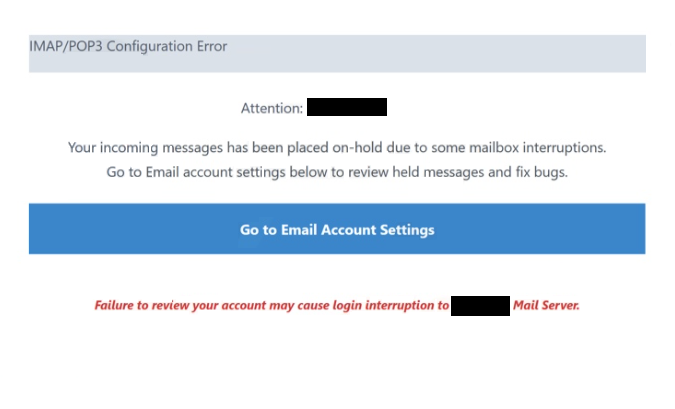
The message usually suggests that incoming or outgoing email will stop working unless the recipient confirms settings or completes a required update. Some versions claim that messages are being held, that the mailbox is not syncing, or that the account will be blocked if the “error” is not resolved. The wording is meant to sound like a normal technical fault, which can make it seem believable to people who use email clients that rely on IMAP or POP3.
A link or button is included as the supposed fix. It may be presented as a configuration check, a mailbox upgrade, or a verification step. Clicking it leads to a fake login page that imitates a webmail sign-in screen. The page asks for the email address and password. Any information entered is sent to scammers.
This scam can also involve additional prompts after the first login attempt. The fake page may request re-entry of the password, security questions, or other details that appear to be part of a troubleshooting process. These steps exist to collect more accurate credentials or gather extra account information that can help scammers keep access.
If scammers obtain working email credentials, they can sign in to the mailbox, read private emails, and search for sensitive information such as invoices, documents, or password reset links. They can also use the email account to reset passwords for other services connected to the same address. That can lead to further account compromise across banking, shopping, social media, or workplace systems.
A real IMAP or POP3 issue would not be resolved by signing in through a random link in an unexpected email. Email providers and IT teams do not request passwords through external pages reached from unsolicited emails. Any email claiming a configuration error and pushing a login link should be treated as suspicious.
The full “IMAPPOP3 Configuration Error” phishing email is below:
Subject: Action Required on your Email Settings
IMAP/POP3 Configuration Error
Attention: -,
Your incoming messages has been placed on-hold due to some mailbox interruptions.
Go to Email account settings below to review held messages and fix bugs.Go to Email Account Settings
1/20/2026 12:49:49 p.m…Failure to review your account may cause login interruption to – Mail Server.
How this phishing email is delivered and what makes it recognizable
The “IMAP/POP3 configuration error” email scam is typically sent through bulk spam campaigns. Scammers send large numbers of emails using the same template, hoping to reach recipients who rely on email syncing and will react quickly to the warning. The email is often generic and may not include real account details because it is not connected to any actual mailbox diagnostics.
The sender address is an important clue. The display name may look like a support team or administrator, but the actual sending address often comes from an unrelated domain. Some scam emails also include a reply-to address that does not match the sender. These inconsistencies are common signs of impersonation.
The message itself often uses vague technical language. It may mention IMAP, POP3, or configuration updates without stating which email provider is involved or which device is affected. Legitimate technical notices usually provide clear context, such as the service name, specific settings, and instructions that do not require entering passwords through an email link.
The link is one of the strongest indicators of phishing. Scam emails often hide the real destination behind a button that claims to fix the problem. If the link leads to an unfamiliar domain, it should not be trusted. A fake login page can look convincing, but the domain name and the unexpected delivery method are key warning signs.
Another red flag is any request for credentials to “restore syncing” or “fix configuration.” Configuration issues in email clients are resolved through account settings inside the email application or through the official provider website. They are not resolved by signing in to a page reached from an unsolicited warning email.
Site Disclaimer
2-remove-virus.com is not sponsored, owned, affiliated, or linked to malware developers or distributors that are referenced in this article. The article does not promote or endorse any type of malware. We aim at providing useful information that will help computer users to detect and eliminate the unwanted malicious programs from their computers. This can be done manually by following the instructions presented in the article or automatically by implementing the suggested anti-malware tools.
The article is only meant to be used for educational purposes. If you follow the instructions given in the article, you agree to be contracted by the disclaimer. We do not guarantee that the artcile will present you with a solution that removes the malign threats completely. Malware changes constantly, which is why, in some cases, it may be difficult to clean the computer fully by using only the manual removal instructions.